
Is Vibe Coding Safe? Security Risks Every Developer Should Know
Is vibe coding safe for real-world development? Explore 14 major vibe coding security risks, including exposed API keys, weak authentication, SQL injection, insecure APIs, dangerous dependencies, prompt injection, AI agent permissions, and practical ways developers can secure AI-generated code

Table of Content
Table of Content
Vibe coding has changed the way many developers build software.
Instead of manually writing every component, API route, database query, validation rule, and configuration file, developers can now describe what they want in natural language and let an AI coding assistant generate large parts of the application.
A prompt such as:
“Create a complete authentication system using Next.js, Node.js, MySQL, JWT, and role-based access control.”
can produce hundreds of lines of code within minutes.
Tools such as GitHub Copilot, Cursor, Claude Code, Codex, Windsurf, and other AI-powered development environments can help developers prototype products faster, understand unfamiliar frameworks, fix bugs, generate tests, refactor code, and automate repetitive programming work.
But there is an important question developers need to ask before deploying AI-generated applications:
Is vibe coding actually safe?
The short answer is:
Vibe coding can be safe when AI-generated code is treated as untrusted code that must be reviewed, tested, scanned, and understood before deployment.
The dangerous version of vibe coding is not using AI.
The dangerous version is blindly accepting everything AI generates because the application appears to work.
Modern AI coding assistants can create surprisingly convincing applications. A login page works. Payments process successfully. Data appears in the dashboard. APIs return the expected response.
But functional software and secure software are not the same thing.
GitHub itself warns that AI-generated code may contain security vulnerabilities or incorrect code and recommends reviewing and testing generated code carefully, especially for security-sensitive applications. OWASP's guidance for AI-assisted coding similarly emphasizes human ownership, security testing, dependency auditing, restricted agent permissions, and explicit approval before AI-generated changes reach production.
Understanding these risks is becoming an essential skill for every developer using AI.
What Is Vibe Coding?
Vibe coding is a software development approach where developers rely heavily on artificial intelligence to generate, modify, debug, and sometimes deploy code using natural-language instructions.
The term is generally associated with a style of development where the programmer focuses more on describing the desired outcome than manually constructing every implementation detail. IBM describes vibe coding as building products primarily through AI tools and natural-language prompts, while distinguishing it from more deliberate AI-assisted engineering where experienced developers remain deeply involved in understanding and validating the implementation.
For example, instead of manually creating a dashboard, a developer might tell an AI assistant:
Build an admin dashboard with user management, role-based permissions, analytics charts, search, pagination, and responsive mobile design.
The AI might then:
- Create frontend components
- Generate backend routes
- Design database queries
- Install dependencies
- Create authentication middleware
- Configure environment variables
- Add API integrations
- Generate tests
- Fix compilation errors
- Refactor existing files
Modern agentic coding tools can go even further. Some can execute terminal commands, modify files, install packages, access development tools, run tests, and interact with external systems. OWASP specifically notes that modern agentic coding systems may operate with broad developer-level permissions, making permission management and sandboxing important security concerns.
That capability makes AI extremely useful.
It also increases the potential damage when something goes wrong.
Is Vibe Coding Safe?
Vibe coding itself is not inherently unsafe.
The security problem comes from how developers use it.
Consider two developers.
Developer A
The developer asks AI to create an authentication system, copies the generated files, sees that login works, and immediately deploys the application.
Developer B
The developer generates the same system but then:
- Reviews authentication logic
- Checks password hashing
- Verifies authorization rules
- Tests invalid input
- Runs dependency audits
- Searches for exposed secrets
- Runs static security analysis
- Tests API endpoints manually
- Reviews database permissions
- Checks rate limiting
- Performs deployment security checks
Both developers used vibe coding.
But their security posture is completely different.
The most useful mindset is:
AI-generated code should be treated like code written by an unknown developer whose work has not yet been reviewed.
You can use it.
You simply should not trust it automatically.
NIST's Secure Software Development Framework recommends integrating practices such as code review and code analysis into the development lifecycle so vulnerabilities can be identified before software is released.
AI does not remove that requirement.
If anything, faster code generation makes security review more important.
Why AI-Generated Code Can Become Dangerous
Large language models generate code by predicting useful patterns based on their training and available context.
They do not inherently understand your entire security architecture.
An AI assistant may not know:
- Which data is confidential
- Which users should access a resource
- What regulatory requirements apply
- What your organization's threat model looks like
- Which internal APIs are trusted
- Whether a database table contains sensitive information
- Whether an endpoint should be public
- What would happen if a user intentionally manipulated a request
This creates an important difference between:
“Does this code work?”
and
“Can this code safely handle hostile users?”
Attackers do not interact with applications the way normal users do.
They intentionally send unusual inputs, modify API requests, change IDs, manipulate headers, automate login attempts, inspect JavaScript bundles, search repositories for secrets, and exploit assumptions developers forgot to validate.
That is why security must be designed intentionally.
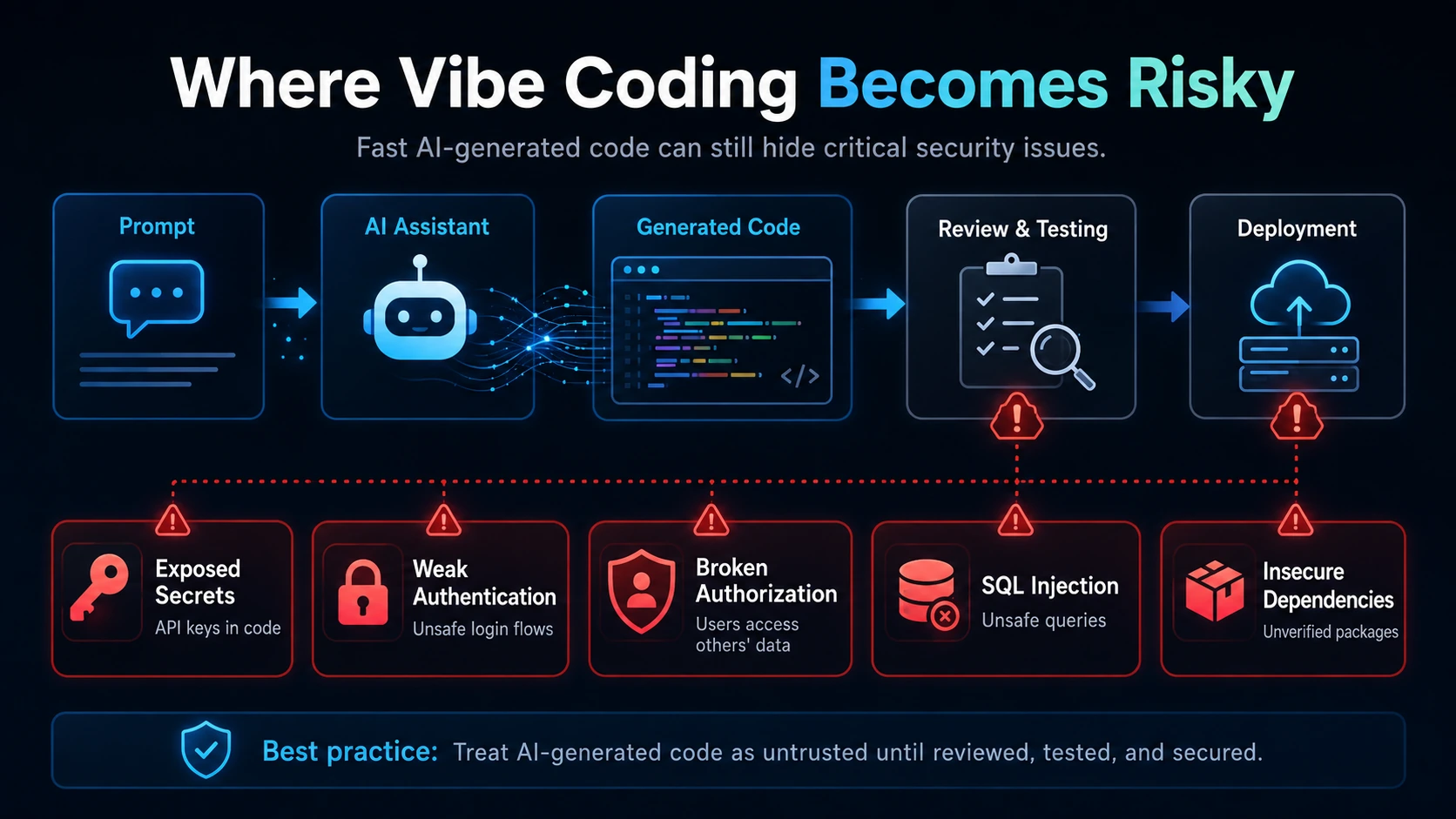
Security Risk #1: Exposed API Keys and Secrets
One of the simplest but most dangerous vibe coding mistakes is accidentally exposing secrets.
Developers frequently work with:
- Database passwords
- JWT secrets
- Stripe or Razorpay keys
- AWS credentials
- Firebase credentials
- SMTP passwords
- OAuth secrets
- Cloud service tokens
- Private API keys
Suppose you tell AI:
“Connect my application to this API.”
A generated example might place a secret directly inside frontend code:
const API_KEY = "your-secret-api-key";
If this code runs in a browser, that secret may become visible to users.
Another common mistake is committing a .env file into a public GitHub repository.
Safer approach
Secrets should normally be:
- Stored in environment variables
- Kept outside source control
- Added to
.gitignore - Rotated immediately if accidentally exposed
- Restricted using least privilege
- Separated between development and production
- Managed through secure secret-management systems when appropriate
You should also run secret scanning before deployment.
Remember:
Deleting a leaked API key from GitHub does not necessarily make the key safe again.
Once exposed, assume it may have been copied and rotate it.
Security Risk #2: Weak Authentication
Authentication determines whether someone really is who they claim to be.
AI can easily generate authentication systems that appear functional while missing important protections.
Potential problems include:
- Weak password hashing
- Incorrect JWT validation
- Extremely long token expiration
- Missing token revocation
- Predictable reset tokens
- Insecure session cookies
- Missing login rate limits
- User enumeration
- Poor password-reset workflows
Imagine an AI-generated password reset endpoint that accepts:
{
"email": "user@example.com",
"newPassword": "newpassword"
}
If the backend does not require a securely generated and validated reset token, an attacker may be able to change another user's password.
The page works.
The API works.
The security model does not.
Authentication code deserves manual review regardless of who or what generated it.
Security Risk #3: Broken Authorization
Authentication and authorization are different.
Authentication asks:
Who are you?
Authorization asks:
What are you allowed to do?
This distinction is frequently overlooked.
Suppose your application has:
/api/users/124/orders
A logged-in user requests their own orders.
Everything works.
But what happens if they manually change the URL to:
/api/users/125/orders
If the backend simply trusts the provided user ID, the attacker may access someone else's information.
This is a classic authorization failure.
The frontend hiding an “Admin” button is also not authorization.
Attackers can call backend APIs directly.
Every sensitive action should enforce permissions on the server.
For example:
if (req.user.id !== requestedUserId && req.user.role !== "admin") {
return res.status(403).json({ message: "Forbidden" });
}
The exact implementation depends on your application, but the principle is universal:
Authorization must be enforced on the backend, not merely represented in the interface.
Security Risk #4: Missing Input Validation
AI-generated applications often focus heavily on the happy path.
For example:
const { email, age } = req.body;
But what if:
emailcontains thousands of characters?ageis an object?- Required parameters are missing?
- HTML or script content is submitted?
- Unexpected JSON properties are included?
- A number is negative when it should not be?
- A filename contains dangerous path characters?
Every external input should be considered untrusted.
That includes input from:
- Forms
- URL parameters
- API requests
- Cookies
- HTTP headers
- Uploaded files
- Webhooks
- Third-party APIs
Strong validation should define exactly what the application expects rather than merely checking obvious errors.
Security Risk #5: SQL Injection and Database Attacks
SQL injection remains one of the most important risks developers should understand.
Consider:
const query =
"SELECT * FROM users WHERE email = '" +
req.body.email +
"'";
An attacker may manipulate the input so it changes the SQL statement itself.
The safer pattern is parameterized queries or prepared statements.
For example:
const [rows] = await db.execute(
"SELECT * FROM users WHERE email = ?",
[req.body.email]
);
AI tools frequently generate parameterized queries correctly, but developers should never assume they always will.
Database security should also include:
- Minimum necessary database privileges
- Validation
- Safe error handling
- Backups
- Restricted remote database access
- Strong credentials
- Encrypted connections where appropriate
Your web application usually does not need a database account with unrestricted administrative privileges.
Security Risk #6: Insecure API Endpoints
Modern applications rely heavily on APIs, making API security critical.
A vibe-coded backend might accidentally expose routes such as:
GET /api/users
DELETE /api/users/:id
POST /api/admin/create-user
GET /api/payments
If authentication or authorization middleware is missing, serious data exposure can occur.
Developers should verify each endpoint for:
- Authentication
- Authorization
- Input validation
- Rate limiting
- Error handling
- Logging
- Data exposure
- HTTP method restrictions
- Request size limitations
Do not rely on the fact that an API URL is “hidden.”
Anything used by a browser application can generally be discovered.
Security Risk #7: Dangerous or Hallucinated Dependencies
AI assistants frequently recommend libraries.
For example:
npm install some-package
Blindly installing every suggested package creates supply-chain risk.
Before adding a dependency, check:
- Does the package actually exist?
- Is it actively maintained?
- Is the publisher trustworthy?
- Does the package have known vulnerabilities?
- Does your project really need it?
- What permissions or lifecycle scripts does it execute?
- Is there a better-known alternative?
AI can also hallucinate package names.
An attacker could potentially publish packages matching names commonly hallucinated by AI systems, hoping developers install them without verification.
Dependency auditing therefore remains essential.
For Node.js projects, commands such as:
npm audit
can help identify known dependency vulnerabilities, although automated tools should be treated as one layer rather than a complete security solution.
OWASP's AI secure-coding guidance explicitly recommends auditing dependencies and warns against trusting packages or AI-selected tooling without appropriate verification.
Security Risk #8: Security Misconfiguration
Not every security vulnerability exists inside application logic.
Infrastructure configuration matters too.
Examples include:
- Database accessible publicly
- Debug mode enabled in production
- Directory listing enabled
- Overly permissive CORS
- Public cloud storage
- Missing HTTPS
- Insecure cookie settings
- Public admin dashboards
- Unnecessary ports exposed
- Default passwords
- Excessive filesystem permissions
OWASP has specifically highlighted security misconfiguration as a concern in AI-assisted and citizen-development environments because generated solutions may prioritize functionality without including all necessary security controls.
Suppose an AI generates:
app.use(cors());
The application works immediately.
But perhaps your production API should only accept requests from:
https://example.com
A production configuration might instead restrict allowed origins.
The correct configuration depends on your architecture.
The important lesson is that convenient defaults are not always secure defaults.
Security Risk #9: AI Agent Permissions
Traditional AI coding assistants mostly suggested text.
Agentic coding assistants are different.
They may be capable of:
- Reading project files
- Editing files
- Running terminal commands
- Installing dependencies
- Accessing Git repositories
- Connecting to MCP servers
- Running database commands
- Reading environment variables
- Calling external APIs
Giving an AI agent unrestricted permissions means a mistake can have much larger consequences.
OWASP recommends sandboxing agentic coding environments and limiting filesystem, credential, and network access because an agent operating with developer permissions can potentially perform any action available to that developer account.
Use the principle of least privilege.
The AI should receive only the access necessary for the current task.
Avoid casually granting production credentials, root-level permissions, unrestricted cloud access, or access to sensitive infrastructure.
Security Risk #10: Prompt Injection Against Coding Agents
Prompt injection is not only a chatbot problem.
It is becoming relevant to development environments as AI agents read more external content.
Imagine telling an agent:
“Read issue #248 and fix the bug.”
The issue description itself may contain malicious instructions intended for the AI.
Or an agent could read:
- README files
- Pull request comments
- Documentation
- Web pages
- Tool descriptions
- Repository files
OWASP warns that indirect prompt injection can occur when coding agents consume untrusted repository, issue, documentation, or tool content. Malicious instructions embedded in that context could potentially influence agent behavior.
This creates an entirely new security boundary.
Developers should therefore review sensitive agent actions before execution and avoid giving agents unlimited autonomous permissions.
Security Risk #11: Sensitive Source Code Leakage
Developers also need to think about what information gets sent to AI services.
A coding assistant may receive context from:
- Open files
- Terminal output
- Repository contents
- Logs
- Error traces
- Configuration files
- Database schemas
That context could contain:
- Customer information
- Authentication tokens
- Internal infrastructure details
- Proprietary algorithms
- Private source code
- Employee information
- Production URLs
OWASP recommends understanding what project context an AI coding tool sends to its provider and excluding sensitive directories or information where appropriate.
Organizations should evaluate privacy and retention policies before allowing sensitive repositories to be processed by external AI tools.
Security Risk #12: AI-Generated Tests Can Create False Confidence
Another subtle problem appears when developers ask AI to write both the feature and the tests.
Imagine:
- AI generates authentication code.
- AI generates authentication tests.
- Every test passes.
- Developer assumes the feature is secure.
But both implementations may contain the same misunderstanding.
OWASP specifically recommends writing or independently validating security-critical tests for areas such as authentication, authorization, input validation, and cryptographic operations rather than relying solely on AI-generated tests.
Passing tests only prove that the system behaves according to those tests.
They do not prove that the tests represent every attack scenario.
Security tests should intentionally attempt things users are not supposed to do.
Security Risk #13: Business Logic Vulnerabilities
Automated scanners are useful, but many dangerous vulnerabilities are logical rather than syntactic.
Imagine an e-commerce application with this API:
POST /api/checkout
and the frontend sends:
{
"productId": 21,
"price": 499
}
If the backend trusts that price, an attacker might modify the request:
{
"productId": 21,
"price": 1
}
The application could sell a ₹499 product for ₹1.
There is no SQL injection.
There may be no vulnerable dependency.
Every scanner may be happy.
The application's business logic is still broken.
The server should calculate trusted values such as pricing from authoritative server-side data instead of trusting values provided by the browser.
This is one reason security cannot be completely automated.
Security Risk #14: Maintainability and Technical Debt
Security problems become harder to fix when developers no longer understand their own codebase.
A dangerous vibe-coding cycle looks like this:
AI generates code
↓
Error occurs
↓
Developer pastes error into AI
↓
AI generates another patch
↓
New error appears
↓
AI generates another patch
↓
Application eventually works
After several rounds, nobody fully understands:
- Why certain functions exist
- Which middleware protects which route
- Why a dependency was added
- What database assumptions were made
- Which patch introduced a security issue
This creates technical debt.
If developers use AI to accelerate development, they should still periodically stop and understand:
- Application architecture
- Authentication flow
- Data flow
- Database relationships
- Permission model
- Error handling
- External dependencies
You do not need to manually type every line.
But someone needs to understand the system.
Is Vibe Coding Safe for Beginners?
Beginners can absolutely use AI coding tools.
In fact, they can be excellent learning tools.
AI can explain:
- Error messages
- Framework concepts
- Code structure
- Database queries
- APIs
- Authentication
- Git
- Deployment
- Testing
The problem begins when AI becomes a replacement for learning fundamentals.
If a beginner builds a production application containing authentication, payments, customer data, or administrative controls without understanding how those systems work, identifying security mistakes becomes extremely difficult.
A better approach is:
Use AI to move faster while learning what the generated code actually does.
Whenever AI generates important code, ask:
- Explain this file line by line.
- What security risks exist here?
- How could an attacker abuse this endpoint?
- Why is this middleware required?
- What happens if the user modifies this request?
- What should never be trusted from the frontend?
- What edge cases are missing?
That turns AI from a code generator into a development tutor.
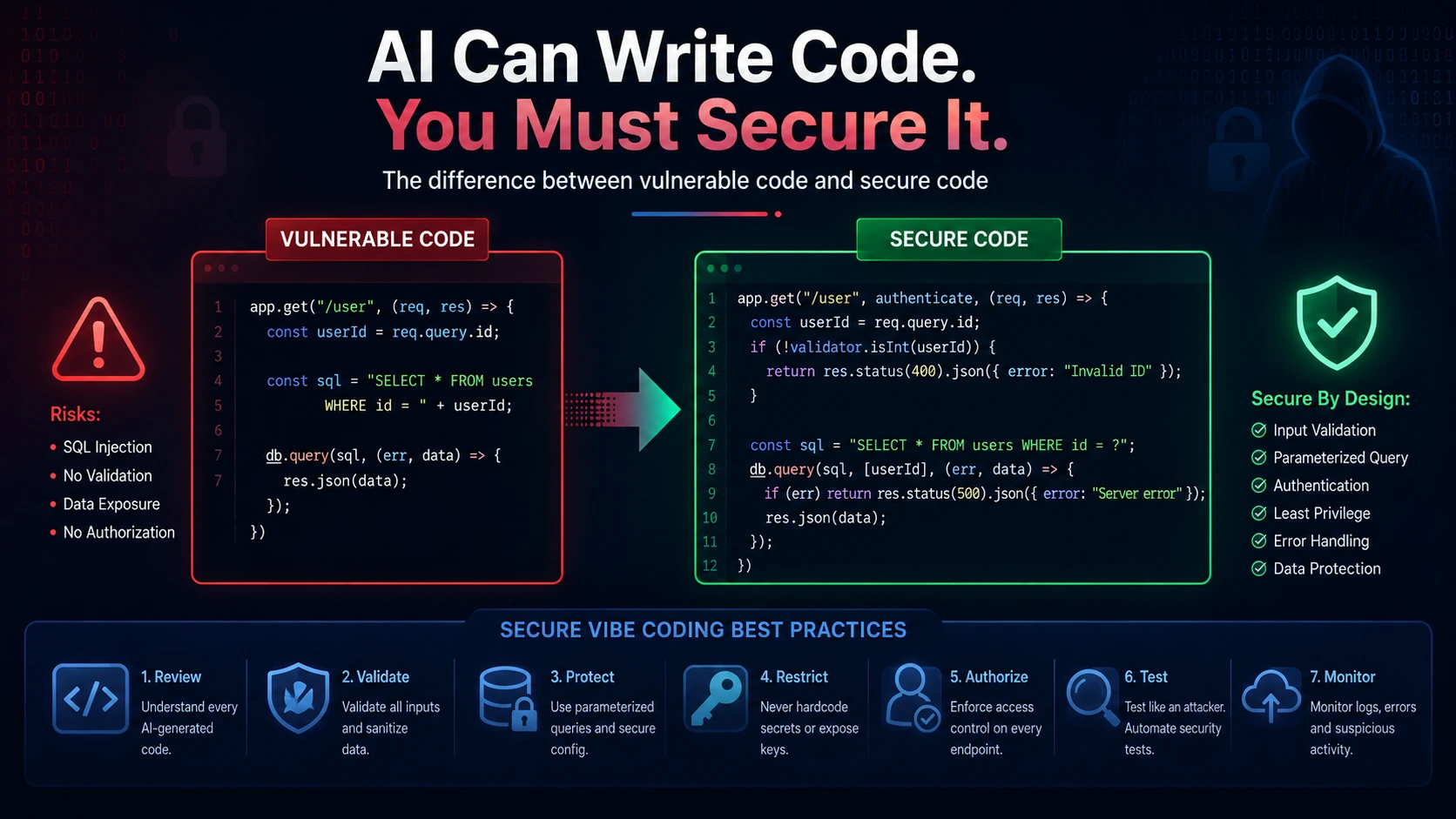
How to Use Vibe Coding Safely
The safest approach is not avoiding AI.
It is adding a secure development process around AI.
1. Define the architecture first
Before generating hundreds of files, decide:
- Frontend framework
- Backend architecture
- Database
- Authentication strategy
- Authorization model
- Deployment architecture
- External services
Otherwise AI may continuously redesign the project.
2. Generate small components
Instead of saying:
“Build my entire SaaS application.”
work feature by feature.
For example:
Authentication
↓
User profile
↓
Dashboard
↓
Payments
↓
Admin panel
↓
Notifications
Smaller changes are easier to understand and review.
3. Review every security-sensitive file
Pay extra attention to:
- Authentication middleware
- Authorization middleware
- Database queries
- File uploads
- Payments
- Password reset
- Admin functionality
- Webhooks
- Environment configuration
- API routes
Never auto-approve these simply because the code compiles.
4. Keep secrets outside source code
Use environment variables and secure secret-management practices.
Never paste real production credentials into prompts unless you fully understand how that tool handles and protects submitted information and generally, avoid doing so altogether.
5. Validate all external input
Every API request should be validated.
Depending on your stack, you may use libraries such as:
- Zod
- Joi
- Yup
- express-validator
But libraries do not replace correct validation rules.
6. Enforce authorization server-side
Never trust frontend visibility.
If only administrators can perform an action, the backend must verify administrator permissions.
7. Scan dependencies
Use ecosystem-specific dependency scanning and keep important packages updated.
Remove dependencies that are no longer required.
A smaller dependency tree generally creates a smaller supply-chain attack surface.
8. Use static analysis
Static Application Security Testing can help discover suspicious patterns before deployment.
Useful categories of tools include:
- SAST scanners
- Secret scanners
- Dependency scanners
- Linters
- Type checkers
No individual tool will catch everything.
Use multiple security layers.
9. Test APIs like an attacker
Try:
- Removing authentication tokens
- Changing user IDs
- Changing product IDs
- Changing prices
- Sending invalid JSON
- Sending extremely large input
- Calling administrator endpoints as a normal user
- Replaying requests
- Uploading unexpected file types
You learn much more about security when you intentionally try to break your application.
10. Limit AI agent permissions
Do not give coding agents unrestricted access unless genuinely required.
Consider using:
- Development environments
- Sandboxes
- Restricted API credentials
- Non-production databases
- Separate development accounts
Production infrastructure should receive much stronger protection.
11. Use human code review
Every important AI-generated change should have a human owner.
OWASP explicitly recommends human accountability for AI-generated changes and warns against deploying generated code without developer review and approval.
This remains one of the most important rules of secure vibe coding.
12. Separate development and production
Do not experiment directly against production systems.
Maintain separate environments such as:
Development
Testing/Staging
Production
Test significant AI-generated changes before production deployment.
Secure Vibe Coding Checklist
Before deploying an AI-generated application, verify the following.
Authentication
- Passwords are securely hashed
- Login is rate-limited where appropriate
- Tokens are validated properly
- Password reset flows use secure tokens
- Cookies use appropriate security attributes
Authorization
- Permissions are checked server-side
- Users cannot access another user's resources by changing IDs
- Administrator endpoints require administrator permissions
Database
- Queries are parameterized
- Database credentials are protected
- Database accounts use minimum necessary privileges
- Production databases are not unnecessarily exposed publicly
APIs
- Inputs are validated
- Sensitive routes require authentication
- Rate limiting exists where necessary
- Error responses do not expose sensitive system details
- Request sizes are limited appropriately
Secrets
- No credentials exist in frontend bundles
.envfiles are excluded from Git- Accidentally exposed credentials have been rotated
Dependencies
- Dependencies are audited
- Suspicious packages have been verified
- Unused packages are removed
- Important vulnerabilities are patched
Infrastructure
- HTTPS is enabled
- CORS is properly configured
- Debug mode is disabled in production
- Unnecessary ports are closed
- Server permissions follow least privilege
AI Agents
- Production credentials are restricted
- Sensitive directories are protected
- Dangerous commands require approval
- External instructions are treated as untrusted
- Agents do not receive unnecessary filesystem or network permissions
Testing
- Security-critical functionality is independently tested
- Authorization bypass attempts have been tested
- API manipulation has been tested
- Business logic has been reviewed manually
If several of these questions cannot be answered confidently, the application probably needs additional review before production deployment.
When You Should Avoid Pure Vibe Coding
Some projects deserve significantly stricter security engineering.
Be especially careful with applications involving:
- Banking
- Financial transactions
- Healthcare information
- Government systems
- Authentication infrastructure
- Enterprise customer data
- Cryptocurrency wallets
- Payment processing
- Personally identifiable information
- Critical infrastructure
Vibe coding can still assist development in these areas.
However, relying entirely on prompts without professional security review would be extremely risky.
The more severe the consequences of a breach, the stronger the security process should become.
The Future of Secure AI-Assisted Development
Vibe coding is probably not disappearing.
AI coding assistants are becoming increasingly capable of understanding repositories, generating applications, running tests, executing tools, and interacting with development infrastructure.
The future therefore is unlikely to be:
Human developers versus AI developers.
It will be closer to:
Developers who know how to supervise AI effectively versus developers who blindly trust AI output.
Secure development frameworks remain relevant regardless of whether code was manually written or machine generated. NIST's Secure Software Development Framework emphasizes integrating security practices throughout software development rather than treating security as something performed only after the product has been completed.
The strongest developers will combine:
- AI speed
- Programming fundamentals
- System design
- Security knowledge
- Testing
- Critical thinking
- Human judgment
AI can dramatically increase how much software one developer can produce.
Security practices need to scale alongside that productivity.
Final Thoughts
So, is vibe coding safe?
Yes but only when developers remain responsible for the software they ship.
Vibe coding becomes dangerous when developers assume:
“The AI generated it, so it must be correct.”
A better mindset is:
“The AI generated it. Now I need to verify it.”
AI coding assistants can generate applications faster than traditional development workflows, but faster development also means developers can generate vulnerabilities faster.
Every developer using AI should understand authentication, authorization, input validation, secure database access, dependency management, secrets management, API security, infrastructure configuration, testing, and least-privilege access.
You do not need to stop using Cursor, GitHub Copilot, Claude Code, Codex, Windsurf, or other AI development tools.
Use them for what they are extremely good at:
- Accelerating repetitive work
- Generating boilerplate
- Exploring ideas
- Explaining code
- Creating prototypes
- Refactoring
- Debugging
- Writing documentation
- Assisting testing
But keep one principle in mind:
AI can write your code, but it cannot take responsibility for your production security.
The developer or organization deploying the application remains responsible for understanding what the software does and protecting the people who use it.
That combination AI-assisted speed with disciplined human verification is the difference between careless vibe coding and professional AI-assisted software engineering.
Frequently Asked Questions
1. Is vibe coding safe for production applications?
Vibe coding can be used for production applications, but AI-generated code should never be deployed simply because it appears to work. Production code should undergo human review, automated testing, security scanning, dependency auditing, authentication and authorization testing, input validation checks, and infrastructure review. Security-sensitive components such as payments, authentication, file uploads, administrative features, and database access deserve additional attention.
2. What is the biggest security risk of vibe coding?
The biggest risk is blind trust. Individual vulnerabilities such as exposed API keys, SQL injection, broken authorization, unsafe dependencies, and incorrect security configuration can usually be detected and corrected. They become dangerous when developers assume AI-generated code is secure without verifying it. Treat every generated change as unreviewed code until a developer understands and validates it.
3. Can AI-generated code contain vulnerabilities?
Yes. AI-generated code can contain incorrect logic, insecure defaults, vulnerable dependencies, missing validation, authentication weaknesses, authorization mistakes, and other security problems. GitHub's own documentation recommends carefully reviewing and testing AI-generated code, particularly when working with security-sensitive applications. Developers should apply the same or stronger security review standards they would apply to human-written code.
4. Is vibe coding safe for beginner developers?
Vibe coding can be extremely useful for beginners when it is used as a learning assistant rather than a complete replacement for programming knowledge. Beginners should ask AI to explain generated code, understand authentication and APIs, learn database fundamentals, test edge cases, and study common web security vulnerabilities. Building applications with AI while learning the underlying concepts is much safer than continuously copying generated code without understanding it.
5. How can developers make vibe coding more secure?
Developers can reduce vibe coding risks by generating smaller changes, reviewing important code manually, protecting secrets, validating external input, enforcing server-side authorization, using parameterized database queries, auditing dependencies, scanning source code, limiting AI agent permissions, testing APIs against malicious inputs, separating development from production, and requiring human approval before deployment. AI should accelerate a secure development process not replace one.