
Best Cybersecurity Projects for Students: 20 Practical Ideas
20 practical cybersecurity projects for students, from beginner-friendly password and encryption tools to advanced SOC dashboards, SIEM systems, vulnerability management platforms, and security monitoring projects.

Table of Content
Table of Content
Cybersecurity is one of those fields where reading books and watching tutorials can only take you so far. You may understand what phishing is, know the difference between encryption and hashing, and even recognize terms such as SQL injection or ransomware. But real learning starts when you actually build something.
That is why cybersecurity projects are especially valuable for students.
A good cybersecurity project helps you understand how systems behave, how security controls work, how vulnerabilities can appear, and how defenders detect suspicious activity. More importantly, projects give you something concrete to show in your resume, portfolio, internship application, or technical interview.
The good news is that you do not need expensive hardware, a large cloud server, or advanced hacking knowledge to get started. Many excellent cybersecurity projects can be built using Python, Linux, virtual machines, open-source security tools, networking concepts, and a normal laptop.
In this guide, we will explore some of the best cybersecurity projects for students, starting with beginner-friendly ideas and gradually moving toward intermediate and advanced projects.
The goal is not simply to create another college project. The goal is to build something that teaches you how cybersecurity works in the real world.
Important: Perform security testing only on systems, applications, devices, and networks that you own or have explicit permission to test. Build your projects in local labs, virtual machines, intentionally vulnerable applications, or authorized training environments.
Why Cybersecurity Projects Matter for Students
Cybersecurity is highly practical.
An interviewer may ask you what a firewall does, but they may be much more impressed if you can explain how you configured firewall rules in your own lab.
Similarly, saying that you know Python is useful. Saying that you created a Python-based file integrity monitoring tool that detects unauthorized modifications is much stronger.
Cybersecurity projects can help students:
- Understand theoretical concepts through practical implementation.
- Learn Linux, networking, Python, databases, APIs, and cloud technologies.
- Build confidence with cybersecurity tools.
- Develop analytical and problem-solving skills.
- Prepare for technical interviews.
- Create a portfolio for cybersecurity internships and jobs.
- Understand how attackers and defenders think.
- Learn how logs, alerts, vulnerabilities, authentication, and encryption work together.
Projects can also help you discover which cybersecurity specialization interests you most.
You may enjoy network security, security operations, malware analysis, cloud security, application security, digital forensics, penetration testing, or security automation.
Let us look at some projects you can actually build.
1. Password Strength Checker
A password strength checker is one of the easiest cybersecurity projects for beginners.
The application analyzes a password and determines whether it follows basic security principles.
Instead of simply checking password length, you can create a scoring system.
Your program can evaluate whether the password contains:
- Uppercase letters
- Lowercase letters
- Numbers
- Special characters
- Sufficient length
- Repeated characters
- Common password patterns
- Dictionary words
For example, a password such as password123 should receive a poor score even though it contains letters and numbers.
You can build this project using Python and later convert it into a web application using Flask, Django, Node.js, or another backend framework.
What You Will Learn
You will understand password security, validation, regular expressions, user input handling, and basic security policy design.
Ways to Improve the Project
Add:
- Password strength meter
- Password suggestions
- Estimated password entropy
- Common-password detection
- Secure password generator
Avoid storing or transmitting submitted passwords unnecessarily.
2. Secure Password Generator
Another simple but useful project is a secure password generator.
The program can generate strong random passwords using cryptographically secure randomness.
Allow users to select options such as:
- Password length
- Uppercase characters
- Lowercase characters
- Numbers
- Symbols
- Characters to exclude
A common mistake is using ordinary pseudo-random functions for security-sensitive password generation. Instead, research and use secure random-generation libraries available in your programming language.
For example, Python provides the secrets module for generating security-sensitive random values.
This project teaches you an important cybersecurity lesson: random-looking does not always mean cryptographically secure.
3. File Encryption and Decryption Tool
Encryption is one of the foundations of cybersecurity.
For this project, create an application that encrypts files and allows authorized users to decrypt them using a secret key or password.
You could provide a simple interface where the user selects a file, enters a password, and encrypts the file.
The encrypted version should not be readable without successful decryption.
Concepts You Can Explore
- Symmetric encryption
- Encryption keys
- Initialization vectors or nonces
- Password-based key derivation
- File handling
- Authentication tags
- Secure key storage
Use established, well-tested cryptographic libraries instead of inventing your own encryption algorithm.
Creating your own encryption algorithm may be interesting academically, but it should not be used to protect real information.
4. File Integrity Monitoring System
A File Integrity Monitoring, or FIM, system checks whether important files have been modified.
This is a very useful defensive cybersecurity project.
Suppose you have a folder containing important configuration files. Your program calculates a cryptographic hash for each file and stores the results.
Later, the tool calculates the hashes again.
If the hash changes, the system can report that the file was modified.
You can implement it using algorithms such as SHA-256.
Features You Can Add
- Monitor multiple directories
- Store file hashes in a database
- Generate alerts when files change
- Detect deleted files
- Detect newly created files
- Generate daily integrity reports
- Display changes in a dashboard
This project introduces you to concepts used in endpoint security and host-based intrusion detection.
5. Login System with Multi-Factor Authentication
Authentication is an important part of application security.
Build a login system that goes beyond email and password authentication.
For example:
- User enters username and password.
- Credentials are verified.
- A second authentication step is required.
- The user enters a time-based code.
- Access is granted after successful verification.
You can implement Time-Based One-Time Passwords using established libraries and authenticator apps.
Security Features to Include
Your project can demonstrate:
- Password hashing
- Salted passwords
- Account lockout
- Rate limiting
- Session management
- Multi-factor authentication
- Secure cookies
- Password reset mechanisms
Do not store passwords as plain text.
This project is especially useful for students interested in web security and backend development.
6. Phishing Awareness Simulator
Phishing remains one of the most common ways attackers attempt to manipulate users.
Instead of building a system designed to steal credentials, create an educational phishing awareness simulator.
The platform can show students examples of suspicious emails and ask them to identify warning signs.
For example, your application could display an email containing:
- Suspicious sender address
- Unexpected attachment
- Urgent language
- Fake login button
- Spelling mistakes
- Unusual domain
- Requests for sensitive information
The user selects which parts appear suspicious.
At the end, the system explains the correct answer.
Why This Is a Great Project
It combines:
- Cybersecurity
- Human psychology
- UI/UX
- Web development
- Security awareness training
You could even create an admin dashboard where educators add new phishing awareness questions.
7. Secure Notes Application
Create a web or mobile application where users can save confidential notes securely.
This project may look simple, but it allows you to implement several security concepts.
Your application can include:
- User registration
- Secure authentication
- Password hashing
- Encrypted notes
- Session expiration
- Role-based authorization
- Input validation
- Secure API communication
You can use React or Next.js for the frontend and Node.js, Django, or another framework for the backend.
A database such as MySQL, PostgreSQL, MongoDB, or Firebase can store application data.
The interesting part is not the note-taking interface. The main objective is designing the application so unauthorized users cannot access another user's information.
8. Network Device Scanner for Your Own Lab
Students interested in networking can build a simple network inventory scanner for a private lab network.
The goal is to discover devices you own within an authorized test environment and record basic information.
Your project could identify:
- IP addresses
- Hostnames
- Device availability
- MAC addresses when locally available
- Known services in a controlled lab
- Device type entered by the administrator
You can then create a dashboard showing your home lab inventory.
This project teaches networking fundamentals such as IP addressing, ports, local networks, and device discovery.
Keep scanning restricted to your own network or environments where you have permission.
9. Cybersecurity Log Analyzer
Security professionals work with logs every day.
Create a tool that reads log files and searches for suspicious patterns.
For example, your project can process authentication logs and identify:
- Multiple failed login attempts
- Login attempts from unusual locations
- Repeated access failures
- Unexpected administrative activity
- Large numbers of requests
- Suspicious timestamps
Instead of manually reading thousands of lines, the analyzer summarizes important events.
Advanced Version
You could create a dashboard containing:
- Number of successful logins
- Number of failed logins
- Most active IP addresses
- Frequently targeted usernames
- Security alerts
- Event timeline
This is one of the best student projects for anyone interested in becoming a SOC Analyst or Security Analyst.
10. Basic Security Information and Event Management Dashboard
After creating a log analyzer, you can take the idea further and create a small SIEM-style dashboard.
A Security Information and Event Management system collects logs from multiple sources and allows security teams to investigate events.
Your student version does not need to compete with enterprise platforms.
Instead, collect logs from your own lab systems.
For example:
- Linux authentication logs
- Web server logs
- Application logs
- Firewall logs
- Failed login events
Send the data into a central database and create visualizations.
Your dashboard can provide security alerts based on predefined rules.
For example:
Generate an alert when a single account has more than five failed login attempts within a defined time window.
This project demonstrates security monitoring, databases, backend APIs, logging, and visualization.
11. Vulnerability Management Dashboard
Organizations often have many vulnerabilities and need a way to prioritize them.
Create a vulnerability management application where users can manually add vulnerabilities discovered in authorized systems or import results from permitted lab scanners.
Each record could contain:
- Vulnerability name
- Asset
- Severity
- CVE number
- Description
- Discovery date
- Assigned owner
- Remediation status
- Fix deadline
You could classify vulnerabilities as:
- Critical
- High
- Medium
- Low
- Informational
Build an admin dashboard to track which vulnerabilities are open, fixed, or awaiting verification.
This demonstrates a side of cybersecurity that students sometimes ignore: security is not just discovering problems; it is managing and fixing them.
12. Security Headers Checker
Modern websites use HTTP security headers to improve browser-side security.
Create a web application where a user enters a domain that they own or are authorized to assess.
Your application checks for common security-related HTTP headers and provides an educational report.
The report can explain the purpose of each header and whether it appears to be configured.
Possible topics include:
- Content Security Policy
- Strict Transport Security
- MIME-sniffing protection
- Referrer policies
- Permissions policies
- Frame-related protections
Rather than simply giving a score, explain what each configuration means.
This makes the project educational and useful.
13. Website Security Checklist Tool
You can build a defensive website security assessment checklist.
The user enters information about their own website and answers questions such as:
- Is HTTPS enabled?
- Are dependencies regularly updated?
- Is multi-factor authentication enabled for administrators?
- Are backups tested?
- Are login attempts rate-limited?
- Are database credentials stored outside the source code?
- Are security headers configured?
- Are admin routes protected?
- Is user input validated?
Based on the answers, the application generates a security report.
You can create categories such as:
Excellent Security
Needs Improvement
High Risk
Provide practical remediation recommendations for each missing security control.
This can become an impressive full-stack portfolio project.
14. Malicious URL Awareness Detector
Create an educational tool that analyzes a URL and highlights characteristics that can make a link suspicious.
The goal should be awareness and classification rather than claiming with certainty that every URL is malicious.
Your system could examine characteristics such as:
- Very long URLs
- Suspicious subdomains
- Misleading domain structure
- Unusual characters
- Raw IP addresses
- Excessive redirects
- Look-alike domains
- URL shortening patterns
For a more advanced machine-learning version, you could train a classifier using a properly sourced and legally usable dataset.
Always explain that automated detection can produce false positives and false negatives.
15. Cybersecurity Quiz Platform
Students who want to combine cybersecurity with web development can build an interactive quiz platform.
Create different categories:
- Network Security
- Web Security
- Cryptography
- Linux Security
- Digital Forensics
- Malware Basics
- Cloud Security
- Security Awareness
Users can answer questions, receive scores, and view explanations.
Additional Features
Add:
- Difficulty levels
- Leaderboard
- User accounts
- Progress tracking
- Daily cybersecurity challenge
- Certificates
- Admin question management
- Bookmarking
- Question history
This project is easier to demonstrate than many command-line security projects because recruiters can interact with it directly.
16. Cybersecurity Incident Reporting System
Imagine that employees in a company need to report suspicious cybersecurity events.
Create an application where users can submit reports such as:
- Suspicious email
- Lost device
- Malware warning
- Unauthorized account access
- Data exposure
- Suspicious login
Each incident can receive a tracking number.
Security administrators can then assign statuses:
- Reported
- Under Investigation
- Contained
- Resolved
- Closed
You can add severity levels, comments, evidence uploads, responsible team members, and timelines.
This project helps you understand how real cybersecurity teams manage incidents.
17. Honeypot Monitoring Dashboard for a Controlled Lab
A honeypot is a system designed to observe suspicious interaction.
For students, the safest approach is to deploy one only inside a controlled and isolated lab or use intentionally designed honeypot software according to its documentation.
Your project can focus primarily on monitoring and visualization.
Collect events such as:
- Timestamp
- Source identifier
- Attempted service
- Event type
- Number of attempts
Create graphs showing changes over time.
The dashboard could answer questions such as:
- Which services receive the most interaction?
- At what time are the most events recorded?
- Which sources generate repeated activity?
This is a strong project for students interested in blue-team cybersecurity.
18. Digital Forensics File Metadata Analyzer
Digital forensics involves collecting and analyzing digital evidence.
Create a metadata analysis tool where users upload files from their own lab or test dataset.
Depending on the file type, your application can extract information such as:
- File name
- File size
- File type
- Creation information when available
- Modification information
- Cryptographic hash
- Image dimensions
- Available metadata fields
You can create a report that summarizes everything discovered.
An advanced version could compare hashes to identify duplicate files.
This project gives students experience with digital evidence, metadata, hashing, and forensic workflows.
19. Mini SOC Dashboard
If you want a cybersecurity project that can become the centerpiece of your portfolio, build a Mini Security Operations Center Dashboard.
The project can combine multiple smaller projects.
Your architecture might look like:
Endpoint / Server Logs → Log Collector → Backend API → Database → Detection Rules → Dashboard → Alerts
The dashboard could display:
- Total security events
- Failed authentication attempts
- High-severity alerts
- Recently detected incidents
- Event timeline
- Top affected systems
- Top alert categories
- Status of investigations
You can also create an incident-management module.
For each security alert, analysts could select:
New → Investigating → Contained → Resolved
This project demonstrates more than cybersecurity knowledge.
It can show skills in:
- Backend development
- Databases
- APIs
- Data visualization
- Security monitoring
- Authentication
- Role-based access control
- Logging
- Incident response
That combination makes it highly valuable for a student portfolio.
20. Complete Cybersecurity Learning Lab
If you are looking for an advanced final-year project, create your own cybersecurity learning environment.
Instead of building a single tool, create an educational platform containing multiple defensive security modules.
For example:
Module 1: Password Security
Teach users about:
- Password strength
- Password reuse
- Password hashing
- Multi-factor authentication
Module 2: Phishing Awareness
Allow users to identify suspicious emails and URLs.
Module 3: Network Security
Explain:
- IP addresses
- Firewalls
- Ports
- Network segmentation
Module 4: Web Application Security
Explain common defensive concepts such as:
- Input validation
- Authentication
- Authorization
- Secure cookies
- Security headers
Module 5: Security Monitoring
Show example security events and ask users to classify them.
Module 6: Incident Response
Simulate an incident and allow students to choose the appropriate response steps.
You could include:
- User accounts
- Progress tracking
- Quiz system
- Learning modules
- Admin dashboard
- Certificates
- Security challenges
- Scoreboards
This could become much more than a college project. With enough polish, it could become a real educational platform.
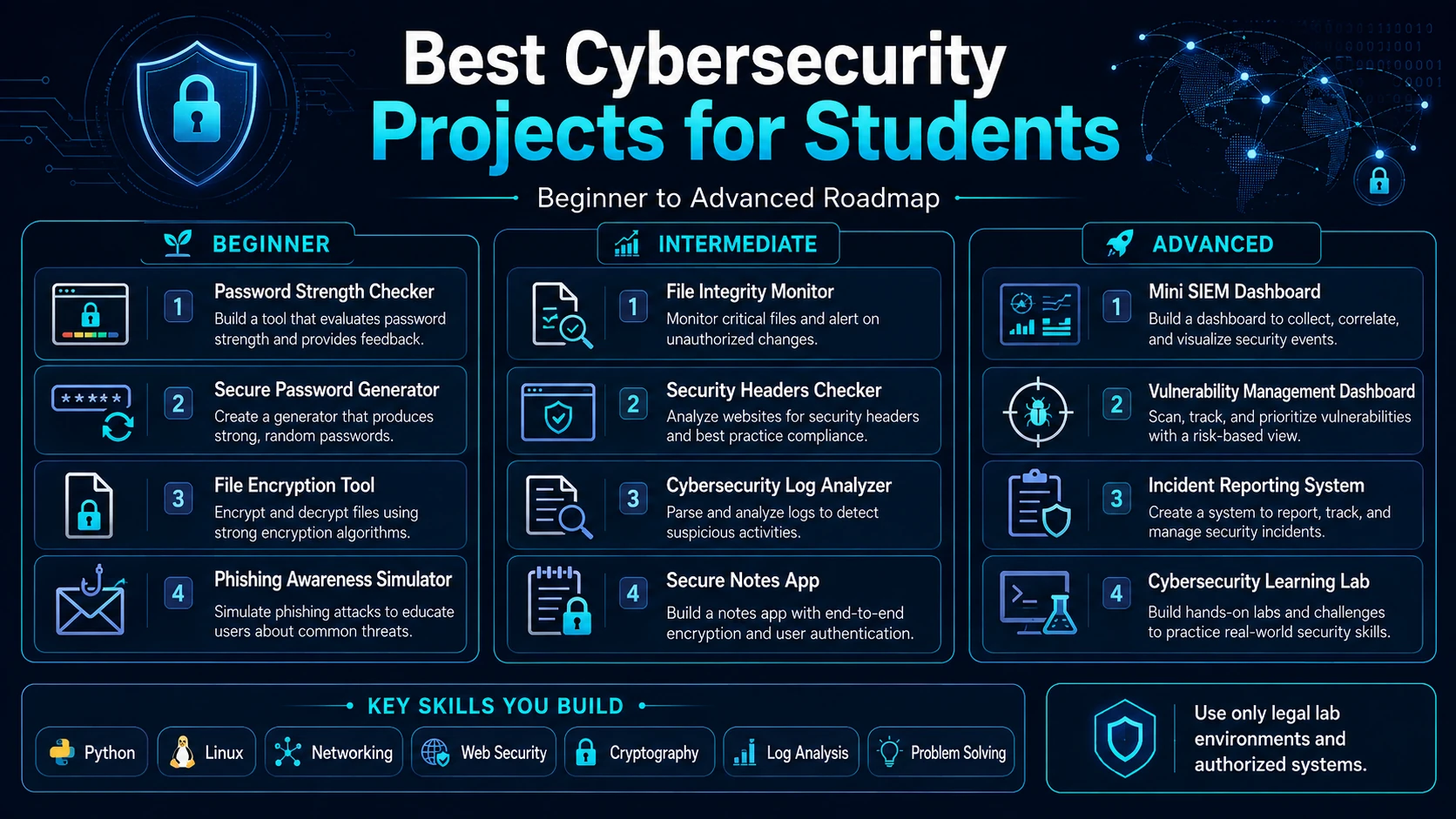
Best Cybersecurity Project Ideas by Skill Level
Choosing the right project is important.
Do not immediately choose the most advanced project because it sounds impressive.
A smaller project that actually works is better than a huge project that remains unfinished.
Beginner Projects
If you are new to cybersecurity, start with:
- Password strength checker
- Secure password generator
- File encryption application
- File integrity monitor
- Cybersecurity quiz
- Phishing awareness simulator
These projects teach programming and basic cybersecurity fundamentals.
Intermediate Projects
After understanding networking, Linux, backend development, and databases, try:
- Security log analyzer
- Website security checklist tool
- Security headers checker
- Vulnerability management dashboard
- Authentication system with MFA
- Incident reporting system
- Digital forensics metadata analyzer
Advanced Projects
Students who already understand security fundamentals can build:
- Mini SIEM
- Mini SOC dashboard
- Controlled honeypot monitoring platform
- Cybersecurity learning lab
- Machine-learning-based malicious URL classification project
Advanced does not necessarily mean offensive.
Some of the most valuable cybersecurity engineering projects are defensive systems that help organizations detect, investigate, and prevent attacks.
Technologies You Can Use for Cybersecurity Projects
Different projects require different technologies.
You do not need to learn all of them.
Programming Languages
Python is extremely useful because of its simplicity and large cybersecurity ecosystem.
You can also use:
- JavaScript
- TypeScript
- Java
- Go
- C
- C++
depending on your project.
Frontend
For dashboards and web interfaces:
- HTML
- CSS
- JavaScript
- React
- Next.js
Backend
You could use:
- Node.js
- Express.js
- Django
- Flask
- FastAPI
- Spring Boot
Databases
Popular options include:
- MySQL
- PostgreSQL
- MongoDB
- SQLite
Cybersecurity Environment
Students can also learn:
- Linux
- Virtual machines
- Docker
- Git
- Networking
- Log analysis
- Authentication
- Cryptography
Again, build and test security tools only in environments you control or have permission to use.
How to Make Your Cybersecurity Project Stand Out
Building the application is only half the work.
Presentation matters.
Suppose two students create the same log analyzer.
Student A uploads three Python files to GitHub.
Student B creates a professional repository containing documentation, screenshots, architecture diagrams, installation instructions, security considerations, sample data, and a demo.
Student B will usually create a much stronger impression.
Your project should ideally contain:
1. Good README Documentation
Explain:
- What the project does
- Why you created it
- Technologies used
- Architecture
- Installation process
- Features
- Screenshots
- Future improvements
2. Architecture Diagram
Show how components communicate.
For example:
Client → API → Authentication → Database → Security Engine → Dashboard
3. Screenshots
Add screenshots showing major functionality.
4. GitHub Repository
Keep your code organized.
Use meaningful commit messages instead of uploading everything in one commit.
5. Demo
If possible, create a safe public demonstration version containing only intentionally prepared sample data.
6. Security Explanation
Explain the security decisions you made.
For example:
Passwords are hashed before being stored, sessions expire after inactivity, and authorization checks prevent users from accessing resources belonging to other accounts.
That demonstrates genuine security understanding.
Common Mistakes Students Make with Cybersecurity Projects
Many students focus so heavily on making something appear advanced that they ignore the fundamentals.
Avoid these mistakes.
Copying Entire Projects from GitHub
Reading existing code is useful for learning.
Copying an entire project and changing its name is not.
Interviewers can easily discover whether you actually understand your own project.
Build the important components yourself and understand every major feature you include.
Building Projects Without Documentation
A project without documentation is difficult for recruiters and other developers to understand.
Always create proper documentation.
Ignoring Security in a Cybersecurity Project
It sounds obvious, but it happens frequently.
A cybersecurity dashboard should not have passwords stored in plain text or expose secrets inside the source code.
Pay attention to:
- Authentication
- Authorization
- Input validation
- Secrets management
- Database permissions
- Error handling
- Dependency updates
Testing Systems Without Permission
This is one of the most important rules.
Learning cybersecurity does not give someone permission to test random websites, servers, Wi-Fi networks, or accounts.
Use:
- Your own systems
- Local virtual machines
- Purpose-built security labs
- Intentionally vulnerable training applications
- Platforms explicitly created for cybersecurity practice
Authorization matters.
Which Cybersecurity Project Is Best for a Resume?
There is no single answer.
The best project depends on the job you want.
If you want to become a SOC Analyst, build:
Security Log Analyzer + Mini SIEM Dashboard
If you want to become an Application Security Engineer, build:
Secure Web Application + Security Assessment Dashboard
If you are interested in Digital Forensics, build:
File Metadata and Integrity Analysis Platform
If you are interested in Cloud Security, create a dashboard that audits the configuration of your own cloud lab.
If you are interested in Cybersecurity Awareness, build:
Phishing Awareness Simulator + Cybersecurity Learning Platform
Your project should match the cybersecurity role you eventually want.
A Better Way to Build Cybersecurity Projects
Do not attempt to build twenty projects at once.
Build projects in stages.
Stage 1: Learn the Fundamentals
Understand:
- Networking
- Linux
- HTTP
- Authentication
- Databases
- Basic cryptography
- Programming
Stage 2: Build Small Tools
Build:
- Password checker
- File hash checker
- Log parser
- Encryption utility
Stage 3: Build a Full Application
Combine multiple concepts into:
- Vulnerability dashboard
- Incident reporting platform
- SIEM dashboard
Stage 4: Build Your Portfolio Project
Finally, build one large cybersecurity system where several components work together.
This approach gives you deeper understanding instead of a collection of unfinished repositories.
Final Thoughts
Cybersecurity is best learned by building, experimenting, documenting, and continuously improving.
You do not need to begin with complex penetration-testing tools.
Start with simple projects that help you understand authentication, encryption, logs, file integrity, networking, and security monitoring.
Then gradually move toward larger systems.
A student who builds a well-documented log analyzer, vulnerability management dashboard, or mini SOC platform may develop stronger practical knowledge than someone who only completes cybersecurity courses without applying what they learned.
The most valuable cybersecurity project is not necessarily the most complicated one.
It is the project that you:
- Built yourself
- Understand completely
- Tested responsibly
- Documented properly
- Can explain confidently
- Improved after identifying weaknesses
If you are starting today, choose one beginner project and build a basic version first.
Once it works, improve it.
Add authentication.
Add a database.
Add logging.
Add a dashboard.
Add alerts.
Document everything.
That process of repeatedly improving a working project is exactly how you develop real cybersecurity skills.
Frequently Asked Questions
1. What are the best cybersecurity projects for beginners?
Beginners can start with a password strength checker, secure password generator, file integrity monitoring tool, file encryption application, cybersecurity quiz platform, or phishing awareness simulator. These projects are relatively manageable while still teaching important concepts such as encryption, authentication, hashing, security awareness, and secure programming.
2. Is Python good for cybersecurity projects?
Yes. Python is one of the most useful programming languages for cybersecurity students because it has simple syntax and a large ecosystem of libraries. It can be used for log analysis, security automation, file integrity monitoring, cryptography projects, network lab tools, API integrations, data processing, and security dashboards.
3. Which cybersecurity project is best for a final-year student?
A mini SOC dashboard, SIEM-style security monitoring system, vulnerability management platform, cybersecurity learning platform, or incident response management system can make a strong final-year project. These projects combine cybersecurity with programming, databases, APIs, authentication, visualization, and system design.
4. Can cybersecurity projects help me get a job?
Yes, especially when the projects are original, properly documented, and related to the position you are applying for. Recruiters and interviewers may use your project to understand how well you know Linux, networking, cybersecurity concepts, programming, databases, security monitoring, and problem-solving. Being able to explain why you made specific security decisions is often more valuable than simply listing several tools on your resume.
5. How many cybersecurity projects should I add to my resume?
Usually, two to four strong projects are better than listing many basic projects. Choose projects that demonstrate different skills. For example, you could include a security log analyzer, secure web application, file integrity monitoring system, and mini SOC dashboard. Make sure you can explain the architecture, technologies, challenges, security controls, and lessons learned from every project you include.