
Model Context Protocol (MCP) Complete Notes
Model Context Protocol (MCP) with complete beginner-friendly notes covering MCP architecture, hosts, clients, servers, tools, resources, prompts, JSON-RPC, transport, security, authorization, and practical implementation concepts
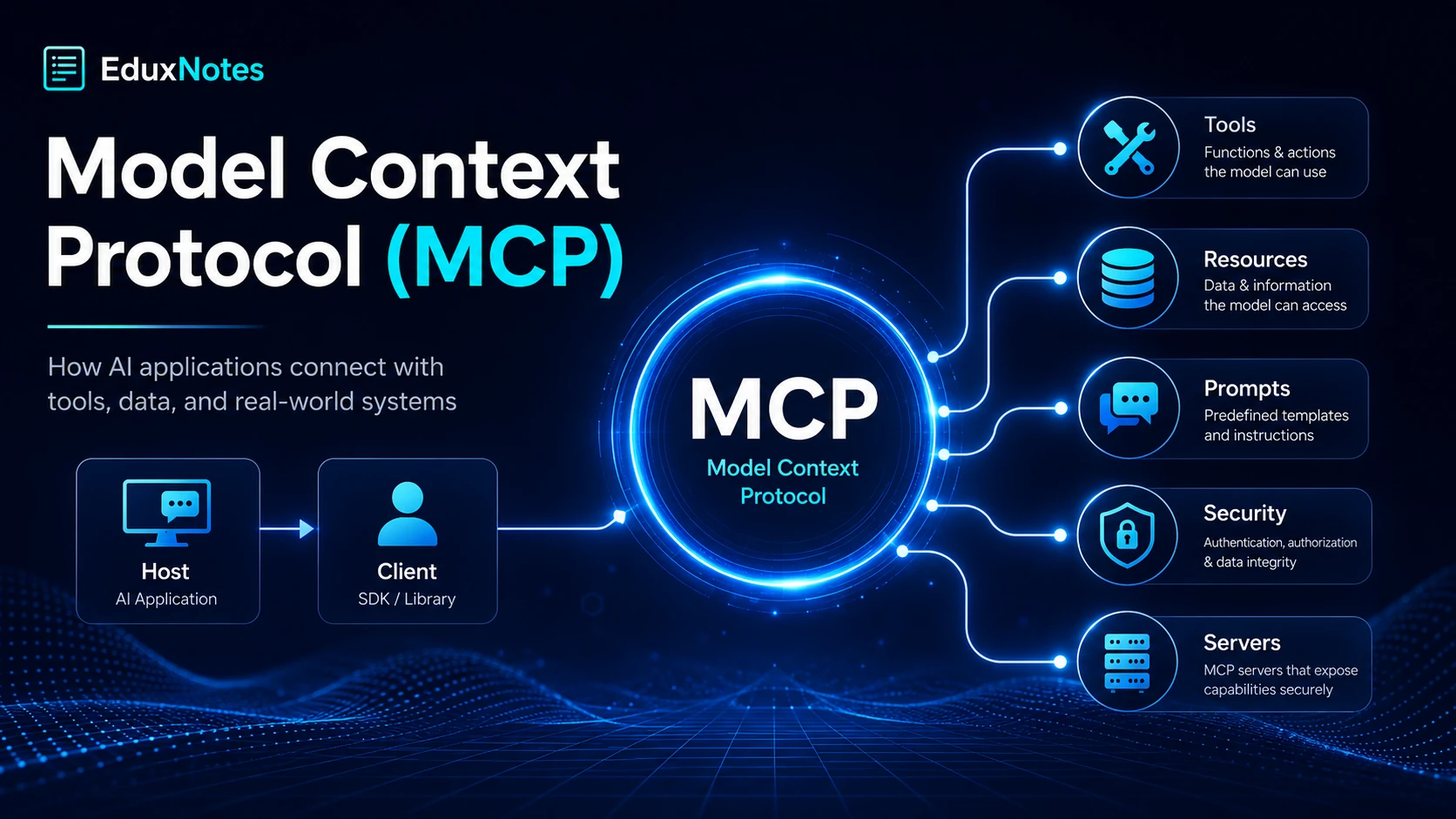
Model Context Protocol, commonly called MCP, is an open standard designed to provide a common way for AI applications to communicate with external tools, data sources, and services.
A large language model can understand and generate text, reason about information, and respond to user questions. However, the model by itself does not automatically have access to things such as local files, databases, calendars, company documentation, APIs, development environments, or other real-world systems.
MCP provides a standardized bridge between the AI application and those external systems.
Instead of every AI application creating a completely different integration for every tool, MCP defines a shared communication pattern. An application that understands MCP can communicate with systems that expose their capabilities through MCP without needing a completely new integration design every time.
MCP was introduced by Anthropic in November 2024 as an open, community-driven specification. The specification continues to evolve, so implementation details can change as newer revisions are published.
A simple way to think about MCP is:
AI Model → AI Application → MCP → External Tools/Data
For example, an AI assistant could potentially use MCP-compatible systems to:
- search files,
- read project documentation,
- query a database,
- perform Git operations,
- access business systems,
- interact with APIs,
- execute development tools,
- retrieve information from company services.
MCP standardizes how these capabilities are discovered and accessed.
Why Was MCP Needed?
Before a common protocol existed, developers normally had to create separate integrations between every AI application and every external service.
Imagine that a company uses three AI applications:
- an AI chat assistant,
- an AI coding assistant,
- an AI customer-support assistant.
And the company wants those applications to access:
- a database,
- a file system,
- an internal knowledge base,
- a project-management platform.
Without a common standard, each application might require its own custom integration with each system.
This creates what the study notes describe as the M × N integration problem.
If there are M applications and N systems, developers may have to maintain M × N integrations. With MCP, each application and external system can instead implement the common protocol, significantly reducing the need for application-specific connectors.
This idea is similar to other standards in computing.
HTTP gives browsers and web servers a common communication standard. The Language Server Protocol allows editors and programming-language tooling to communicate through a shared protocol.
MCP applies a similar idea to AI applications and external capabilities.
It is important, however, not to confuse MCP with an AI model.
MCP does not replace model reasoning or function calling. Instead, it standardizes the infrastructure through which an AI application discovers and interacts with available tools and data.
Core MCP Architecture
An MCP system is built around three important roles:
- Host
- Client
- Server
Understanding the difference between these three components is one of the most important parts of understanding MCP.
1. MCP Host
The host is the AI application that the user interacts with.
Examples can include:
- an AI desktop application,
- an AI-enabled IDE,
- a custom AI chatbot,
- another application containing an AI assistant.
The host manages the overall user experience.
It can decide which MCP servers should be connected, which capabilities should be available, and whether a particular operation should be allowed.
A host may connect to several MCP servers simultaneously.
2. MCP Client
An MCP client exists inside the host application.
Its responsibility is to maintain communication with an MCP server.
The architecture normally uses a one-client-to-one-server connection.
For example:
AI Host
|
├── MCP Client A → File Server
|
├── MCP Client B → Git Server
|
└── MCP Client C → Database Server
If the host wants to connect to three different MCP servers, it normally maintains three separate client connections.
Keeping these connections isolated helps maintain independent state, capabilities, and lifecycle management for each server.
The uploaded notes describe the host as the coordinator, while each client manages its own dedicated connection to one server.
3. MCP Server
An MCP server is a program that exposes capabilities to an MCP client.
A server might expose:
- tools,
- resources,
- prompts,
- or other supported MCP features.
For example, a file-system MCP server could provide access to selected files, while a database MCP server could expose safe database operations.
The server does not need to understand the complete AI conversation or know which AI model the host uses. Its main responsibility is to correctly expose its capabilities and respond through the protocol.
This separation makes MCP servers reusable across different compatible applications.
How MCP Communication Works
MCP uses JSON-RPC 2.0 as its message format.
JSON-RPC is a lightweight protocol based on JSON that can be implemented in many programming languages.
For example, a tool call conceptually looks like:
{
"jsonrpc": "2.0",
"id": 7,
"method": "tools/call",
"params": {
"name": "get_weather",
"arguments": {
"city": "Bengaluru"
}
}
}
The server then returns the appropriate result.
MCP Connection Lifecycle
Before normal operations begin, the client and server establish a connection and determine which protocol capabilities each side supports.
The connection has three broad stages:
Initialization
The client contacts the server and sends its:
- protocol version,
- supported capabilities,
- client information.
The server replies with its own protocol version, capabilities, and identifying information.
Operation
Once initialization is complete, normal operations can begin, such as:
- discovering tools,
- calling tools,
- reading resources,
- retrieving prompts.
Shutdown
When the connection is no longer required, the underlying transport is closed.
Capability negotiation is particularly important because not every MCP implementation supports every optional feature. The client and server therefore advertise supported capabilities before attempting to use them.
MCP Transport Methods
A transport determines how JSON-RPC messages move between the MCP client and server.
Two important transport approaches covered by the notes are:
stdio
Standard Input/Output (stdio) is commonly used when an MCP server runs locally as a subprocess on the same computer as the host.
It works well for things such as:
- local file access,
- local developer utilities,
- personal automation,
- command-line integrations.
Because the process executes locally, operating-system permissions provide part of the access boundary.
Streamable HTTP
Streamable HTTP is intended for servers that run remotely or need to serve multiple clients.
It supports normal HTTP requests while also supporting server-pushed communication when required.
This is more appropriate for:
- shared company services,
- hosted integrations,
- remote APIs,
- multi-user MCP systems.
The notes explain that stdio is generally suited to local subprocess servers, while Streamable HTTP is intended for remote or multi-user environments.
The Six Core MCP Primitives
The uploaded material organizes MCP around six important primitives:
Tools, Resources, Prompts, Sampling, Roots, and Elicitation.
Each serves a different purpose.
1. Tools
Tools represent actions or computations that can be performed.
Examples could include:
search_database
create_ticket
convert_currency
send_message
search_docs
calculate_shipping
A server describes the available tools, including their:
- names,
- descriptions,
- expected parameters,
- input schemas.
The client discovers tools with:
tools/list
and invokes one with:
tools/call
A major characteristic of tools is that the model may decide during reasoning when a tool should be used.
Tool descriptions therefore need to be precise. If several tools are available, the model relies heavily on their descriptions and schemas to determine which one matches the user's request.
Tools can also return different content types, including text, images, audio, and embedded resources. The protocol supports metadata such as readOnlyHint, destructiveHint, and idempotentHint, but the notes emphasize that these annotations are hints rather than security guarantees.
2. Resources
Resources represent readable information.
Unlike tools, which usually perform an action, resources primarily provide data.
A resource is identified by a URI.
Examples might include:
file:///project/README.md
company://policies/security
database://reports/monthly-sales
Clients can discover resources using:
resources/list
and read them using:
resources/read
Some resources can also support subscriptions, allowing clients to receive notifications when data changes.
A useful distinction is:
Resource = something you read
Tool = something you execute
The study material describes a resource like a file that can be opened, while a tool is closer to a button that performs an operation.
3. Prompts
MCP prompts are reusable prompt templates provided by a server.
Instead of users repeatedly writing the same complex instructions, the server can provide a predefined prompt.
For example, a development server might expose:
review_pull_request
The prompt could contain tested instructions for reviewing code against a team's standards.
Prompts can accept arguments and generate one or more conversation messages.
They are discovered using:
prompts/list
and retrieved using:
prompts/get
Unlike tools, which can be model-controlled, prompts are generally user-controlled. A host might expose them as slash commands or menu actions.
Prompts may also include live resource content rather than only static text.
4. Sampling
Sampling allows an MCP server to ask the host/client to perform a model completion.
Normally, the AI application asks the server for something. Sampling allows communication in the opposite direction.
Conceptually:
Server
↓
Requests model completion
↓
Client / Host
↓
User reviews request
↓
AI Model
↓
Result returned to server
The method associated with this is:
sampling/createMessage
Sampling is powerful but sensitive because it allows a server to trigger AI-model usage.
The notes therefore place strong emphasis on human-in-the-loop approval. A trustworthy host should show what will be submitted and allow the user to approve, modify, or deny the request rather than blindly executing it.
5. Roots
Roots allow a client to tell a server which locations are relevant to the current session.
Consider a file server connected to a coding assistant.
The user might only be working inside:
/project/my-nextjs-app/
Without additional context, a file server may not know whether it should consider that project, another project, or the whole machine.
The client can expose the active project directory as a root.
Roots are commonly represented as URIs.
The server can retrieve them through:
roots/list
Roots can help scope file browsing, searching, and editing to relevant locations.
However, roots are advisory boundaries, not security enforcement. Real permission control should still come from mechanisms such as OS permissions and sandboxing.
6. Elicitation
Elicitation allows a server to ask the user for additional structured information when something is missing.
Suppose an MCP server is booking a restaurant.
The user says:
“Book a table for tomorrow evening.”
But the server still needs the number of guests.
Instead of guessing or failing completely, the server can request that information.
It sends:
elicitation/create
along with a schema describing the information required.
The host displays the request to the user, gathers the answer, and sends the structured response back.
The uploaded material notes that elicitation is a newer MCP feature, so older clients, servers, or SDKs may not support it and capability negotiation should be checked first.
Building an MCP Server
Developers generally do not need to manually implement every JSON-RPC message.
MCP SDKs handle much of the protocol infrastructure.
For example, an SDK can manage:
- JSON-RPC serialization,
- initialization,
- capability advertisement,
- connection handling,
- schema generation,
- error formatting.
The developer remains responsible for the actual application logic.
If you create a currency-conversion tool, for instance, the SDK can expose it through MCP, but you still need to implement how currency conversion actually works.
The notes also recommend precise tool descriptions because the AI model uses the description and schema when deciding how to use a tool.
Building an MCP Client
An MCP client:
- opens a connection to an MCP server,
- performs initialization,
- discovers available capabilities,
- sends MCP requests,
- receives results and notifications,
- manages the connection lifecycle.
Most developers building ordinary AI applications may use an existing client or host rather than implementing the protocol manually.
A complete host generally adds functionality beyond the raw MCP client, such as:
- managing several MCP servers,
- combining tools from multiple servers,
- requesting user confirmation,
- reconnecting after failures,
- converting MCP content into the AI model's required format.
The SDK provides protocol communication, while trust, permissions, approvals, and user experience remain responsibilities of the host application.
Reliability Features in MCP
Real-world systems sometimes deal with operations that take time or return large amounts of information.
MCP therefore includes mechanisms for:
- notifications,
- progress reporting,
- cancellation,
- pagination.
Progress notifications can report updates during long-running tasks.
Cancellation allows one side to indicate that an earlier request is no longer needed, although the notes describe cancellation as best-effort rather than guaranteed.
Pagination allows large lists to be retrieved in smaller portions using opaque cursors.
MCP Security and Trust
Security becomes extremely important once an AI application can access files, databases, messages, APIs, and other systems.
An MCP integration may potentially perform real actions, which means careless permissions can cause data leakage or unwanted operations.
One important risk described in the material is indirect prompt injection.
Suppose an AI retrieves an email or web page through an MCP resource. That content could contain malicious instructions intended to manipulate the AI.
For example, retrieved content could attempt to tell the model to ignore previous instructions or expose sensitive information.
The model should not automatically treat external content as trusted instructions.
Important security practices include:
- treating tool/resource output as untrusted data,
- asking for confirmation before sensitive operations,
- validating inputs,
- limiting permissions,
- using read-only access where possible,
- reviewing MCP servers before connecting them.
The notes strongly recommend least privilege. A reporting server that only reads a database should ideally not receive credentials that can delete or modify that database.
Authorization for Remote MCP Servers
Local stdio servers and remote servers have different security requirements.
A local subprocess already operates under local OS permissions.
A remote MCP server, however, is exposed through a network and must determine:
- who is connecting,
- whether they are authenticated,
- what they are allowed to access.
The study material describes MCP's remote authorization approach as being based on OAuth 2.1.
Important elements include:
- authorization-server discovery,
- dynamic client registration,
- PKCE,
- access tokens.
For a user, this can look like a normal browser authentication process:
MCP Client
↓
Authorization Server
↓
Browser login
↓
User approves access
↓
Authorization code + PKCE
↓
Access token
↓
Client accesses MCP Server
The notes advise against using simplistic hardcoded shared credentials as a substitute for a proper authorization system on remote MCP servers.
MCP vs Function Calling
These concepts are related but not identical.
Function calling is a model capability.
It allows a model to produce a structured request such as:
get_weather(city="Pune")
MCP operates at a different layer.
It provides a standard through which an application can discover and interact with capabilities made available by external systems.
So:
Function Calling
= What a model is capable of requesting

MCP
= How an application standardizes access to external capabilities
The uploaded notes make the distinction that function calling is a model capability, while MCP standardizes how an application discovers and invokes such capabilities across different tools and data sources.
MCP vs Agent Frameworks
An agent framework is normally a higher-level system responsible for things such as:
- multi-step planning,
- tool selection,
- state management,
- workflows,
- reasoning loops.
MCP does not provide all of that orchestration.
Instead, an agent framework may use MCP underneath to connect to external tools.
A useful conceptual stack is:
User
↓
AI Application / Agent
↓
AI Model
↓
MCP Client
↓
MCP Server
↓
Database / Files / APIs / Services
MCP therefore acts primarily as the integration and interoperability layer rather than the entire AI-agent architecture.
Why MCP Is Important for AI Applications
MCP addresses one of the important engineering challenges in AI development: giving models controlled access to external systems without building every integration from scratch.
Its main advantages include:
- reusable integrations,
- standardized tool discovery,
- structured communication,
- separation between AI hosts and external services,
- support for local and remote systems,
- model-provider independence,
- easier integration maintenance,
- explicit capability negotiation,
- support for user-controlled permissions,
- better interoperability between AI applications and tools.
Instead of creating an ecosystem where every AI application needs its own proprietary integration for every database, API, tool, or file system, MCP provides a shared protocol those systems can implement.
Frequently Asked Questions
1. What is Model Context Protocol in simple words?
Model Context Protocol is an open standard that gives AI applications a common method for connecting to external tools, services, and data. Instead of developers building a separate integration for every AI application and every external system, both sides can implement the same protocol.
2. Is MCP an AI model?
No. MCP is not an AI model. It is a communication and integration protocol. An AI application can use MCP to discover and interact with external capabilities, while the language model itself remains responsible for reasoning and generation.
3. What are the main components of MCP?
The three main architectural roles are the host, client, and server. The host is the application the user interacts with, the client manages a connection to an MCP server, and the server exposes capabilities such as tools, resources, and prompts.
4. What is the difference between MCP tools and resources?
A resource primarily provides readable information, while a tool performs an action or computation. For example, reading a documentation page could be represented as a resource, while searching that documentation dynamically could be implemented as a tool.
5. Is MCP secure?
MCP includes mechanisms and implementation guidance that can support secure integrations, but simply using MCP does not automatically make an application safe. Hosts and server developers still need proper authentication, least-privilege permissions, user confirmation for consequential actions, input validation, and protection against threats such as indirect prompt injection.
Note: Ye information maine tumhari uploaded 65-page EduxNotes Model Context Protocol PDF ko base banake prepare ki hai. PDF khud bhi mention karti hai ki MCP ek evolving standard hai, isliye exact current protocol-version details future mein change ho sakti hain.