
A2UI Protocol Complete Notes PDF – Agent-to-User Interface Tutorial
Download complete A2UI Protocol Notes PDF covering Agent-to-User Interface architecture, components, JSON examples, MCP, A2A, AG-UI, security, projects and tutorials
 Aditya Chavhan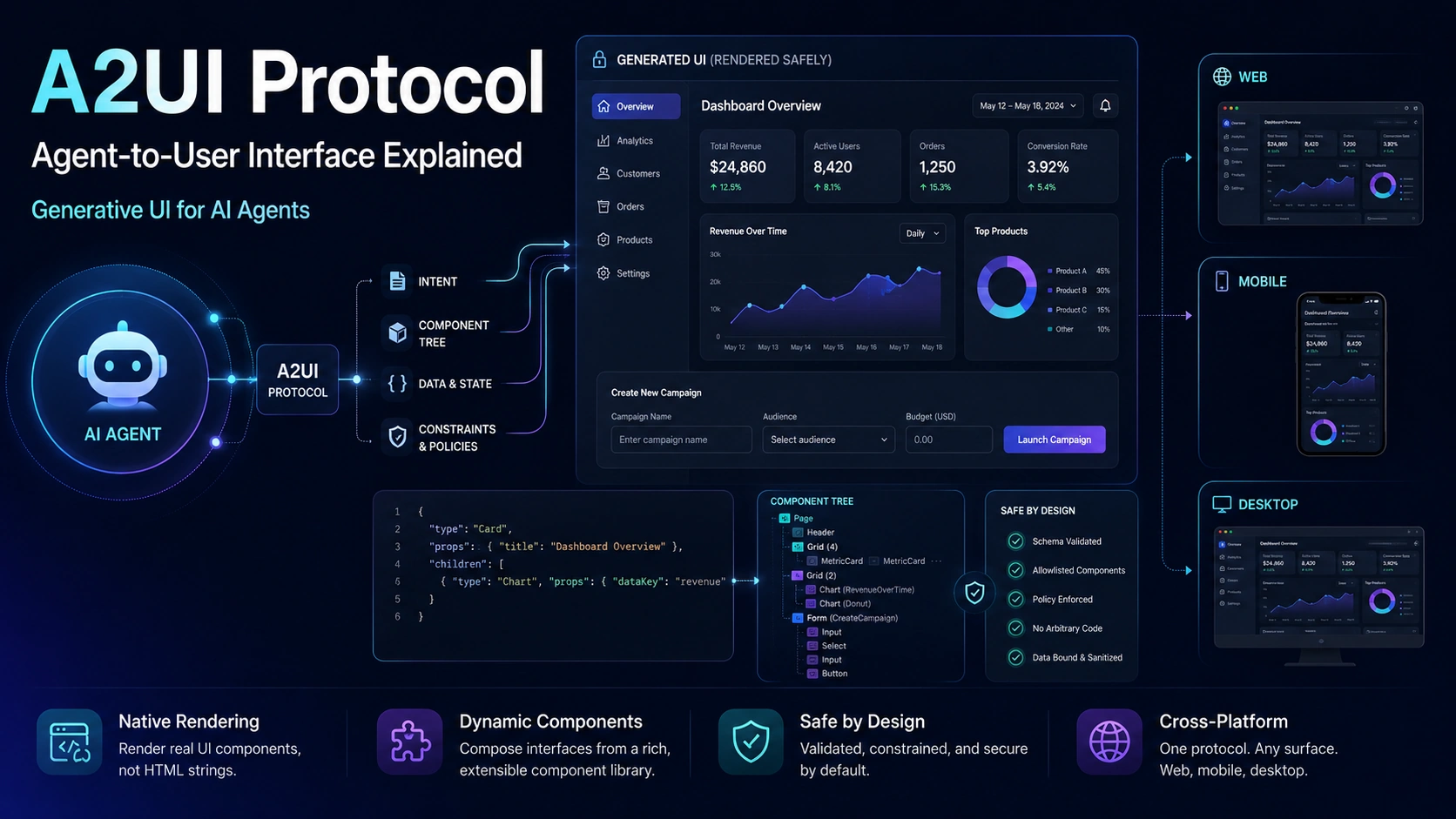
For the first few years of the generative AI boom, most AI applications followed a familiar pattern: the user typed something into a chat box, the model processed it, and the result appeared as text.
That approach works surprisingly well for questions, explanations, summaries, and brainstorming. But it starts to feel restrictive when an AI agent needs to help someone complete an actual task.
Imagine asking an AI assistant to compare four hotels. A paragraph describing prices, ratings, locations, and amenities is useful, but a comparison table with selectable cards would be much easier to work with.
Now imagine asking an agent to create a travel plan. Instead of replying with a long wall of text, the agent could present a date picker, destination cards, filters, a budget field, and a confirmation button.
The same idea applies to shopping, analytics, healthcare dashboards, booking systems, developer tools, business software, customer support, and almost every other interactive application.
This is the problem that A2UI, or Agent-to-User Interface Protocol, is trying to solve.
A2UI gives AI agents a structured way to describe user interfaces instead of returning only text or generating arbitrary frontend code. The host application receives a declarative UI description, maps it to trusted components, and renders the result using its own framework and design system.
That sounds simple, but it represents an important change in how developers may build agent-driven applications.
Instead of designing every possible screen in advance, applications can allow an agent to decide which interface best fits the task while the application still controls what can actually be rendered.
As of 2026, A2UI is actively evolving. Google publicly introduced the project in December 2025, released the stable v0.9 specification in 2026, and the repository also contains a v1.0 candidate specification.
This guide explains what A2UI is, why it exists, how the protocol works, where it fits alongside MCP and A2A, its security model, its limitations, and what developers should learn before building with it.
What Is A2UI?
A2UI stands for Agent-to-User Interface.
It is an open protocol designed to let an AI agent describe interactive interfaces using structured data.
Instead of asking the model to generate raw HTML, CSS, JavaScript, React components, or Flutter widgets, the agent produces a declarative representation of the interface.
The client application then interprets that representation and renders it using components the developer has already approved.
A simple mental model is:
Agent decides what the interface should contain.
A2UI describes that interface.
The client decides how it should actually look and behave.
That separation is important.
The agent might say that the interface needs a heading, a text field, a date selector, and a submit button.
The application can decide whether those elements become React components, Angular components, Flutter widgets, native controls, or something else.
This is why A2UI is described as framework-agnostic.
Google's A2UI documentation describes the protocol as a JSON-based streaming UI protocol that keeps UI structure separate from application data.
Why Do AI Agents Need Their Own UI Protocol?
Traditional software is predictable.
Developers know most of the screens and workflows before the application is shipped.
A banking application may have a login screen, transaction history, transfer form, account page, and settings page. Developers design those screens in advance.
Agents are different.
An intelligent agent may be asked to complete hundreds of tasks that developers did not explicitly design screens for.
For example, a business assistant might receive these requests:
“Compare revenue from the previous three quarters.”
“Show overdue invoices.”
“Create a customer follow-up plan.”
“Find our most profitable products.”
“Prepare a form for adding a new vendor.”
“Show delivery delays by region.”
Each request may benefit from a different interface.
Building a separate frontend component for every possible agent response becomes difficult quickly.
One alternative is to let the AI generate HTML or JavaScript.
That provides flexibility, but it introduces another problem: arbitrary executable code is difficult to trust.
Giving a remote agent permission to generate and execute JavaScript directly inside your application can create security, reliability, accessibility, design consistency, and performance problems.
A2UI takes a different approach.
The agent does not receive unlimited frontend control.
It receives a vocabulary.
The application tells the agent which interface components are available, and the agent composes an interface from that trusted catalog.
The official A2UI materials describe this as allowing agents to create UI using a fixed set of safe primitives that are rendered by the client rather than executing arbitrary agent-generated code.
The Core Idea: Declarative UI Instead of Generated Code
Suppose an AI agent wants to show a user profile.
A risky approach would be to return something like:
<div class="profile">
  <h2>Rahul Sharma</h2>
  <button onclick="deleteUser()">Delete</button>
</div>
The receiving application would now need to decide whether it trusts that code.
A declarative protocol works differently.
Conceptually, the agent could send structured information such as:
{
  "component": "Card",
  "children": [
    {
      "component": "Text",
      "text": "Rahul Sharma"
    },
    {
      "component": "Button",
      "label": "View Profile",
      "action": "open_profile"
    }
  ]
}
The application never needs to execute JavaScript supplied by the agent.
It already knows what a Card, Text, and Button mean.
The renderer maps those definitions to approved local components.
That means the same logical interface could look completely different in two applications while still representing the same intent.
A banking application could render the button using its corporate design system.
A mobile application could turn it into a native Flutter widget.
An enterprise dashboard might render it using Angular.
This separation between UI intent and UI implementation is one of A2UI's most important ideas.
Understanding A2UI Architecture
A useful A2UI architecture contains several layers.
At the top is the agent.
The agent understands the user's request and decides that an interface would communicate the result better than plain text.
The agent then generates A2UI messages.
Those messages travel through a transport layer to the client.
A2UI itself is designed to be transport-independent. The specification focuses on the structure and meaning of messages rather than forcing developers to use one specific networking technology. Reliable ordering and clear message boundaries are important because later updates may depend on earlier messages.
On the client side, the renderer receives those messages.
The renderer maintains the current UI state, resolves component relationships, reads associated data, and maps catalog components to real interface elements.
The final layer is the application's component library.
This is where A2UI becomes especially interesting for production software.
Developers remain responsible for the real components.
The agent is not rewriting the company's frontend.
It is composing approved building blocks.
Surfaces: The Container for an A2UI Interface
A2UI introduces the concept of a surface.
You can think of a surface as an independent agent-controlled area of the interface.
For example, an AI assistant might create a surface containing a product comparison.
Later it might update the same surface when the user changes a filter.
Another surface could contain an order confirmation form.
Each surface has its own component tree and associated data.
This architecture allows applications to update portions of an agent-generated interface without rebuilding everything from scratch.
It also becomes useful when an application contains several independent interactive agent experiences.
The Four Important A2UI Messages
The stable v0.9 protocol defines four core server-to-client message types: createSurface, updateComponents, updateDataModel, and deleteSurface.
createSurface
createSurface tells the renderer that a new UI surface should exist.
Think of it as creating an empty canvas.
The renderer learns the surface identifier and prepares state for the interface that will follow.
updateComponents
Once the surface exists, the agent can provide component definitions.
These components describe the structure of the interface.
One component might reference another component as a child, allowing the renderer to reconstruct the component hierarchy.
updateDataModel
The structure of an interface and the information displayed inside it are deliberately separated.
That means the agent can update data without redefining the entire UI.
Imagine a stock dashboard.
The layout may remain unchanged while prices update repeatedly.
Instead of sending the complete component structure every time the price changes, the agent can update the relevant data model.
This separation can reduce unnecessary work and makes streaming interfaces much more practical.
deleteSurface
When an interface is no longer needed, the agent can send deleteSurface.
The renderer removes the corresponding UI and associated state.
This lifecycle creates a simple pattern:
Create Surface
      ↓
Add / Update Components
      ↓
Add / Update Data
      ↓
User Interacts
      ↓
Agent Updates UI
      ↓
Delete Surface When Finished
The v1.0 candidate continues the streaming model while refining several areas of the protocol and validation model.
A2UI Is Designed for Streaming Interfaces
One of the less obvious benefits of A2UI is that the agent does not necessarily have to generate the entire interface before the user sees anything.
Messages can arrive progressively.
The agent may create a surface first.
Then the title and basic controls may arrive.
Additional information can follow.
Later data updates can modify what the user already sees.
This matters because generative applications often feel slow when users must wait for one large response to finish.
Progressive rendering can make the application feel more responsive.
It is similar to streaming text from a language model, except the streamed result is gradually becoming an interactive interface.
Component Catalogs Are the Real Safety Boundary
The component catalog is one of the most important parts of an A2UI implementation.
A catalog defines what the agent is allowed to use.
The standard basic catalog provides a small set of common interface primitives. Google has described the basic A2UI model as using 18 safe component primitives for composing interfaces.
The exact visual implementation still belongs to the host.
That creates a powerful trust boundary.
Suppose your application exposes:
Text, Button, TextField, Card, Row, Column, Image, and DatePicker.
The agent can combine those components.
But it cannot suddenly decide to execute a shell command, inject an unknown iframe, load an arbitrary script, or call internal browser APIs unless the host explicitly provides capabilities that allow such behavior.
This is considerably easier to reason about than arbitrary generated frontend code.
Organizations can also create custom catalogs containing business-specific controls.
A travel company might expose a FlightCard.
A finance application might expose a TransactionTable.
An education application could expose a QuizQuestion, ProgressCard, or CodeExercise.
The agent can then build interfaces using concepts that already belong to the product.
Why Data Binding Matters
Suppose the agent creates a form that asks for:
Name
Preferred date
The visible controls are one part of the interface.
The values entered by the user are another.
A2UI separates the component structure from the data model, allowing UI components to bind to values stored at data paths.
That separation makes updates easier.
The agent does not need to recreate a text field just because its value changes.
Instead, the value in the data model can change while the component remains the same.
This pattern should feel familiar to developers who have worked with modern frontend frameworks.
The important difference is that the component description may now come from an agent rather than being hard-coded into the application.
User Actions: Making Generated UI Interactive
An interface is not useful if the user cannot interact with it.
A2UI therefore includes a mechanism for representing actions.
A button might represent an action such as:
confirm_booking
The renderer does not blindly execute agent-supplied code.
Instead, it recognizes that an action occurred and sends structured information back through the application's agent communication layer.
The agent can then decide what happens next.
For example:
A user clicks Compare Plans.
The application sends the action and relevant form data.
The agent processes the request.
The agent sends updated A2UI messages.
The comparison surface changes.
This produces a loop:
User → UI → Action → Agent → New UI
That interaction model is central to agentic applications.
The agent does not merely answer.
It participates in an ongoing workflow.
A Real-World Example: AI Travel Assistant
Imagine building a travel assistant.
A user says:
Find a three-day trip to Goa for two people under ₹30,000.
A text-only agent may return a list of suggestions.
An A2UI-powered agent could respond with an interface containing destination information, hotel cards, transportation options, a total budget estimate, date controls, and a button to modify the itinerary.
The user changes the hotel.
That action goes back to the agent.
The agent recalculates the budget and updates only the affected data.
The user selects new dates.
The availability portion changes.
The user clicks Confirm Plan.
The agent moves the workflow forward.
Notice what happened.
The developer did not necessarily build a dedicated “Goa three-day itinerary under ₹30,000” screen.
The application provided safe components.
The agent assembled the interface needed for that particular conversation.
That is the larger promise behind generative UI.
A2UI vs Traditional Frontend Development
A2UI does not mean traditional frontend development is disappearing.
In fact, A2UI depends heavily on good frontend engineering.
Developers still need to design components, build the renderer, manage accessibility, protect actions, validate messages, handle errors, maintain application state, and create a consistent design system.
What changes is who decides how those components are combined in certain parts of the product.
Traditional application:
Developer decides layout
→ Code is deployed
→ User sees fixed workflow
Agent-driven application:
Developer defines trusted components
→ Agent chooses composition
→ Renderer builds interface
→ User interacts
→ Agent adapts interface
These approaches can also coexist.
Most real products will probably keep large portions of their interface deterministic while allowing agents to generate specific workflow areas dynamically.
A2UI vs MCP
A2UI and MCP solve different problems.
The Model Context Protocol helps AI systems connect to tools, resources, and external capabilities.
A2UI focuses on how an agent communicates an interface to the user.
An easy way to think about the difference is:
MCP helps an agent do things.
A2UI helps an agent show things interactively.
Suppose an AI travel assistant needs hotel availability.
MCP could provide access to the hotel search tool.
After receiving the results, A2UI could describe the comparison interface shown to the user.
These technologies can complement each other rather than compete.
A2UI and MCP Apps
The comparison becomes more interesting with MCP Apps.
MCP Apps allow tools to return interactive UI experiences that can be displayed inside MCP-compatible hosts. The MCP project announced MCP Apps as its first official extension in January 2026.
A2UI and MCP Apps take different approaches.
MCP Apps can provide highly customized interfaces using familiar web technologies, often through an embedded environment.
A2UI focuses on declarative interface descriptions that the host renders using native components.
There is a tradeoff.
A fully custom application surface gives developers greater visual and behavioral freedom.
Native declarative rendering provides stronger consistency with the host application's design system and can reduce the need to embed isolated web experiences.
Google's A2UI team published integration patterns in June 2026 showing that the two approaches do not need to be mutually exclusive. Developers can combine A2UI and MCP Apps depending on the type of experience they need.
That hybrid approach may become particularly important for complex agent platforms.
Where A2A Fits
A2A stands for Agent-to-Agent protocol.
Its purpose is different again.
A2A helps independent agents collaborate.
Imagine a main travel assistant that delegates work to a flight agent, hotel agent, and local activity agent.
A2A can help those agents communicate.
A2UI can then help present the final result to the human.
Conceptually:
MCP → Agent accesses tools

A2A → Agent communicates with other agents

A2UI → Agent communicates interactive UI to the user
These protocols address different layers of the emerging agent ecosystem.
Google's 2026 developer guidance presents A2UI alongside other agent protocols rather than as a replacement for them.
Why A2UI Can Improve Security
Letting language models generate executable code and immediately running that code creates an obvious trust problem.
A2UI attempts to reduce that risk through constrained, declarative output.
The agent says what component it wants.
The application decides what that component actually is.
This means developers can validate every incoming message before rendering it.
A production renderer should reject unknown components, malformed properties, invalid data paths, unsupported actions, dangerous URLs, and messages that exceed reasonable limits.
Actions should also be treated as requests rather than trusted commands.
For example, an agent-generated button saying “Delete account” should not gain permission to delete an account simply because the UI contains the button.
The application still needs authorization.
The normal security rules remain:
Authenticate the user.
Check permissions.
Validate input.
Authorize sensitive operations.
Sanitize untrusted content.
Restrict external resources.
Log important actions.
Apply rate limits.
The protocol reduces one category of risk, but it does not replace secure application engineering.
Validation Is Essential When LLMs Generate A2UI
Language models are probabilistic.
Even when given an exact specification, a model may occasionally produce malformed output.
The stable A2UI v0.9 design explicitly recognizes this issue.
The specification moved toward a prompt-first model, which provides richer schema flexibility but also makes post-generation validation particularly important.
A strong production pipeline therefore looks more like this:
LLM generates A2UI
        ↓
Schema validation
        ↓
Catalog validation
        ↓
Security checks
        ↓
Business-rule checks
        ↓
Renderer
If validation fails, the system can reject the message or provide structured error information that allows the agent to correct its output.
The v1.0 candidate specification formalizes renderer-to-agent error reporting further, including validation error details that identify what failed.
For developers, this is an important lesson.
Do not connect an LLM directly to the renderer and assume the generated structure will always be correct.
Build a validation layer.
A2UI and Your Existing Design System
One of A2UI's strongest practical advantages is that businesses do not necessarily need to surrender visual consistency to the model.
Suppose a company already has a React design system.
Its buttons, typography, forms, cards, alerts, spacing, accessibility behavior, and responsive rules already exist.
The A2UI renderer can map protocol components to those existing React components.
The agent might request:
Button
but the user sees the company's actual production button.
The same idea applies to Flutter, Angular, and other UI environments.
Google's v0.9 announcement specifically emphasizes framework-independent UI intent and support for existing client component catalogs across different platforms.
This makes A2UI more attractive to established products than an approach where every AI response generates an entirely new visual style.
Where A2UI Makes the Most Sense
A2UI is particularly interesting when the required interface cannot always be predicted before the user makes a request.
Strong use cases include agent dashboards, booking assistants, customer support workflows, product comparisons, internal enterprise assistants, analytics tools, dynamic forms, onboarding flows, educational tutors, AI shopping assistants, developer assistants, and multi-agent applications.
The common pattern is variability.
If an interface is completely predictable, traditional UI code may still be simpler.
There is little reason to ask an AI agent to generate the same login form every time a user visits a website.
But when the optimal interface depends heavily on the user's request, available data, context, or agent reasoning, generative UI becomes much more interesting.
When You Probably Should Not Use A2UI
New technology often creates pressure to use it everywhere.
That would be a mistake.
A2UI adds another abstraction layer.
Your system now needs a renderer, protocol validation, catalog management, agent instructions, action handling, observability, and fallback behavior.
For a simple website with predictable screens, this complexity may provide little value.
A traditional React or Next.js component will often be easier to build, test, maintain, and optimize.
The better question is not:
“Can we use A2UI here?”
Ask:
“Does this workflow genuinely benefit from an interface that changes dynamically based on agent reasoning?”
If the answer is no, use normal UI.
Challenges Developers Should Expect
A2UI is promising, but agent-generated interfaces introduce problems traditional applications do not face as often.
An agent may choose a technically valid but confusing layout.
Two models might generate different interfaces for similar requests.
A generated form might technically work but provide poor usability.
Streaming updates might arrive when the user is interacting with an earlier state.
Complex catalogs can make model generation harder.
Small catalogs can make the UI too restrictive.
Accessibility still needs careful implementation.
Analytics become more difficult because the exact interface may vary between sessions.
Testing requires more than snapshotting a handful of fixed screens.
There is also the broader challenge of specification maturity.
The protocol is evolving. The stable v0.9 specification exists alongside a v1.0 candidate, so teams adopting A2UI today should expect changes as the ecosystem matures.
For experimental and forward-looking products, that may be acceptable.
For critical long-lived infrastructure, teams should evaluate versioning and migration costs carefully.
How I Would Learn A2UI as a Developer
Do not start by connecting an LLM.
That sounds counterintuitive, but it makes learning easier.
First build a tiny renderer that understands a few components.
Create a manually written A2UI message.
Render a text element.
Add a button.
Add a row and column.
Introduce a simple data model.
Make the button produce an action.
Update the data.
Create and delete a surface.
Only after you understand the deterministic renderer should you introduce an AI model that generates the messages.
Then add validation.
Then deliberately ask the model to produce bad structures and make sure your application fails safely.
After that, experiment with streaming.
Finally, connect the agent to real tools or other protocols such as MCP.
This sequence teaches the architecture rather than hiding it behind a demo.
A2UI Could Change How We Think About Frontend Architecture
The most interesting part of A2UI is not the JSON format itself.
Formats change.
Specifications evolve.
Component names can be redesigned.
The important idea is the separation between agent reasoning and trusted interface rendering.
For decades, applications have generally assumed that developers determine the screens users will interact with.
Agentic applications challenge that assumption.
A user may describe a goal rather than navigate through a predefined workflow.
The software may then need to create the most useful interaction model for that particular goal.
Text is one possible interface.
A chart may be better in another situation.
A form may be better for another.
A comparison table may be better for another.
A collection of interactive cards may be better for another.
A2UI gives developers a way to explore this model without simply handing frontend code execution to a language model.
That is why the project is worth watching even if today's specification is not the final version.
The Future of Generative UI
AI interfaces are moving beyond chat.
We are already seeing assistants use tool calls, structured responses, embedded applications, interactive cards, artifacts, dashboards, and workflows.
The next stage is likely to involve AI systems that choose not only what information to provide, but also how that information should be presented and manipulated.
A2UI represents one possible standard for that future.
It gives agents flexibility while trying to preserve an important engineering principle: the host application should remain in control of what code runs and how the final product behaves.
The ecosystem around agent protocols is also becoming more specialized.
MCP can connect agents to tools.
A2A can connect agents to agents.
A2UI can connect agents to interactive user experiences.
MCP Apps can provide richer embedded application surfaces.
Rather than expecting one protocol to solve everything, developers may end up combining several of them.
That is already the direction current protocol work is moving toward.
Final Thoughts
A2UI should not be viewed as a replacement for React, Angular, Flutter, or traditional frontend engineering.
It is better understood as a protocol that sits between an intelligent agent and a trusted renderer.
The agent describes interface intent.
The renderer interprets that intent.
The application remains responsible for real components, security, accessibility, validation, permissions, and user experience.
That distinction is what makes A2UI interesting.
A language model can gain more freedom to create context-specific experiences without receiving unlimited control over the application's frontend environment.
For developers exploring agentic software in 2026, A2UI is worth learning because it introduces a design problem that will likely become increasingly important:
If an AI agent understands what a user is trying to accomplish, should the interface itself be able to adapt to that goal?
For many applications, the answer may eventually be yes.
The challenge is making that flexibility safe, portable, consistent, and maintainable.
A2UI is one of the clearest attempts so far to create a standard way of doing exactly that.
Frequently Asked Questions
1. What is A2UI in simple terms?
A2UI, or Agent-to-User Interface, is a protocol that allows AI agents to describe interactive user interfaces using structured data. Instead of generating and executing arbitrary frontend code, the agent selects components from an approved catalog, and the client application renders those components using its own UI framework and design system.
2. Is A2UI the same as MCP?
No. MCP and A2UI solve different problems. MCP primarily helps AI systems connect to tools and resources, while A2UI helps an agent describe an interactive interface for the user. They can be used together in the same application.
3. Does A2UI replace React, Angular, or Flutter?
No. A2UI does not replace frontend frameworks. A renderer can map A2UI component descriptions to React components, Angular components, Flutter widgets, or another UI system. Developers still build and maintain the actual interface components.
4. Is A2UI safe for production applications?
Its declarative architecture can be safer than blindly executing model-generated HTML or JavaScript because the host controls the available component catalog. However, production applications still need strong schema validation, authentication, authorization, input validation, action security, URL restrictions, logging, testing, and other normal application-security controls.
5. What should I learn before learning A2UI?
A basic understanding of JavaScript or another programming language, JSON, frontend component architecture, APIs, application state, and AI agents will make A2UI much easier to understand. Knowledge of MCP, A2A, React, Angular, or Flutter is useful but not mandatory when starting.