
Top 100 Node.js and Express.js Interview Questions and Answers PDF
Explore 100 Node.js and Express.js interview questions and answers for freshers. Prepare APIs, middleware, databases, authentication, security, and more.
 Aditya Chavhan
Node.js and Express.js are two essential technologies for modern backend development. They allow JavaScript developers to create web servers, REST APIs, authentication systems, real-time applications, and complete backend services.
If you are preparing for a backend developer, Node.js developer, MERN Stack developer, or full-stack developer interview, understanding Node.js and Express.js can significantly improve your chances of performing well. Interviewers usually begin with JavaScript and Node.js fundamentals before moving toward Express middleware, routing, databases, authentication, error handling, and application security.
To make your preparation easier, we have created a downloadable PDF containing 100 important Node.js and Express.js interview questions and answers. It covers the concepts commonly discussed in fresher interviews, internships, campus placements, and junior backend developer assessments.
This guide explains the topics covered in the PDF, how Node.js and Express.js work together, what interviewers expect from freshers, and how you can prepare effectively.
Why Learn Node.js and Express.js?
JavaScript was originally used mainly inside web browsers. Node.js made it possible to execute JavaScript outside the browser, allowing developers to use the same programming language on both the frontend and backend.
Node.js is not a programming language or a web framework. It is a JavaScript runtime environment built on the V8 engine. It provides APIs and tools for working with files, networks, processes, streams, servers, and other operating system resources.
Express.js is a lightweight web application framework that runs on Node.js. It simplifies common backend tasks such as:
- Creating HTTP servers
- Defining API routes
- Handling requests and responses
- Processing middleware
- Reading route parameters
- Managing errors
- Serving static files
- Creating REST APIs
Node.js can create a server without Express, but Express provides a cleaner and more organized approach for building web applications.
Node.js and Express.js are commonly used for:
- REST APIs
- Authentication systems
- Real-time chat applications
- E-commerce backends
- Admin dashboards
- Content management systems
- Microservices
- Streaming services
- Serverless functions
- Mobile application backends
- Full-stack MERN applications
Their large ecosystem and shared use of JavaScript make them popular among startups, product companies, and web development teams.
About the Node.js and Express.js Interview Questions PDF
The downloadable PDF contains 100 Node.js and Express.js interview questions with answers. The questions cover beginner-friendly concepts along with important intermediate backend development topics.
The PDF is useful for:
- Node.js developer interviews
- Express.js developer interviews
- Backend development internships
- MERN Stack interviews
- Full-stack developer interviews
- Junior software developer roles
- Campus placements
- Technical viva examinations
- Backend development assessments
- Quick revision before interviews
Instead of memorizing every answer word for word, use the PDF as a structured preparation checklist. Try explaining each answer in your own words and support it with a practical example whenever possible.
What Interviewers Expect from Freshers
Freshers are not usually expected to design a highly distributed production system during an entry-level interview. However, they should understand backend fundamentals and demonstrate that they can create a basic, secure, and maintainable API.
An interviewer may expect you to understand:
- What Node.js is and how it works
- The difference between synchronous and asynchronous code
- The Node.js event loop
- Modules and packages
- Core Node.js modules
- Express routing
- Middleware
- HTTP methods and status codes
- Request and response objects
- REST API design
- Database integration
- Authentication and authorization
- Error handling
- Environment variables
- Backend security basics
- Application deployment
You may also receive a small coding assignment. For example, you may be asked to create a CRUD API, validate request data, build authentication middleware, or explain how you would structure an Express project.
Clear fundamentals and practical experience are more important than using complicated terminology.
Node.js Interview Topics Covered in the PDF
What Is Node.js?
Node.js is an open-source, cross-platform JavaScript runtime environment. It allows developers to execute JavaScript outside a web browser.
Node.js uses the V8 JavaScript engine, which compiles JavaScript into machine code. It also provides access to capabilities that browser JavaScript does not normally expose directly, such as file system operations, networking, server creation, processes, and operating system information.
One common interview question asks whether Node.js is single-threaded. JavaScript execution typically happens on a main thread, but Node.js can use the operating system, its runtime facilities, and a worker pool for various asynchronous operations. Worker threads can also be used explicitly for suitable CPU-intensive work.
Therefore, simply saying that Node.js performs everything on one thread would be incomplete.
Event-Driven Architecture
Node.js follows an event-driven programming model. Instead of waiting for every operation to finish before proceeding, the application can register callbacks or promise continuations and continue handling other work.
When an operation completes, its related callback or continuation becomes eligible to execute according to the runtime’s scheduling rules.
This architecture is useful for applications that perform many input and output operations, including:
- Reading files
- Making database queries
- Calling external APIs
- Handling network requests
- Processing streams
- Managing real-time connections
Event-driven programming helps Node.js support many concurrent connections efficiently, provided that the main JavaScript thread is not blocked by long-running synchronous work.
The Node.js Event Loop
The event loop is one of the most frequently discussed Node.js interview topics.
The event loop coordinates the execution of callbacks associated with asynchronous operations. Node.js organizes work into different phases related to timers, pending callbacks, polling, checking, and closing callbacks.
Promise reactions and other microtasks have their own scheduling behaviour. process.nextTick() also has a special queue and can run before the event loop proceeds to another phase.
Freshers do not need to memorize every internal implementation detail. However, you should understand why a slow synchronous operation can block other requests.
For example, performing a large calculation directly on the main JavaScript thread can prevent the server from responding promptly to other clients. CPU-intensive work may need optimization, worker threads, a job queue, or a separate service.
Blocking and Non-Blocking Operations
A blocking operation prevents the current thread from continuing until the operation finishes. A non-blocking operation allows other work to continue while waiting for the result.
Node.js provides both synchronous and asynchronous versions of many file system operations.
Synchronous operations can be useful in startup scripts, command-line utilities, or situations where blocking behaviour is acceptable. However, synchronous operations inside request handlers can reduce server responsiveness.
In backend interviews, explain the practical effect of blocking code rather than only repeating that Node.js is asynchronous.
Node.js Modules
Modules help developers divide applications into smaller and reusable files.
Node.js supports two major module systems:
- CommonJS
- ECMAScript modules
CommonJS commonly uses require() and module.exports. ECMAScript modules use import and export.
The module system used by a project can depend on file extensions, the type field in package.json, tooling, and project configuration.
You should understand:
- How to export functions or objects
- How to import them into another file
- Default and named exports
- Module caching
- Local modules
- Core modules
- Third-party packages
Organizing code into modules makes applications easier to test, maintain, and scale.
Package.json and NPM
The package.json file stores important information about a Node.js project.
It may contain:
- Project name and version
- Scripts
- Dependencies
- Development dependencies
- Module type
- Engine requirements
- Package metadata
NPM is a package manager commonly used with Node.js. It allows developers to install, update, remove, and publish packages.
Dependencies are packages required when the application runs. Development dependencies are generally needed during development, testing, building, or code-quality checks.
The lock file stores the resolved dependency tree and supports more consistent installations across environments. It should usually be committed to version control for applications.
Core Node.js Modules
Node.js provides several built-in modules that can be used without installing third-party packages.
Important core modules include:
httphttpsfspathosurleventsstreamcryptobuffer
The http module can be used to create a web server. The fs module handles file system operations. The path module works with file and directory paths. The crypto module provides cryptographic functionality.
Understanding the purpose of these modules helps you explain what Express simplifies and what Node.js provides directly.
Buffers and Streams
A buffer represents a fixed-length sequence of bytes. Buffers are useful when working with binary data such as files, images, videos, network packets, and encrypted content.
Streams allow applications to process data piece by piece rather than loading everything into memory at once.
The main stream categories are:
- Readable
- Writable
- Duplex
- Transform
Streams are useful for large files, uploads, downloads, video delivery, compression, and data transformation.
Backpressure occurs when data is produced faster than it can be consumed. Node.js stream APIs help coordinate this flow and avoid uncontrolled memory growth.
Events and EventEmitter
The EventEmitter class allows objects to emit named events and register listeners for those events.
A listener can be attached using methods such as on() or once(). An event can be triggered using emit().
Events are useful for decoupling parts of an application. However, they should not be used as a replacement for every direct function call. Too many implicit event relationships can make an application difficult to understand.
You should also handle special error events correctly where required because an unhandled error event can terminate a process.
Process and Environment Variables
The global process object provides information and control over the current Node.js process.
It can be used to access:
- Command-line arguments
- Environment variables
- Process identifiers
- Exit codes
- Standard input and output
- Runtime information
- Signals
Environment variables are commonly used for database URLs, API keys, ports, secrets, and environment-specific configuration.
Sensitive credentials should not be hardcoded into application files or committed to a public repository. Local .env files are often used during development, while production environments usually provide secrets through deployment or secret-management systems.
Express.js Interview Topics Covered in the PDF
What Is Express.js?
Express.js is a minimal and flexible web framework for Node.js. It provides routing and middleware features that simplify server-side application development.
A basic Express application can:
- Create an Express instance.
- Register middleware.
- Define routes.
- Start listening on a port.
Express does not force one particular project structure. This flexibility is useful, but developers must decide how to organize controllers, routes, services, models, configuration, and middleware.
Express Routing
Routing determines how an application responds to a request made to a specific path using a particular HTTP method.
Common route methods include:
app.get()app.post()app.put()app.patch()app.delete()
Express also provides routers that help group related routes into separate modules.
For example, user-related routes can be managed inside a user router, while product-related routes can be managed in another router.
You should understand the difference between:
- Route parameters
- Query parameters
- Request body data
A route parameter may identify a specific resource, such as a user ID. Query parameters commonly control filtering, searching, sorting, and pagination. The request body usually carries information for creating or updating a resource.
Middleware in Express.js
Middleware functions are central to Express applications. They receive the request object, response object, and a function that passes control to the next matching middleware.
Middleware can:
- Log requests
- Parse JSON
- Authenticate users
- Check permissions
- Validate input
- Add response headers
- Serve static files
- Apply rate limits
- Handle errors
Middleware order matters. Express processes registered middleware and routes in sequence. If a middleware does not send a response or pass control correctly, the request may remain unfinished.
Error-handling middleware uses a four-parameter signature containing the error, request, response, and next function.
Request and Response Objects
The Express request object provides information about the incoming HTTP request.
Common request properties include:
req.paramsreq.queryreq.bodyreq.headersreq.methodreq.path
The response object is used to send data back to the client.
Common response methods include:
res.status()res.json()res.send()res.redirect()res.set()res.download()
A response should be sent only once. Attempting to send multiple responses for the same request can produce errors related to headers already being sent.
Using return with certain response statements can make control flow clearer and prevent the remaining handler code from running unintentionally.
REST API Design
REST is an architectural style commonly used to design web APIs. A RESTful API organizes operations around resources.
For example:
GET /usersretrieves users.GET /users/:idretrieves one user.POST /userscreates a user.PATCH /users/:idpartially updates a user.DELETE /users/:idremoves a user.
Good API routes usually use nouns rather than action-heavy names.
Developers should also choose appropriate HTTP status codes. Common examples include:
200 OK201 Created204 No Content400 Bad Request401 Unauthorized403 Forbidden404 Not Found409 Conflict422 Unprocessable Content500 Internal Server Error
Status codes should accurately describe the outcome rather than returning 200 for every situation.
Controllers, Services and Project Structure
Small Express applications can place route logic in a single file, but larger projects need a clearer structure.
A common organization may include:
- Routes
- Controllers
- Services
- Models
- Middleware
- Validation
- Configuration
- Utilities
Routes define endpoints and connect them with handlers. Controllers manage the HTTP layer. Services contain business logic. Models handle data structures and database interaction, depending on the project’s architecture.
There is no single perfect folder structure. The goal is to separate responsibilities and make the code easier to understand, test, and modify.
Database Integration
Node.js applications can work with relational and non-relational databases.
Popular options include:
- MongoDB
- MySQL
- PostgreSQL
- SQLite
- Redis
MongoDB is frequently used in MERN Stack projects. Mongoose is an object data modeling library commonly used to define schemas, perform validation, and interact with MongoDB.
For SQL databases, developers may use database drivers, query builders, or object-relational mapping tools.
Important database interview topics include:
- Creating database connections
- Schemas and models
- CRUD operations
- Validation
- Indexes
- Relationships
- Pagination
- Transactions
- Connection pooling
- Error handling
Database queries should be validated, limited, and optimized. Returning unlimited records can increase memory use and slow down an API.
Authentication and Authorization
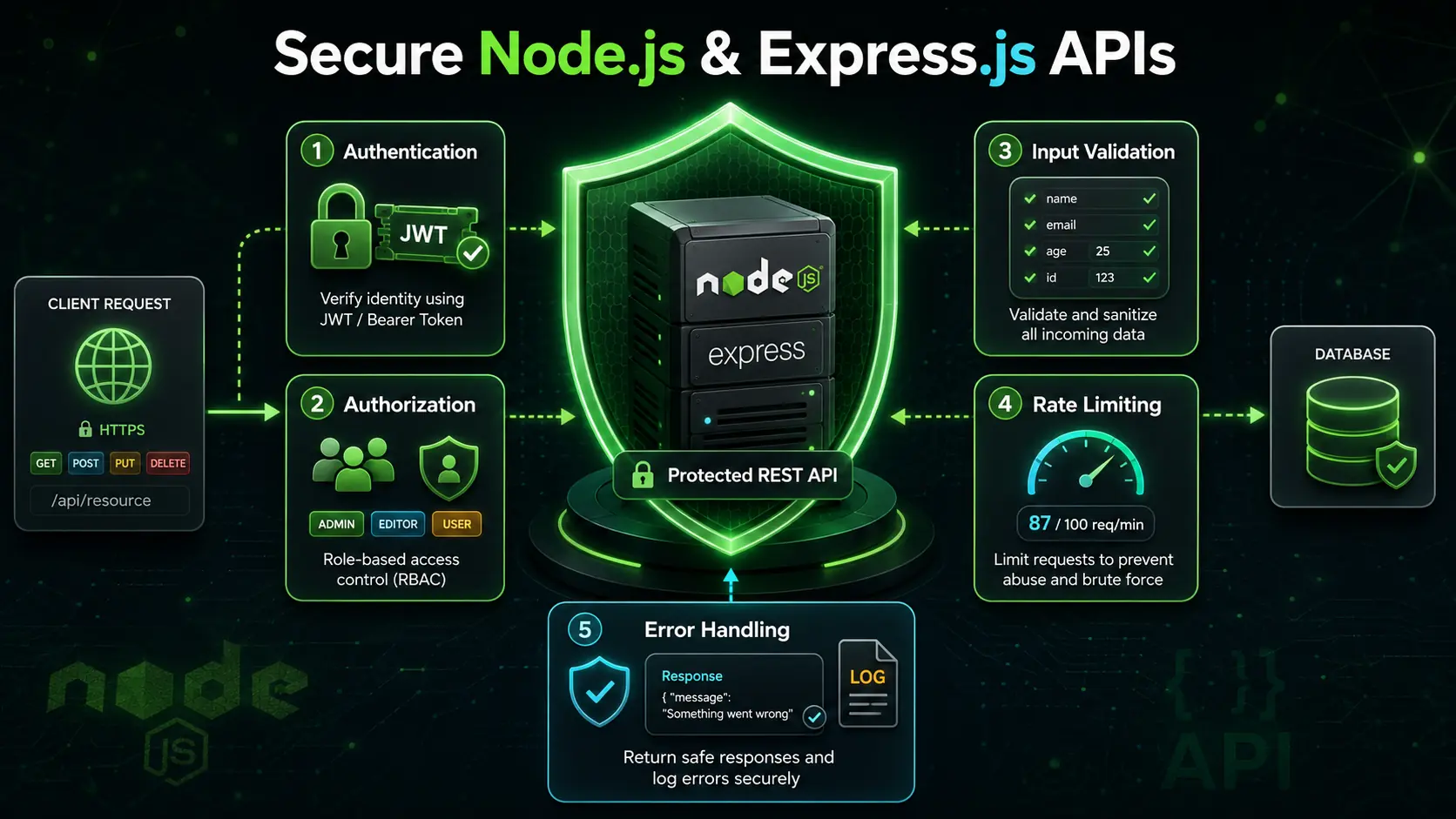
Authentication confirms who a user is. Authorization determines what that authenticated user is allowed to do.
A common token-based flow includes:
- The user submits login credentials.
- The server verifies the credentials.
- The server issues a token or creates a session.
- The client sends authentication information with future requests.
- Middleware verifies it before allowing access.
Passwords should never be stored in plain text. They should be processed using a secure password-hashing algorithm designed for password storage.
JSON Web Tokens are often used in APIs, but they must be implemented carefully. Applications should consider expiration, secret management, secure transmission, token storage, revocation strategy, and refresh flows.
A token should not contain sensitive information merely because its payload is encoded. A typical signed JWT provides integrity, not automatic confidentiality.
Input Validation and Sanitization
Never assume that client-provided data is safe or correct. Frontend validation improves the user experience, but the backend must validate every request independently.
Validation may verify:
- Required fields
- Data types
- String lengths
- Allowed formats
- Number ranges
- Enum values
- Object shapes
Sanitization can reduce risky or unwanted input, but it should be performed according to context. Data used in a database query, HTML page, shell command, or URL may require different protections.
Clear validation errors help legitimate clients correct their requests while preventing invalid information from reaching business logic.
Error Handling
A professional backend should handle predictable and unexpected errors consistently.
Errors may come from:
- Invalid input
- Missing records
- Database failures
- Authentication failures
- Permission checks
- External API calls
- Programming mistakes
Rather than placing repetitive error-response code in every route, applications can pass errors to centralized Express error-handling middleware.
Production responses should not expose stack traces, database details, file paths, tokens, or sensitive system information. Detailed errors can be logged internally while clients receive safe, useful messages.
Security Best Practices
Backend security is an important interview topic, even for freshers.
Basic Express security practices include:
- Validating request data
- Hashing passwords securely
- Protecting secrets
- Using HTTPS
- Restricting cross-origin requests appropriately
- Applying rate limits
- Limiting request body sizes
- Setting suitable security headers
- Avoiding injection vulnerabilities
- Updating dependencies
- Checking authorization on protected resources
- Avoiding sensitive data in logs
- Handling cookies securely
CORS is a browser-enforced access-control mechanism. It is not a complete security system and does not replace authentication or authorization.
Rate limiting can reduce abuse and automated attacks, but production systems may require shared storage so that limits work across multiple server instances.
CORS in Express.js
Cross-Origin Resource Sharing controls whether browser-based frontend code from one origin can access resources served by another origin.
An origin includes the scheme, hostname, and port. Therefore, two URLs can have different origins even if they look similar.
CORS configuration may control:
- Allowed origins
- Allowed methods
- Allowed headers
- Exposed headers
- Credential support
- Preflight behaviour
Allowing every origin may be acceptable for some public APIs, but authenticated applications should use a carefully considered configuration.
File Uploads and Static Files
Express can serve static files such as images, stylesheets, and documents. File upload handling is generally implemented using appropriate middleware or storage services.
When accepting uploaded files, validate:
- File size
- File type
- File name
- Storage location
- User permission
- Upload frequency
Do not rely only on a filename extension or client-provided MIME type. Uploaded files should be stored safely, and executable content should not be placed where it can run unexpectedly.
For scalable applications, files are often stored in object storage or a dedicated media service rather than directly on the application server.
Logging and Monitoring
Logs help developers understand what happened inside an application.
Useful logs may include:
- Request identifiers
- Request methods and paths
- Response status codes
- Error information
- Important business events
- Performance measurements
Avoid logging passwords, complete authentication tokens, payment information, or other sensitive data.
Production monitoring can track response times, error rates, resource use, application availability, and database performance. Logging and monitoring make it easier to diagnose failures after deployment.
Testing Express Applications
Testing helps ensure that API behaviour remains reliable as an application changes.
Common test categories include:
- Unit tests
- Integration tests
- End-to-end tests
A unit test checks a small function or service in isolation. An integration test verifies that multiple components work together. An end-to-end test follows a complete user or API workflow.
Separating business logic from route handlers makes testing easier. If every database query and rule is written directly inside the route, isolated testing becomes more difficult.
How Node.js and Express.js Work Together
Node.js provides the runtime and low-level capabilities needed to execute server-side JavaScript. Express.js provides convenient abstractions for routing, middleware, requests, and responses.
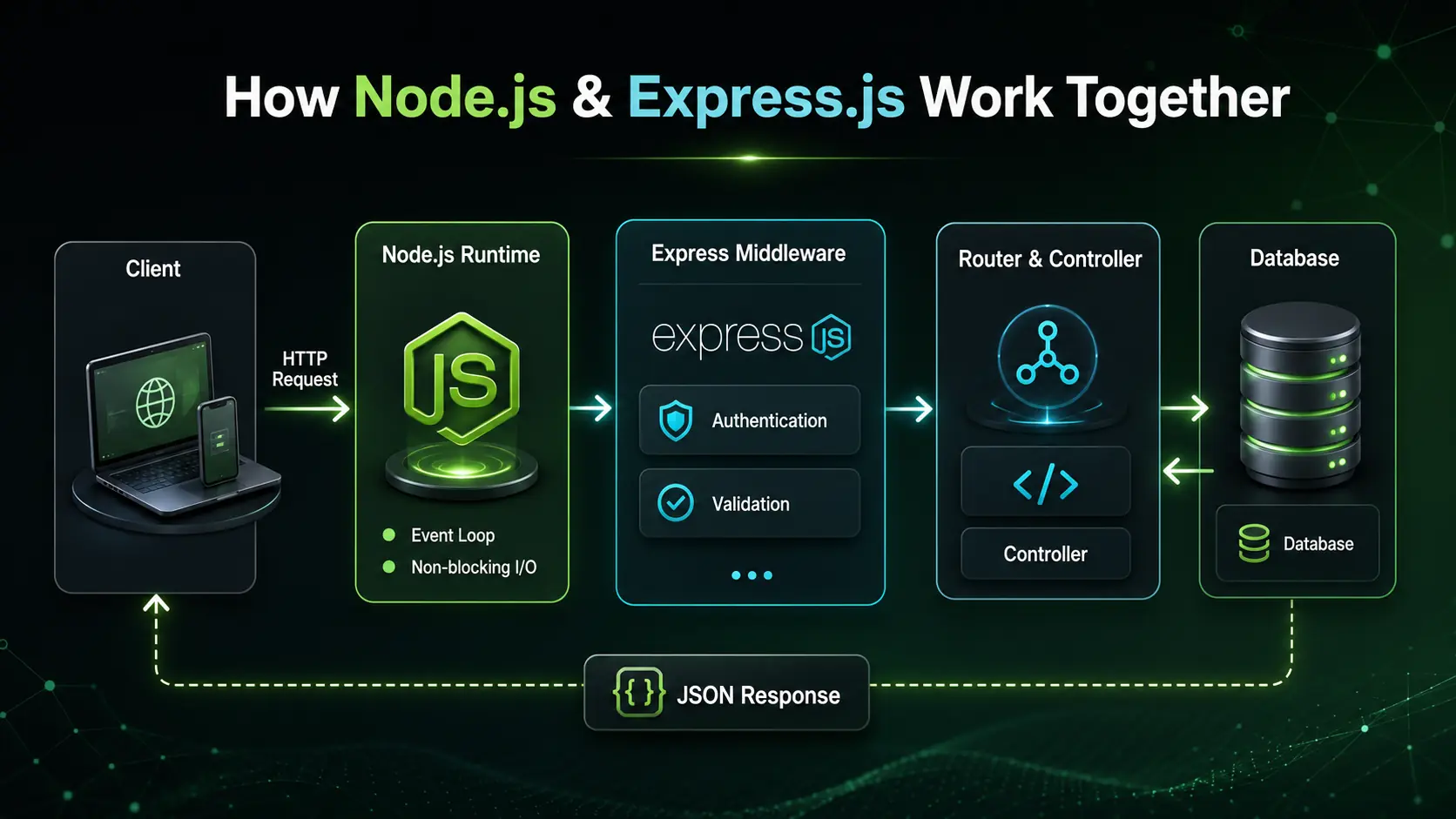
A typical request follows this flow:
- A client sends an HTTP request.
- Node.js receives the network request.
- Express processes registered middleware.
- The request reaches the matching route.
- A controller or service performs the required work.
- The application may communicate with a database.
- Express sends an HTTP response.
- Central error middleware handles failures when necessary.
Understanding this flow helps you debug issues and explain backend architecture during interviews.
Practical Projects You Should Build
Reading interview questions is helpful, but practical projects are necessary for deeper understanding.
Consider building:
- A notes CRUD API
- A task management API
- A blog backend
- A user authentication API
- A product and category API
- A URL shortener
- A file upload service
- A booking system backend
- A real-time chat server
- An expense tracker API
At minimum, your project should demonstrate:
- Organized routes
- Request validation
- Database operations
- Authentication
- Authorization
- Central error handling
- Environment configuration
- API documentation
- Basic security
- Deployment
A small, complete, well-explained project is often more useful in an interview than a large unfinished application.
How to Use the PDF for Interview Preparation
Divide the 100 questions into smaller groups instead of reading everything at once.
You can follow this order:
- Node.js fundamentals and the event loop
- Modules, NPM, files, buffers, and streams
- Express routing and middleware
- REST APIs and HTTP concepts
- Databases and CRUD operations
- Authentication and authorization
- Validation, security, and error handling
- Testing and deployment
For every question:
- Answer it without looking at the solution.
- Compare your response with the PDF.
- Write a small code example where appropriate.
- Test it in a local Node.js project.
- Explain it aloud in simple language.
- Review difficult questions again later.
This approach develops both technical knowledge and interview communication.
Common Preparation Mistakes
Avoid these mistakes while preparing:
- Learning Express without understanding Node.js
- Memorizing definitions without writing APIs
- Blocking the event loop with long synchronous operations
- Putting all backend logic in one file
- Ignoring rejected promises
- Sending multiple responses from one handler
- Trusting frontend validation
- Storing passwords in plain text
- Hardcoding secrets
- Confusing authentication with authorization
- Returning incorrect HTTP status codes
- Exposing internal error details
- Allowing unrestricted CORS without understanding it
- Skipping database indexes and pagination
- Not testing failure cases
- Claiming that Node.js is suitable for every workload
During an interview, explain both the advantages and limitations of a technology. Balanced answers demonstrate practical understanding.
Final Thoughts
Node.js and Express.js provide a powerful foundation for backend and full-stack JavaScript development. Node.js supplies the runtime, event-driven architecture, and system APIs, while Express simplifies routing, middleware, and HTTP application development.
The 100 Node.js and Express.js Interview Questions and Answers PDF can help freshers organize their preparation and revise the most important concepts in one place.
Use the PDF as a learning checklist rather than a script to memorize. Build APIs, test routes, handle errors, validate input, protect sensitive data, and practise explaining your design decisions.
Interviewers value candidates who understand the request lifecycle and can write clear, reliable backend code. Consistent practice with small projects will improve both your knowledge and confidence.
Frequently Asked Questions
1. Is this Node.js and Express.js interview PDF suitable for freshers?
Yes. The PDF is designed for students, beginners, and fresh graduates preparing for backend development, full-stack development, Node.js, Express.js, and MERN Stack interviews.
2. How many interview questions are included in the PDF?
The PDF contains 100 Node.js and Express.js interview questions with answers. It covers Node.js fundamentals, the event loop, modules, Express routing, middleware, databases, authentication, security, testing, and deployment.
3. Should I learn Node.js before Express.js?
Yes. Express.js runs on Node.js, so you should first understand Node.js fundamentals such as modules, asynchronous programming, the event loop, HTTP, files, streams, and environment variables.
4. Is this PDF useful for MERN Stack interviews?
Yes. Node.js and Express.js form the backend part of the MERN Stack. The PDF is useful for candidates preparing for APIs, MongoDB integration, authentication, middleware, and backend security questions.
5. Is reading interview questions enough to learn Node.js?
No. Interview questions are helpful for revision, but practical development is essential. Build at least one complete API that includes CRUD operations, validation, authentication, database integration, centralized error handling, and deployment.