
OWASP Top 10 Explained: The Most Critical Web Application Security Risks
Explore the OWASP Top 10:2025 with clear explanations, practical examples, and effective prevention strategies for the most critical web application security risks.

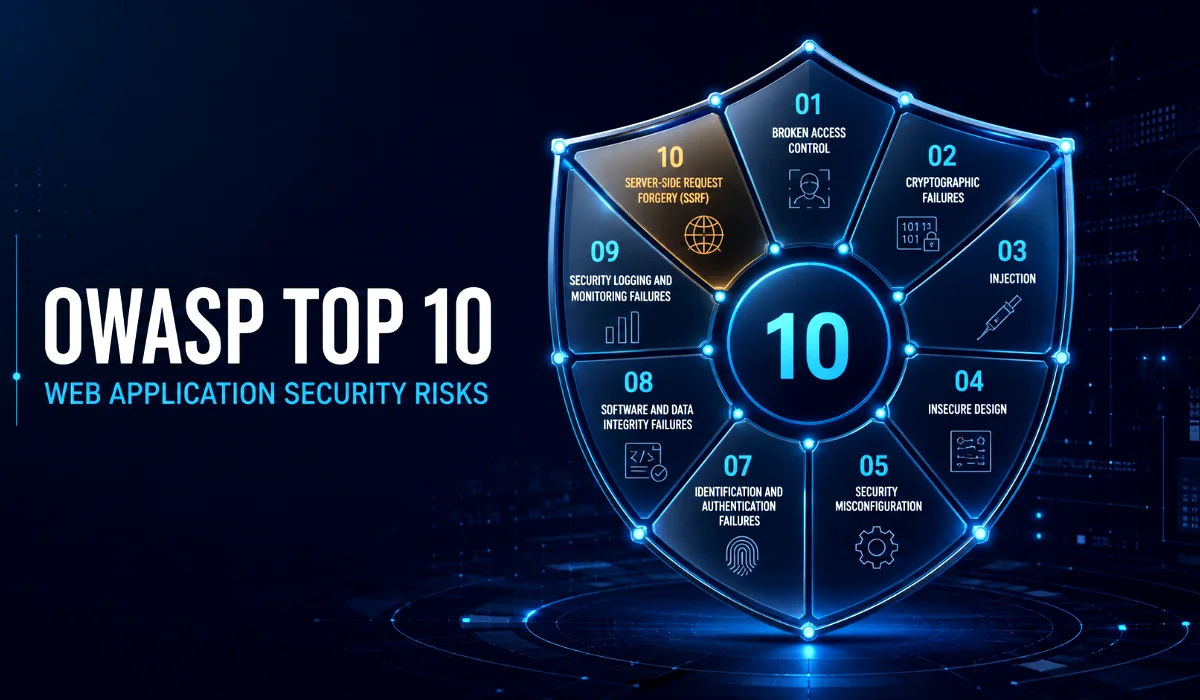
Table of Content
Table of Content
Modern web applications handle passwords, personal information, payment details, business documents, and countless other forms of sensitive data. When security is treated as an afterthought, even a small weakness can give an attacker access to information or functionality that should have remained protected.
The problem is not limited to poorly built websites. Security vulnerabilities can appear in applications created by experienced teams, especially when those applications depend on complex cloud infrastructure, third-party packages, APIs, automated deployment pipelines, and rapidly changing business requirements.
This is where the OWASP Top 10 becomes valuable.
The Open Worldwide Application Security Project, better known as OWASP, is a nonprofit foundation that produces freely available application-security resources. Its OWASP Top 10 is a widely recognized awareness document covering some of the most critical risks affecting web applications.
The latest released edition is the OWASP Top 10:2025. It contains important changes from the 2021 list, including a broader focus on software supply-chain security and a new category for mishandled exceptional conditions. The list is informed by contributed vulnerability data as well as input from the application-security community. It is intended to improve awareness not to act as a complete security standard or a substitute for an organization-specific risk assessment. OWASP describes the Top 10 as a starting point for improving secure development culture.
This guide explains every category in plain English, shows how the risks appear in real applications, and provides practical ways to reduce them.
What Is the OWASP Top 10?
The OWASP Top 10 is a ranked collection of broad application-security risk categories. Each category represents multiple related weaknesses rather than one individual vulnerability.
For example, “Injection” is not limited to SQL injection. It can include command injection, NoSQL injection, LDAP injection, and other situations in which untrusted input is interpreted as an instruction. Similarly, “Broken Access Control” includes several ways an application may allow users to access data or actions beyond their permissions.
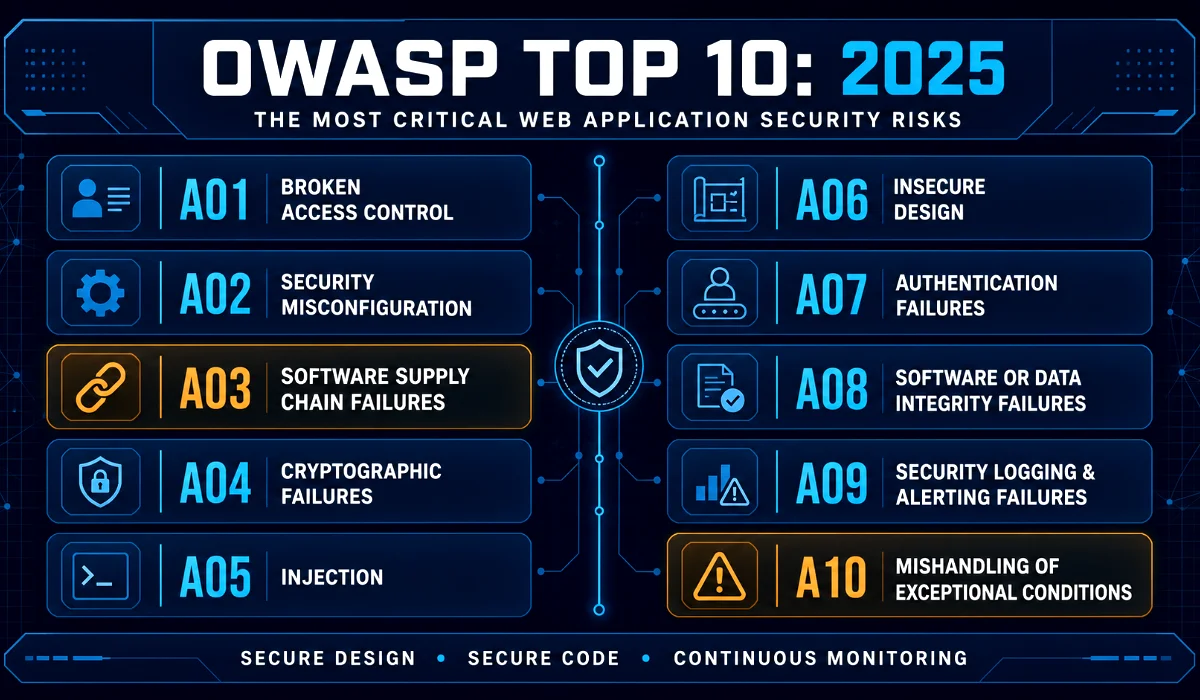
The 2025 edition contains the following categories:
- Broken Access Control
- Security Misconfiguration
- Software Supply Chain Failures
- Cryptographic Failures
- Injection
- Insecure Design
- Authentication Failures
- Software or Data Integrity Failures
- Security Logging and Alerting Failures
- Mishandling of Exceptional Conditions
OWASP’s methodology is data-informed rather than purely data-driven. Large-scale testing data can reveal commonly detected weaknesses, but it naturally looks backward and may underrepresent risks that existing tools cannot test reliably. OWASP therefore combines contributed data with a community survey and expert analysis. The 2025 edition maps 248 Common Weakness Enumerations, or CWEs, across its ten categories. The official introduction explains the methodology and changes in detail.
1. Broken Access Control
Access control determines what an authenticated or unauthenticated user is allowed to view, create, change, or delete. Broken access control occurs when the application fails to enforce those restrictions correctly.
Imagine an online banking application that displays an account using this URL:
example.com/accounts/5834
If a customer changes 5834 to 5835 and can see another person’s account, the application has an access-control vulnerability. The application may have correctly identified the logged-in customer, but it failed to verify whether that customer owned the requested account.
Other examples include:
- A normal user opening an administrator page by entering its URL directly.
- An API allowing a user to delete another customer’s record.
- A mobile application hiding a privileged button while leaving the underlying API unrestricted.
- A user changing a role or account identifier inside a request.
- An improperly configured CORS policy allowing an untrusted origin to interact with an API.
- A server fetching an attacker-controlled location without applying adequate restrictions, creating a server-side request forgery risk.
The most important lesson is that access control must be enforced on the trusted server side. Hiding links, disabling buttons, or checking permissions only in browser-side JavaScript does not protect the underlying function. Attackers can create requests without using the intended interface.
Applications should deny access by default, centralize authorization logic, enforce record ownership, follow the principle of least privilege, and test permissions for every sensitive action. Automated tests should confirm not only that authorized users can perform an action, but also that unauthorized users cannot.
OWASP kept Broken Access Control in the number-one position in 2025. It also incorporated Server-Side Request Forgery into this broader category. Read OWASP’s Broken Access Control guidance.
2. Security Misconfiguration
Applications are rarely made from application code alone. They run on operating systems, web servers, frameworks, databases, containers, cloud platforms, content delivery networks, and external services. A security mistake in any of those layers can expose the entire system.
Security misconfiguration may involve a default password, an unnecessary service, public cloud storage, detailed production error messages, excessive permissions, or a debugging feature left enabled after deployment.
Suppose a company deploys a storage bucket for customer documents. The application itself requires authentication, but the storage bucket is accidentally configured for public access. An attacker does not need to break the application’s login page. They can retrieve the files directly from the misconfigured storage service.
Configuration problems are dangerous because they often look harmless during development. A team enables a debug console to solve a temporary issue, opens a network port for testing, or grants a service broad permissions to make deployment easier. The temporary setting then survives into production.
Prevention begins with a repeatable hardening process. Teams should maintain secure configuration templates, remove unused components, replace default credentials, restrict cloud permissions, disable directory listings, and prevent detailed internal errors from reaching users. Development, testing, and production environments should follow the same security baseline while using separate credentials.
Configuration should also be treated as code. Store approved configuration in version control, review changes, scan infrastructure definitions, and automatically check deployed environments for drift. Manual checklists are useful, but automation provides more consistent coverage.
Security Misconfiguration moved from fifth place in 2021 to second place in 2025, reflecting how heavily modern applications depend on configurable infrastructure. See OWASP’s Security Misconfiguration guidance.
3. Software Supply Chain Failures
Most development teams do not write every line of their software. They use open-source libraries, container images, frameworks, build tools, package registries, integrated development environment extensions, and hosted services.
That improves productivity, but it also expands the application’s trust boundary.
A software supply-chain failure happens when some part of the process used to build, distribute, update, or operate software is vulnerable or compromised. The risk is broader than simply running an outdated library.
For example, an attacker could:
- Compromise a legitimate package and publish a malicious update.
- Upload a package with a name similar to a popular dependency.
- Steal credentials for a build or package-distribution service.
- Modify an artifact after it has passed security testing.
- Exploit an unsupported framework used by the application.
- Compromise a developer tool or extension.
- Insert malicious code into an insecure CI/CD pipeline.
Organizations should know exactly what components their applications contain. A Software Bill of Materials can help create that inventory, although an inventory is useful only when someone monitors and acts on it.
Dependencies should come from trusted sources, use controlled versions, and be checked for known vulnerabilities. Development and build systems need strong access controls, multifactor authentication, protected branches, peer review, and separation of duties. Production releases should be reproducible and traceable to reviewed source code.
Teams also need a realistic update process. Automatically upgrading every dependency without testing may introduce instability, while delaying every update for months creates an unnecessary exposure window. A risk-based process should prioritize actively exploited or high-impact vulnerabilities, test updates quickly, and document accepted exceptions.
The 2025 category expands the older “Vulnerable and Outdated Components” concept to cover the wider software ecosystem. It ranked first in OWASP’s community survey, demonstrating how seriously practitioners view this risk. Read OWASP’s Software Supply Chain Failures guidance.
4. Cryptographic Failures
Cryptographic failures occur when sensitive information is insufficiently protected in storage or transit. They can result from missing encryption, weak algorithms, leaked keys, predictable random values, poor certificate validation, or incorrect implementation.
A common example is an application that sends login credentials over an unencrypted connection. Anyone able to observe the network traffic may capture the username and password. Another example is storing passwords with a fast, general-purpose hash rather than a password-hashing algorithm designed to resist offline guessing.
Cryptography can fail even when encryption is technically present. An application might use an obsolete algorithm, reuse initialization values, generate reset tokens with a predictable random-number generator, or keep an encryption key beside the encrypted database. In the last case, an attacker who steals the database may steal the key at the same time.
The first step is data classification. Teams need to know which information is sensitive, where it is stored, where it travels, who can access it, and how long it must be retained. Collecting less sensitive data and deleting it when no longer required reduces exposure.
All external traffic should use properly configured transport encryption. Sensitive data at rest should be encrypted where appropriate, and passwords should be processed using a modern, adaptive password-hashing function with individual salts. Keys must be generated securely, stored separately from protected data, rotated under a defined policy, and accessible only to authorized identities.
Developers should use established cryptographic libraries and platform services. Designing a custom encryption scheme is almost always an unnecessary and dangerous experiment. See OWASP’s Cryptographic Failures guidance.
5. Injection
Injection happens when an application sends untrusted data to an interpreter and that data is treated as part of a command rather than ordinary input.
SQL injection is the best-known example. Consider an application that creates a database query by joining user input directly into a string. An attacker may submit specially constructed input that changes the meaning of the query, potentially reading private records, modifying data, or bypassing authentication.
The same underlying problem can affect many technologies:
- SQL and NoSQL databases
- Operating-system commands
- LDAP directories
- Template engines
- Browser-rendered HTML and JavaScript
- Object-relational mapping queries
- Expression languages
Cross-site scripting, or XSS, belongs to this category because untrusted content can be interpreted as active browser code. Although an individual XSS vulnerability may have a different impact from SQL or command injection, the underlying trust mistake is similar.
The strongest defense is to keep instructions and data separate. Database access should use parameterized queries or safe prepared statements. Operating-system commands should be avoided when a direct library or platform API is available. Output must be encoded for its destination context, because HTML, JavaScript, CSS, URLs, and SQL each have different rules.
Input validation is still valuable, especially when the application can define an allowlist of acceptable values. However, validation alone should not replace parameterization or context-aware output encoding.
Security testing should cover every input channel not only visible form fields. Headers, cookies, URL parameters, JSON properties, file uploads, and API requests can all carry hostile content. Source-code review, automated scanning, and fuzz testing work best when used together. Read OWASP’s Injection guidance.
6. Insecure Design
Insecure Design is fundamentally different from an implementation bug. An implementation bug means the team designed a secure control but built it incorrectly. Insecure design means the necessary control was missing or unsuitable from the beginning.
Consider a password-recovery process that asks users for their date of birth and mother’s maiden name. Developers could implement that process exactly as specified, yet it would remain insecure because the underlying design relies on information that attackers may discover.
Business-logic abuse often belongs here. An e-commerce platform may validate every request correctly but allow the same discount coupon to be redeemed repeatedly. A booking platform may let users reserve valuable inventory indefinitely without payment. A financial application may process a transaction without imposing a sensible amount or frequency limit.
These problems cannot always be found by scanning source code for known patterns. They require teams to understand how attackers might misuse legitimate features.
Threat modeling should therefore begin while requirements and architecture are still being discussed. Teams should identify sensitive assets, trust boundaries, attacker goals, possible abuse cases, and the security assumptions behind important workflows.
Secure design also requires realistic limits. Ask what should happen when a user performs an action 1,000 times, changes the order of workflow steps, submits an unexpected file type, or calls an internal operation directly. These questions reveal weaknesses before code makes them expensive to correct.
Reference architectures and proven security patterns help, but they must reflect the application’s actual business risks. See OWASP’s Insecure Design guidance.
7. Authentication Failures
Authentication answers the question, “Who is this user?” Authentication failure occurs when an attacker can convince the application to treat them as someone they are not.
Common causes include weak passwords, credential stuffing, unlimited login attempts, insecure account recovery, predictable session identifiers, hard-coded credentials, session fixation, and a failure to invalidate sessions after logout.
Credential stuffing is especially important because users frequently reuse passwords. Attackers take credentials leaked from one service and automatically try them on others. An application may have no database breach of its own and still suffer account takeovers.
Multifactor authentication provides one of the strongest defenses, particularly for administrators and sensitive operations. Applications should also detect automated login behavior, reject commonly breached passwords, use secure password storage, and provide recovery flows that do not depend on easily researched personal questions.
Session security matters after login. Session identifiers should be unpredictable, protected with appropriate cookie attributes, rotated after authentication, and invalidated when the session ends. Sensitive changes such as replacing an email address, adding a payment recipient, or disabling multifactor authentication may require the user to authenticate again.
Error messages should not reveal whether a particular account exists. At the same time, security should not make the experience unnecessarily frustrating. Rate limiting, risk-based checks, and modern authentication standards can provide protection without forcing every legitimate user through an obstacle course. Read OWASP’s Authentication Failures guidance.
8. Software or Data Integrity Failures
Integrity means being able to trust that software or data has not been changed in an unauthorized way. This category covers applications that assume code, updates, serialized objects, plugins, or other critical data are trustworthy without verifying them.
An auto-update feature provides a simple example. If an application downloads and installs an update without checking a cryptographic signature, an attacker who controls the download channel may replace the legitimate update with malicious code.
Insecure deserialization is another example. An application may convert an object into a format that can be stored or transmitted. If a user can modify that serialized content and the application later rebuilds or executes it without adequate validation, the attacker may alter application state or trigger dangerous behavior.
This category overlaps with supply-chain security, but its focus is narrower. Supply-chain failures address broader compromises across dependencies, build systems, and distribution infrastructure. Software or Data Integrity Failures focus on situations where a specific code or data artifact crosses a trust boundary without sufficient verification.
Organizations should verify digital signatures, checksums, and provenance before accepting critical artifacts. CI/CD pipelines should retrieve dependencies from controlled repositories and ensure that the artifact released to production is the same artifact that passed testing.
Applications should also avoid accepting serialized objects from untrusted users. Prefer simple data formats with strict schemas, allow only expected fields and types, and protect sensitive state from client-side modification. See OWASP’s Software or Data Integrity Failures guidance.
9. Security Logging and Alerting Failures
Preventing every attack is unrealistic. Organizations also need to detect suspicious behavior, investigate incidents, and respond before the damage grows.
Logging failures occur when important events are not recorded, records lack useful context, logs can be altered, or sensitive information is written into them. Alerting failures occur when suspicious events are technically logged but nobody is notified in time to act.
For example, an application might record 10,000 failed login attempts from one source but generate no alert. The data exists, yet the organization gains little protection from it. OWASP’s 2025 wording explicitly emphasizes alerting because logs without a response process offer limited defensive value.
Applications should record authentication events, authorization failures, administrative changes, high-value transactions, input-validation failures, and other security-relevant activity. A useful event generally answers what happened, when it happened, where it originated, which account or component was involved, and whether the action succeeded.
Logs must not contain passwords, full payment details, raw session tokens, cryptographic keys, or unnecessary personal information. They should be centrally collected, protected from tampering, retained for an appropriate period, and synchronized to a reliable time source.
Alerts require ownership and testing. The team should know who receives an alert, how quickly it must be reviewed, and what action follows. Run incident exercises to confirm that the process works outside a written policy. Read OWASP’s Security Logging and Alerting Failures guidance.
10. Mishandling of Exceptional Conditions
Mishandling of Exceptional Conditions is new in the 2025 edition. It covers situations in which software fails to prevent, detect, or respond safely to unusual conditions.
Those conditions can include missing parameters, failed network requests, insufficient privileges, unavailable dependencies, unexpected data types, memory pressure, null values, timeouts, and conflicting state changes.
The most dangerous behavior is often “failing open.” Suppose an authorization service becomes unavailable. A secure system should normally deny the sensitive request or move it into a controlled recovery state. If the application allows the request because it could not confirm the restriction, an operational problem has become a security bypass.
Poor exception handling can also expose stack traces, internal file paths, database details, or component versions. Inconsistent handling may leave a transaction partially completed: money is deducted but not credited, inventory is reserved without an order, or a permission change is applied to one service but not another.
Applications should validate input early and handle errors close to their source. Security-sensitive operations must fail securely and return predictable, sanitized responses. Transactions should be atomic where possible, while distributed operations need compensating actions, idempotency controls, and clear recovery states.
Teams should deliberately test adverse conditions. Disconnect a dependency, submit incomplete requests, force a timeout, repeat an operation, exhaust a quota, and observe whether the system remains secure. Happy-path testing alone will not reveal how the application behaves when reality becomes inconvenient. See OWASP’s Mishandling of Exceptional Conditions guidance.
How to Use the OWASP Top 10 in a Real Security Program
Reading the list is helpful, but security improves only when the information changes how software is designed, built, tested, and operated.
Start by mapping each category to your application. Identify which controls already exist, who owns them, and how their effectiveness is verified. Avoid marking an item complete simply because a security feature is present. A login page does not prove authentication is secure, and an authorization library does not prove every endpoint uses it correctly.
Next, include security throughout the development lifecycle:
- Define security and privacy requirements before development begins.
- Perform threat modeling for important features and architectural changes.
- Give developers practical secure-coding guidance for the languages and frameworks they use.
- Review sensitive code and configuration changes.
- Scan dependencies, secrets, infrastructure definitions, and application code.
- Perform dynamic and manual testing against running applications.
- Test authorization using multiple user roles.
- Monitor production behavior and rehearse incident response.
- Track findings to verified remediation rather than merely creating reports.
Do not treat the Top 10 as a complete compliance checklist. A business may face important risks that are not included in a general list of ten categories. Denial of service, fraud, privacy misuse, account abuse, insecure APIs, and organization-specific business-logic attacks may require additional attention.
Risk must also be evaluated in context. The same technical weakness can have very different consequences in a public information website and a healthcare system. OWASP explicitly notes that threat actors, exposure, and business impact vary by organization, even when the underlying software is identical. OWASP’s application-risk guidance explains this contextual approach.
Final Thoughts
The OWASP Top 10 is valuable because it gives developers, security professionals, product owners, and business leaders a shared language. It turns a complicated security landscape into ten understandable areas where teams can begin asking better questions.
Its biggest lesson is that web security is not one feature or one testing tool. It is a continuous discipline involving architecture, code, configuration, dependencies, identity, monitoring, and operational response.
Teams should use the OWASP Top 10 as a practical starting point, then expand their program according to their own technology, users, data, and business impact. The goal is not simply to say that an application “passes OWASP.” The real goal is to build software that remains trustworthy when someone intentionally tries to make it behave in ways its creators never intended.
Frequently Asked Questions
1. What does OWASP stand for?
OWASP stands for the Open Worldwide Application Security Project. It is a nonprofit foundation and global community that creates open resources for improving software security. Its projects include the OWASP Top 10, testing guides, cheat sheets, verification standards, and other educational materials.
2. Is the OWASP Top 10 a security standard?
The OWASP Top 10 is primarily an awareness document, not a complete certification or security standard. It helps organizations recognize critical web application risks and improve secure-development practices. Teams needing detailed, testable security requirements can complement it with resources such as the OWASP Application Security Verification Standard.
3. What is the latest version of the OWASP Top 10?
The latest released version is the OWASP Top 10:2025. It replaced the 2021 edition and introduced significant changes, including Software Supply Chain Failures as a broader category and the new Mishandling of Exceptional Conditions category.
4. Does fixing the OWASP Top 10 make an application completely secure?
No. Addressing the OWASP Top 10 can reduce many important risks, but no general list can cover every vulnerability, business-logic flaw, operational weakness, or organization-specific threat. Applications still require threat modeling, secure design, code review, configuration management, penetration testing, monitoring, and continuous risk assessment.
5. Who should learn the OWASP Top 10?
Developers, security engineers, software architects, testers, DevOps professionals, product managers, and technical leaders can all benefit from it. Developers need to understand how vulnerabilities enter code, while product and business teams need to understand how design decisions, deadlines, and operational processes influence security.