
What Is Burp Suite? How to Use It and Why It Is Useful for Cybersecurity Experts
Learn what Burp Suite is, how it works, how cybersecurity professionals use Burp Proxy, Repeater, Intruder and other tools, and how beginners can safely start web application security testing.

Table of Content
Table of Content
What Is Burp Suite? How to Use It and Why It Is Useful for Cybersecurity Experts
Web applications have become a major part of everyday life. We use websites and web-based applications for banking, shopping, education, healthcare, business operations, social networking, communication, and many other activities.
Because so much sensitive information moves through web applications, they are also attractive targets for cybercriminals.
A small vulnerability in a login page, API endpoint, payment workflow, access-control system, or user input field can sometimes expose sensitive data or allow an attacker to perform actions they should not be able to perform.
This is why security professionals test web applications before malicious attackers find those weaknesses.
One of the most popular tools used for this purpose is Burp Suite.
Burp Suite is not simply a vulnerability scanner. It is an entire toolkit that helps security professionals understand what is happening between a browser and a web application. It allows testers to intercept requests, inspect them, modify them, resend them, compare responses, automate certain tests, and investigate suspicious application behavior.
PortSwigger, the company behind Burp Suite, describes it as a comprehensive suite of tools for web application security testing. Its different tools are designed to work together during a penetration-testing workflow.
If you are learning ethical hacking, penetration testing, application security, bug bounty hunting, API security, or web security, understanding Burp Suite can become one of the most valuable skills in your cybersecurity journey.
In this guide, we will understand what Burp Suite is, how it works, how beginners can start using it, its major tools, real-world applications, limitations, and why cybersecurity professionals rely on it.
What Is Burp Suite?
Burp Suite is a web application security testing platform developed by PortSwigger.
It allows security testers to inspect and manipulate the communication between a browser or client application and a web server.
Imagine that you open a website and submit a login form.
Normally, the process looks something like this:
Browser → HTTP Request → Web Server → HTTP Response → Browser
Your browser creates an HTTP request containing information such as:
- URL
- HTTP method
- Cookies
- Headers
- Authentication information
- Form values
- API parameters
The server processes the request and returns a response.
Normally, this entire communication happens in the background.
Burp Suite can sit between the browser and server as an intercepting proxy.
The workflow then becomes:
Browser → Burp Suite → Web Server
and:
Web Server → Burp Suite → Browser
This allows the security tester to see exactly what information is being exchanged.
More importantly, the tester can modify the request before sending it to the server.
That capability is extremely useful when investigating security weaknesses.
For example, a website may display only certain actions to normal users. A security professional can inspect the underlying HTTP requests to understand whether the server itself correctly enforces those restrictions.
This ability to observe the application at the HTTP level is one of the main reasons Burp Suite is so useful.
Who Developed Burp Suite?
Burp Suite is developed by PortSwigger, a company focused heavily on web application security.
PortSwigger also operates the Web Security Academy, which provides intentionally vulnerable laboratories where students can legally practice web security techniques.
The official Burp Suite documentation describes it as a complete environment containing multiple tools that work together during security testing.
Instead of switching between several unrelated programs, security testers can perform many important activities from one interface.
Why Is Burp Suite Important?
Modern websites are much more complicated than simple HTML pages.
Today, applications may contain:
- REST APIs
- GraphQL APIs
- Authentication systems
- Single sign-on
- JavaScript-heavy frontends
- Cloud services
- Microservices
- WebSockets
- Payment integrations
- File uploads
- User-generated content
- Third-party integrations
- Complex role-based permissions
Testing these systems requires more than clicking around a website.
Security professionals need visibility into how applications communicate.
Burp Suite provides that visibility.
Instead of seeing only the visual interface of a website, you can inspect what is happening behind it.
For example, a webpage might show:
Product Price: $100
but the HTTP request could contain parameters such as:
productId=154
quantity=1
A security tester can inspect how the application processes these parameters and determine whether important values are properly validated on the server.
The goal is not simply to change random parameters.
The real purpose is to answer questions such as:
- Does the server trust information supplied by the browser?
- Are authorization checks performed correctly?
- Are inputs properly validated?
- Can one user access another user's resources?
- Are session cookies protected?
- Does an API expose unnecessary information?
- Can unexpected input break application logic?
Burp Suite makes answering these questions much easier.
How Does Burp Suite Work?
The central concept behind Burp Suite is its proxy.
The Burp Proxy acts as an intermediary between your browser and the target web application.
Suppose you click:
View Profile
Your browser may generate a request similar to:
GET /profile HTTP/1.1
Host: example.test
Cookie: session=example-session-value
Without Burp Suite, the browser sends that directly to the server.
With Burp configured as a proxy, Burp receives it first.
The tester can then:
- Read the request
- Examine headers
- Inspect cookies
- Study parameters
- Send it unchanged
- Modify certain values
- Save it for later analysis
- Send it to another Burp tool
This creates one of the most important workflows in web penetration testing:
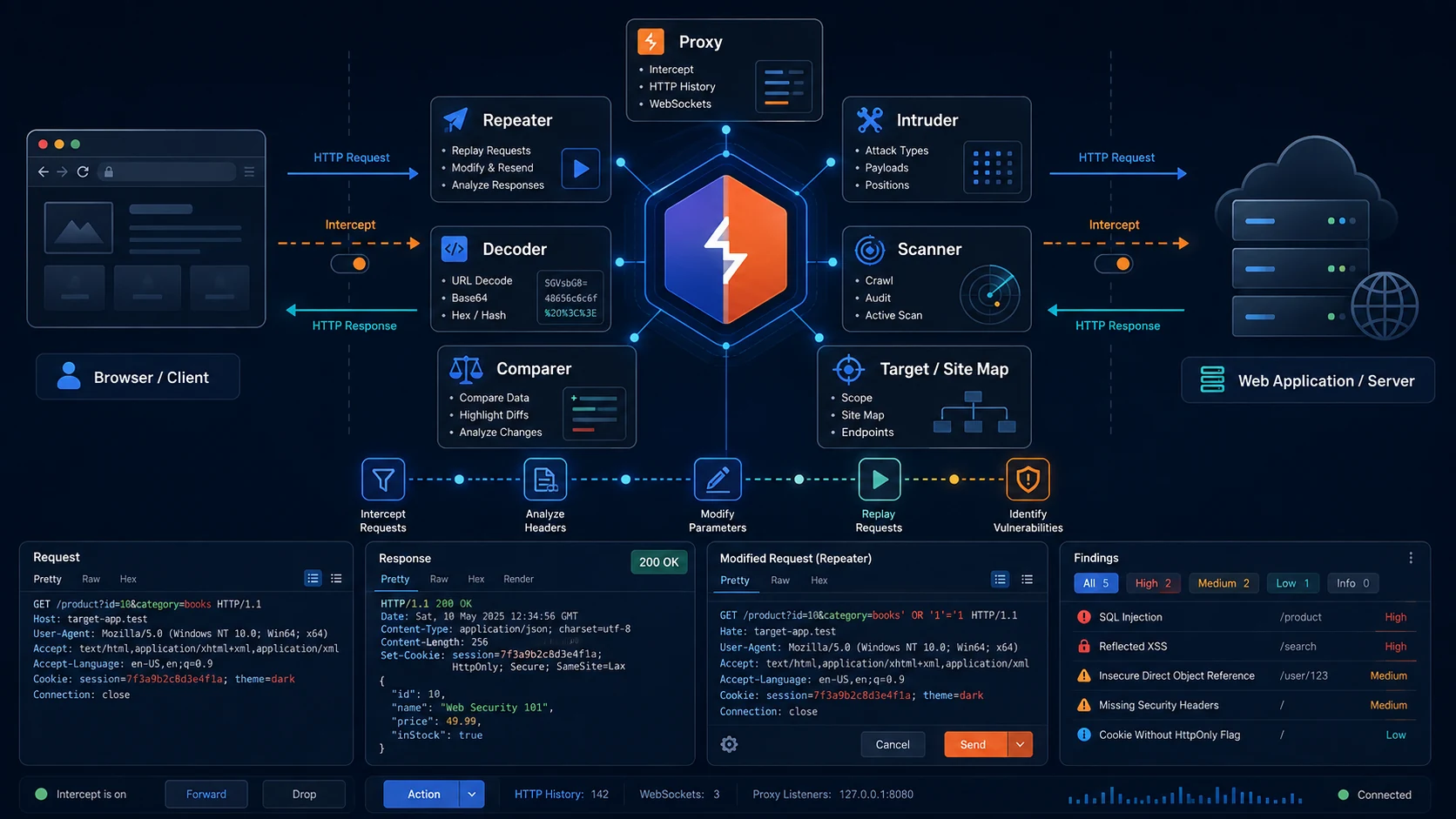
Intercept → Inspect → Modify → Replay → Compare → Validate
Burp Suite becomes valuable because each stage can reveal something different about an application's security.
Burp Suite Editions
Burp Suite is available in different editions designed for different types of users.
Burp Suite Community Edition
Burp Suite Community Edition is the free version.
PortSwigger describes Community Edition as an essential manual toolkit designed for learning and hands-on web security testing.
It is excellent for:
- Students
- Cybersecurity beginners
- Developers learning web security
- Manual vulnerability testing
- Web Security Academy labs
- Understanding HTTP requests
- Learning Burp Proxy
- Learning Burp Repeater
If you are just starting, Community Edition is usually enough to understand the important concepts.
Burp Suite Professional
Burp Suite Professional is intended primarily for professional security testing.
It expands the manual toolkit with advanced capabilities designed to improve testing speed, automation, analysis, and vulnerability discovery. PortSwigger positions Professional as its toolkit for penetration testers and hands-on security professionals.
One major Professional capability is Burp Scanner, which helps automate portions of web vulnerability discovery.
However, professional security testing still requires human knowledge.
A scanner may identify suspicious behavior, but an experienced security professional needs to understand whether the behavior represents a genuine security risk and what its real-world impact might be.
Important Burp Suite Tools
Burp Suite contains multiple tools, and understanding how they work together is more important than memorizing their names.
1. Burp Proxy
Burp Proxy is usually where beginners first experience the real power of Burp Suite.
It allows you to intercept HTTP traffic between your browser and web application.
You can inspect things such as:
- Request methods
- URLs
- Query parameters
- POST body parameters
- JSON data
- Cookies
- Authentication headers
- Response headers
- Server responses
Proxy is especially useful for understanding exactly what an application sends behind the scenes.
For example, a modern React, Next.js, Angular, or Vue application may make dozens of API calls without displaying them to the user.
Burp can help reveal those requests.
2. Burp Repeater
Burp Repeater is one of the most useful tools for manual penetration testing.
PortSwigger defines Repeater as a tool that lets testers repeatedly modify and send HTTP or WebSocket messages.
Suppose you capture an interesting request.
Instead of performing the same action through the website interface again and again, you can send that request to Repeater.
You can then change one part of the request and send it again.
For example:
Original request:
GET /account/profile?id=100
You might modify the request inside an authorized training environment to understand how the server validates the parameter.
Repeater then shows the new server response.
This is extremely valuable because you can experiment with one variable at a time.
A professional tester might ask:
- What happens if this parameter is removed?
- Does changing its format produce an error?
- Is validation performed on the client or server?
- Does the response change depending on the authenticated account?
- Does the application expose unnecessary information?
Repeater gives you precise manual control over that process.
3. Burp Intruder
Burp Intruder helps automate repetitive testing.
PortSwigger describes Intruder as a tool capable of repeatedly sending a request while inserting different payload values into selected positions.
This makes it useful for controlled fuzzing and other repetitive security-testing tasks.
For example, imagine an authorized laboratory application containing:
/item?id=1
Instead of manually testing many possible input values, Intruder can systematically send variations while you analyze how the server responds.
PortSwigger specifically documents fuzzing as one of Intruder's uses, where testers can look for unusual responses, exceptions, or error messages triggered by different inputs.
Intruder should only be used against systems you own or have explicit authorization to test because automated requests can generate significant traffic.
4. Burp Scanner
Burp Scanner is available with Burp Suite Professional and helps automatically analyze applications for potential security vulnerabilities.
Automated scanning can save time, especially on large applications.
However, scanning should not replace manual testing.
Some of the most serious security problems involve business logic.
Consider a hypothetical e-commerce system that accidentally allows a normal customer to approve their own refund.
The application may not contain obvious malicious code.
Technically, every individual request could appear valid.
The vulnerability exists because the workflow itself is logically insecure.
Human testers are often much better at discovering these types of problems.
This is why professional penetration testing usually combines automation with manual investigation.
5. Target and Site Map
As you browse an application through Burp, it can build a picture of the application's structure.
This helps testers understand:
- Pages
- API endpoints
- Parameters
- Resources
- Application paths
- Different hosts
- Authentication-related endpoints
Application mapping is important because you cannot properly test something you do not understand.
Large applications may contain hundreds or thousands of endpoints.
Having an organized view helps security professionals identify interesting areas for deeper testing.
6. Decoder
Security testers regularly encounter encoded data.
For example:
hello%20world
or Base64-encoded values.
Burp Decoder helps transform data between different representations.
This can be useful when trying to understand:
- URL encoding
- Base64
- Hexadecimal data
- Encoded parameters
- Application-generated values
Encoding is not the same thing as encryption.
Being able to quickly recognize and decode common formats makes HTTP traffic easier to analyze.
7. Comparer
Sometimes two requests or responses look almost identical.
The important difference may be hidden inside hundreds of lines of data.
Burp Comparer helps identify those differences.
Imagine testing two accounts:
User A
User B
You request the same endpoint while authenticated as each user.
The responses might be nearly identical except for certain permissions, identifiers, tokens, or returned objects.
Comparing them can help reveal important clues.
8. Sequencer
Session tokens and other security-sensitive values should generally be difficult to predict.
Burp Sequencer helps security professionals analyze the randomness and characteristics of tokens produced by applications.
This can be relevant when evaluating things such as session management.
A good security tester does not simply check whether a session token exists.
They also consider how that token is generated, protected, invalidated, and used.
9. Logger and Other Analysis Features
Modern security testing often produces huge numbers of requests.
Being able to review historical traffic makes investigation easier.
Burp provides logging and message-analysis functionality that can help testers return to earlier requests, search traffic, and investigate interesting behavior. PortSwigger's current Professional feature set includes tooling for message analysis, logging, custom configurations, project files, and other workflow improvements.
How to Use Burp Suite for Beginners
The best way to learn Burp Suite is not by testing random websites.
Use a deliberately vulnerable training environment such as PortSwigger Web Security Academy or an application you own.
PortSwigger itself uses Web Security Academy labs in its official Burp getting-started tutorial.
Here is a beginner-friendly workflow.
Step 1: Install Burp Suite
Download Burp Suite from PortSwigger.
Community Edition is enough for learning manual web security testing.
PortSwigger provides installers for Community and Professional editions, and its current installation documentation walks users through launching Burp and starting a project.
Step 2: Launch Burp Suite
Open Burp Suite.
For beginner practice, you can start with the default settings.
Do not worry about configuring every option.
Learning Burp becomes much easier when you understand one tool at a time.
Step 3: Open Burp's Browser
Burp includes an embedded browser that is already configured to work with the proxy.
Using it avoids many proxy-configuration problems beginners experience.
Open your authorized training application inside this browser.
Step 4: Turn Intercept On
Go to the Proxy section.
Enable request interception.
Now perform an action inside the training website.
For example:
Open a product page.
Burp should capture the request before it reaches the application.
Read it carefully.
Try identifying:
- HTTP method
- Host
- Path
- Query string
- Cookies
- Headers
- Request body
Do not immediately start changing things.
First understand what you are looking at.
That habit is extremely important in cybersecurity.
Step 5: Forward the Request
After inspecting the request, forward it.
The browser receives the resulting response and continues working normally.
Repeat this process with several normal actions.
For example:
- Login
- Logout
- Search
- Open profile
- Add an item
- Change account settings
This teaches you how user actions translate into HTTP requests.
Send an Interesting Request to Repeater
Once you find an interesting request, send it to Burp Repeater.
Now you can resend the request without repeating the action through the browser.
Change one safe parameter inside your lab environment and observe the response.
For example, test how the server behaves when:
- An optional parameter is removed
- A value is empty
- A data type changes
- A harmless unexpected value is supplied
- The same request is sent multiple times
This is where web security starts becoming much more interesting.
You stop seeing the website purely as buttons and pages.
You begin seeing it as a collection of requests, responses, states, permissions, and trust relationships.
A Practical Burp Suite Testing Workflow
Professional security testing rarely looks like:
Open scanner → Click scan → Finished
A more realistic workflow is:
1. Understand the Application
Explore the application normally.
Identify:
- User roles
- Login systems
- Important workflows
- Sensitive functionality
- API endpoints
- Forms
- Upload functionality
- Administrative features
2. Capture Traffic
Use Burp Proxy to observe requests generated by each feature.
3. Map the Attack Surface
Identify endpoints and parameters that may require additional testing.
4. Select Interesting Requests
Send selected requests to Repeater.
5. Modify One Variable
Change one aspect of the request.
This makes differences easier to understand.
6. Compare Responses
Look at:
- HTTP status
- Response length
- Error messages
- Redirects
- Returned JSON
- Headers
- Application behavior
7. Form a Security Hypothesis
For example:
"The application may be checking permissions only in the frontend."
8. Test the Hypothesis
Use controlled requests inside your authorized environment.
9. Validate the Finding
A security finding should be repeatable.
Professional testers need evidence demonstrating that the behavior genuinely creates a security problem.
10. Report the Vulnerability
Explain:
- What the issue is
- Where it occurs
- Why it matters
- What impact it may have
- How developers can fix it
This is the difference between simply using hacking tools and performing professional security testing.
What Vulnerabilities Can Burp Suite Help Test?
Burp Suite can assist with investigating many categories of web application vulnerabilities.
Examples include:
- Broken access control
- Authentication weaknesses
- Session-management problems
- SQL injection
- Cross-site scripting
- Cross-site request forgery
- Server-side request forgery
- File upload vulnerabilities
- Path traversal
- Command injection
- Information disclosure
- Business logic vulnerabilities
- API authorization problems
- HTTP-related security issues
- WebSocket security weaknesses
Burp does not magically discover every vulnerability.
Instead, it provides visibility and control.
The security professional provides the reasoning.
That distinction is important.
Burp Suite for API Security Testing
Modern applications depend heavily on APIs.
Consider a frontend application requesting:
GET /api/profile
Another request might look like:
POST /api/orders
A third might be:
PATCH /api/account/settings
Burp can intercept these requests even if the API calls happen silently in the browser.
You can inspect:
Authorization: Bearer ...
JSON request bodies:
{
"name": "Test User",
"email": "user@example.test"
}
and JSON responses.
This makes Burp extremely useful when evaluating:
- API authentication
- Authorization
- Input validation
- Data exposure
- Object-level access control
- Error handling
- Rate controls
- Sensitive endpoints
Modern versions of Burp Professional have also expanded API-oriented scanning capabilities, including functionality related to identifying API endpoints and working with OpenAPI definitions.
For cybersecurity professionals, API testing is becoming increasingly important because many modern applications place a significant amount of business functionality behind APIs.
Why Cybersecurity Experts Use Burp Suite
1. Complete Visibility Into HTTP Traffic
Burp shows what the application actually sends.
That is much more valuable than relying only on what the webpage displays.
2. Precise Manual Control
Security professionals can modify specific parts of a request and observe exactly what changes.
3. Excellent for Learning
Burp teaches concepts that apply far beyond the tool itself.
By using it, beginners naturally learn:
- HTTP
- Cookies
- Sessions
- Headers
- Authentication
- APIs
- Status codes
- Request methods
- Server-side validation
4. Multiple Tools Work Together
A request discovered in Proxy can be passed into other Burp tools for deeper investigation. PortSwigger specifically designs the tools to work together throughout a testing workflow.
5. Suitable for Manual and Automated Testing
Burp supports detailed manual investigation while Professional adds powerful automation.
That combination is valuable because neither approach is enough by itself.
6. Useful Across Different Cybersecurity Roles
Burp Suite knowledge can benefit:
- Penetration testers
- Application security engineers
- Security analysts
- Bug bounty hunters
- Ethical hackers
- Red team members
- Security consultants
- Backend developers
- API developers
- DevSecOps engineers
Burp Suite for Developers
Burp Suite is not useful only for hackers.
Developers can also benefit from understanding it.
Suppose you build a Node.js API.
The frontend prevents normal users from accessing:
/admin
That looks secure from the interface.
But what happens if someone sends the HTTP request directly?
If your backend authorization is implemented correctly, the server should reject unauthorized requests regardless of what the frontend displays.
Testing with Burp helps developers understand an important security principle:
Never trust the client.
Frontend restrictions improve user experience, but security decisions must normally be enforced on trusted server-side systems.
Using Burp against your own applications can help reveal assumptions that are difficult to notice during normal development.
Burp Suite for Bug Bounty Hunters
Burp Suite is also commonly associated with bug bounty testing.
Bug bounty researchers look for vulnerabilities in organizations that explicitly authorize security testing under published programs.
Burp is valuable because bug hunting usually requires much more than automated scanning.
Researchers may spend time understanding:
- User workflows
- Access control
- Application logic
- APIs
- Account boundaries
- Authentication
- Data flows
Burp provides the technical visibility needed to investigate those areas.
However, every bug bounty program has its own scope and rules.
A domain being publicly accessible does not automatically mean you are authorized to security-test it.
Always read and follow the program's official rules.
Burp Suite vs Automated Vulnerability Scanners
One of the biggest mistakes beginners make is thinking cybersecurity is simply about running tools.
It is not.
Suppose an automated scanner reports:
Potential security issue detected.
That information alone may not tell you:
- Whether the problem is exploitable
- Whether it is a false positive
- Whether authentication is required
- What business impact exists
- Which users are affected
- How serious the vulnerability is
Human reasoning remains essential.
Burp Suite is powerful because it supports both worlds.
Automation can help identify interesting areas.
Manual testing can then validate and understand them.
This combination is much closer to how professional web application penetration testing actually works.
Advantages of Burp Suite
One major advantage of Burp Suite is that it gives security testers detailed control over HTTP communication.
Instead of treating a web application as a black box, testers can examine the requests that power it.
Another advantage is workflow integration.
Proxy, Repeater, Intruder, Scanner, Target, Decoder, Comparer, and other tools can be used together rather than as completely separate programs.
Burp is also valuable because beginners can start with relatively simple tasks.
You might begin by intercepting a login request.
Later, the same fundamental skills can be applied to much more complicated applications involving APIs, WebSockets, authentication flows, or complex authorization logic.
Burp Professional continues to receive additional capabilities for modern security testing. Current PortSwigger documentation also describes optional AI-powered functionality intended to assist with areas such as understanding technologies and streamlining parts of security analysis. These features require explicit activation.
The fundamental value of Burp, however, remains the same:
Understand the application's communication deeply enough to identify where security assumptions fail.
Limitations of Burp Suite
Burp Suite is extremely powerful, but it is not a magic hacking button.
First, it requires knowledge.
If you do not understand HTTP, authentication, sessions, APIs, and common vulnerabilities, many Burp features will not mean much.
Second, automated scanning cannot discover every security problem.
Business logic flaws can require deep knowledge of how an application is supposed to work.
Third, results require validation.
Unexpected behavior is not automatically a vulnerability.
Fourth, security tools can create false positives.
A professional tester needs to separate genuine vulnerabilities from harmless behavior.
Finally, Burp is primarily focused on web application and related application-security workflows.
Cybersecurity is a much wider field involving areas such as:
- Network security
- Cloud security
- Malware analysis
- Digital forensics
- Reverse engineering
- Endpoint security
- Identity security
- Mobile security
No single tool covers everything.
Is Burp Suite Legal?
Burp Suite itself is a legitimate cybersecurity tool.
What matters is where and how you use it.
You should test only:
- Applications you own
- Systems you have explicit permission to test
- Authorized penetration-testing environments
- Cybersecurity labs
- CTF environments
- Bug bounty targets that are explicitly within scope
Do not intercept, manipulate, fuzz, scan, or attempt to bypass security on websites simply because they are accessible from the internet.
Professional cybersecurity depends on authorization.
For learning, intentionally vulnerable environments such as PortSwigger Web Security Academy are a much better option because they are specifically designed for practicing web security safely. PortSwigger's official getting-started guide itself directs learners toward these labs.
How Beginners Should Learn Burp Suite
If you are new to cybersecurity, avoid trying to learn every Burp feature at once.
Start with HTTP.
Understand:
GET
POST
PUT
PATCH
DELETE
Learn important status codes:
200
301
302
400
401
403
404
500
Then understand:
- Headers
- Cookies
- Sessions
- Query parameters
- Request bodies
- JSON
- Authentication
- Authorization
After that, start using Burp Proxy.
Capture traffic and try to identify each part of the request.
Next, learn Repeater.
Repeater is where many beginners start developing the mindset required for manual penetration testing.
Ask questions.
Why is this parameter here?
Where did this cookie come from?
What identifies the current user?
What happens if the request changes?
What happens when the session expires?
Does the server validate this value?
Then learn about common vulnerabilities individually.
For example:
- Broken access control
- Authentication vulnerabilities
- Cross-site scripting
- SQL injection
- CSRF
- SSRF
- Path traversal
- File upload vulnerabilities
- API security
- Business logic vulnerabilities
Use deliberately vulnerable laboratories.
After you understand manual testing, start exploring automation.
This order matters.
If you begin by blindly running scanners, you may learn where buttons are located without learning web security.
The goal is not to become a Burp Suite operator.
The goal is to become a cybersecurity professional who understands why an application behaves the way it does.
The Most Important Burp Suite Skill Is Not Clicking Buttons
There is one lesson that beginners often miss.
The most valuable Burp Suite skill is not knowing where every menu option is located.
It is knowing what question to ask.
Consider an application that contains:
GET /orders/4521
A beginner might simply think:
"This is an HTTP request."
A security professional starts asking questions:
- What does 4521 represent?
- Who owns this order?
- How does the server identify the current user?
- Where is authorization checked?
- Can another role access this endpoint?
- Does the API expose more data than the frontend shows?
- Are sensitive fields included in the response?
- What happens if the order no longer exists?
- Is access determined by the session or by user-controlled input?
Burp Suite gives you the ability to investigate these questions.
But Burp does not create the questions for you.
That is where knowledge, experience, curiosity, and security thinking become important.
Why Burp Suite Knowledge Matters for a Cybersecurity Career
Learning Burp Suite is valuable because it forces you to understand how modern web applications actually work.
While learning Burp, you naturally encounter important concepts such as:
HTTP
HTTPS
APIs
Cookies
Sessions
JWT
Authentication
Authorization
CORS
Headers
Status Codes
WebSockets
JSON
REST
Frontend and Backend Communication
These concepts are not relevant only to penetration testers.
They matter to developers, security engineers, DevSecOps professionals, cloud engineers, bug bounty researchers, and application security teams.
You can even demonstrate deeper Burp knowledge through PortSwigger's official Burp Suite Certified Practitioner certification, which focuses on practical web security knowledge and Burp Suite skills.
But certifications should come after practical understanding.
Build the skill first.
Final Thoughts
Burp Suite is one of the most important tools to understand if you want to learn web application security.
At its core, the concept is simple.
A browser sends requests.
A server sends responses.
Burp Suite allows you to stand between them and understand exactly what is happening.
From there, you can intercept traffic, study parameters, inspect authentication information, modify authorized test requests, replay messages, compare responses, map application functionality, and investigate potential vulnerabilities.
Tools such as Proxy, Repeater, Intruder, Target, Decoder, Comparer, Sequencer, and Burp Scanner support different parts of this process.
But becoming good at Burp Suite is not about memorizing tools.
The real skill is understanding web applications.
You need to understand what the application expects, what the user controls, what the server trusts, where security decisions are made, and how an attacker might challenge incorrect assumptions.
That is why Burp Suite is so useful for cybersecurity professionals.
It turns invisible browser-server communication into something you can inspect and understand.
For a beginner, the best starting point is simple:
Learn HTTP → Use Burp Proxy → Practice with Repeater → Study web vulnerabilities → Practice in legal labs → Develop a security-testing mindset.
Once you understand that workflow, Burp Suite stops looking like a complicated collection of tabs.
It becomes what it really is:
A powerful laboratory for understanding and testing web application security.
Frequently Asked Questions
1. What is Burp Suite used for?
Burp Suite is primarily used for web application security testing. It allows cybersecurity professionals to intercept HTTP traffic, inspect requests and responses, modify requests, replay them, analyze application behavior, map endpoints, and investigate potential security vulnerabilities. Burp Suite Professional also provides advanced automated testing capabilities.
2. Is Burp Suite good for beginners?
Yes. Burp Suite Community Edition is a strong option for beginners learning web security. Start with Burp Proxy and Repeater instead of trying to learn every feature immediately. Combining Burp with deliberately vulnerable Web Security Academy labs is particularly useful because you can practice legally while learning real web-security concepts.
3. Is Burp Suite free?
Burp Suite Community Edition is available as a free manual web security testing toolkit. Burp Suite Professional is the commercial edition designed for professional penetration-testing workflows and includes additional advanced and automated capabilities.
4. Do professional cybersecurity experts use Burp Suite?
Yes. Burp Suite is designed specifically for web application security testing and professional penetration-testing workflows. It is useful for penetration testers, application security professionals, bug bounty researchers, developers, security consultants, and other professionals who need detailed visibility into web and API traffic.
5. What should I learn before Burp Suite?
Before going deeply into Burp Suite, learn basic networking and web concepts, especially HTTP and HTTPS, request methods, status codes, headers, cookies, sessions, authentication, authorization, APIs, JSON, and basic frontend/backend communication. Once these concepts are clear, tools such as Proxy and Repeater become much easier to understand. After that, study individual web vulnerabilities and practice them only in applications you own or environments where you have explicit authorization.