
What Is a Vulnerability? A Complete Guide to Understanding, Preventing, and Fixing Security Vulnerabilities
what a vulnerability is, why security vulnerabilities occur, the most common types of software and web application vulnerabilities, and the best practices developers can follow to prevent and remediate them effectively.
Table of Content
Table of Content
Introduction
Every website, mobile application, and software system is built with the goal of solving problems, improving productivity, or providing valuable services to users. However, no matter how well an application is designed, it can still contain weaknesses that attackers may attempt to exploit. These weaknesses are known as vulnerabilities.
Cybersecurity has become one of the most important aspects of software development. Businesses lose millions of dollars every year because of data breaches, ransomware attacks, and insecure applications. Even small startups and personal websites are common targets because automated bots continuously scan the internet looking for vulnerable systems.
The good news is that most vulnerabilities can be prevented or fixed by following secure development practices. Developers do not need to become cybersecurity experts overnight, but they should understand how vulnerabilities occur, why they matter, and how to build applications that are resilient against common security risks.
In this guide, you'll learn what vulnerabilities are, why they exist, their common types, how organizations identify and manage them responsibly, and the best practices every developer should follow to create secure applications.
What Is a Vulnerability?
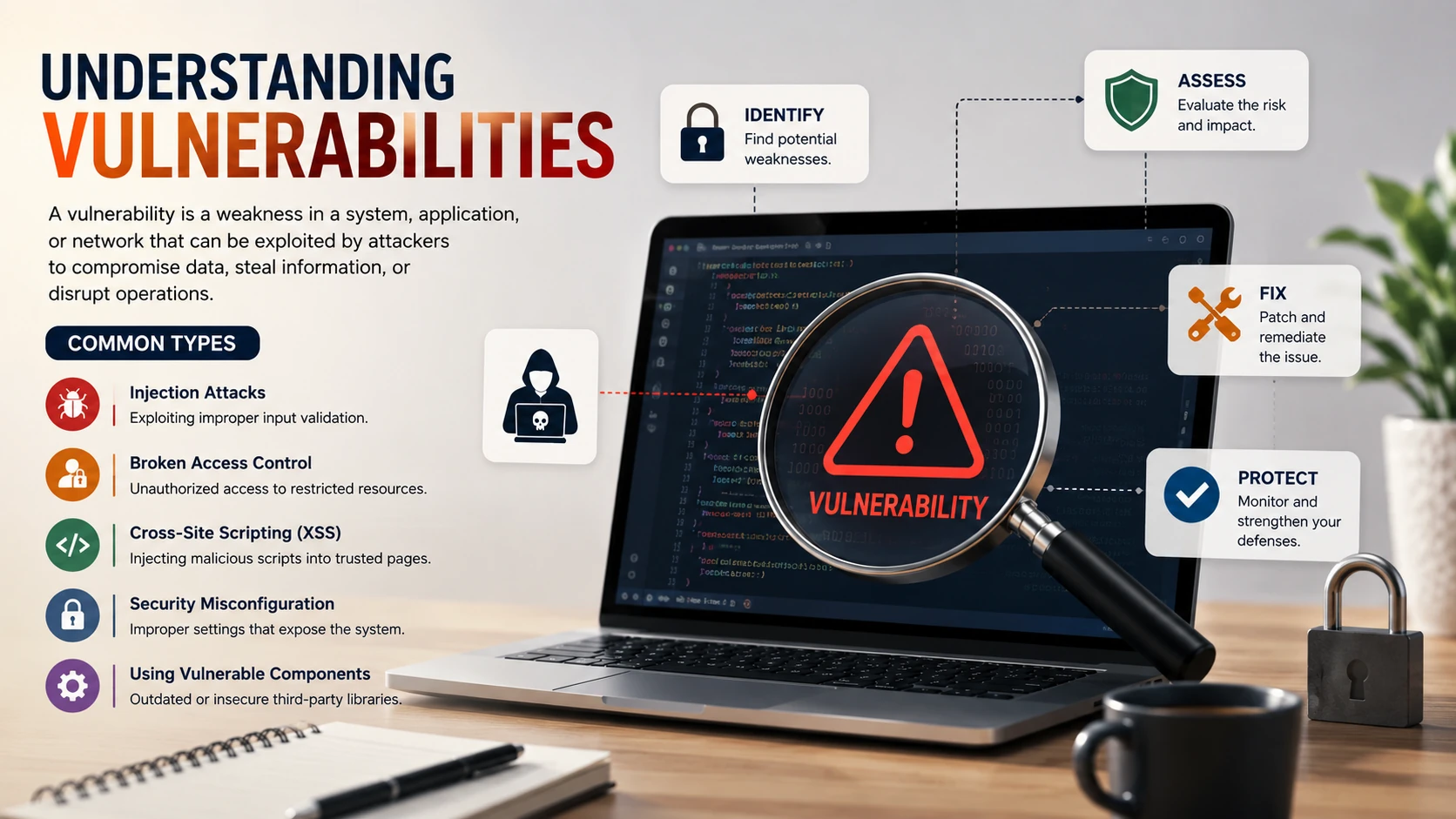
A vulnerability is a weakness or flaw in software, hardware, network infrastructure, or system configuration that could allow unauthorized actions, data exposure, or disruption if left unaddressed.
A vulnerability does not automatically mean a system has been compromised. Instead, it represents a security weakness that should be identified, assessed, and fixed before it can be abused.
Think of a vulnerability as a small crack in the wall of a secure building. The building may still be standing safely, but if the crack grows or someone finds a way to take advantage of it, the entire structure becomes less secure. Similarly, even a small software flaw can lead to significant security incidents if it remains unresolved.
Why Vulnerabilities Matter
Modern applications store enormous amounts of valuable information, including customer accounts, payment details, business documents, personal information, and intellectual property.
If vulnerabilities remain unpatched, organizations may face:
- Data breaches
- Financial losses
- Reputation damage
- Regulatory penalties
- Customer trust issues
- Business downtime
- Legal consequences
Security is no longer optional. Whether you are developing a personal portfolio, an e-commerce platform, a SaaS application, or an enterprise system, protecting user data should always be a top priority.
How Vulnerabilities Are Created
Software vulnerabilities rarely appear intentionally. Most arise during development, deployment, or maintenance.
Some common causes include:
Programming Mistakes
Simple coding errors can introduce unexpected behavior that weakens application security.
Examples include:
- Improper input validation
- Weak authentication logic
- Missing authorization checks
- Unsafe error handling
- Incorrect session management
Even experienced developers make mistakes, which is why code reviews and automated testing are essential.
Outdated Dependencies
Modern applications rely heavily on third-party libraries and open-source packages.
While these libraries save development time, they may eventually contain publicly disclosed security issues.
Keeping dependencies updated significantly reduces security risks while ensuring compatibility with the latest security improvements.
Poor Configuration
Incorrect server or application settings can expose unnecessary services or sensitive information.
Examples include:
- Debug mode enabled in production
- Weak default passwords
- Publicly accessible administrative interfaces
- Excessive permissions
- Missing HTTPS configuration
Secure configuration is just as important as secure code.
Lack of Security Testing
Applications that are never reviewed from a security perspective often accumulate unnoticed weaknesses.
Regular testing helps identify issues before they affect users.
Security testing should become part of the software development lifecycle rather than an afterthought.
Common Types of Vulnerabilities
While thousands of vulnerabilities exist, several categories appear frequently across modern applications.
Broken Access Control
Access control determines which users can perform specific actions.
If these controls are implemented incorrectly, users may gain access to information or features they should never see.
For example:
- Viewing another user's profile
- Accessing administrative dashboards without proper permissions
- Editing records belonging to other users
Proper authorization checks should always be enforced on the server.
Injection Vulnerabilities
Applications often interact with databases, operating systems, and external services.
If user input is handled insecurely, attackers may attempt to manipulate commands or queries.
Modern development frameworks reduce this risk significantly when developers use parameterized queries, prepared statements, and safe APIs.
Input should always be validated, sanitized where appropriate, and handled securely.
Cross-Site Scripting (XSS)
Cross-Site Scripting occurs when untrusted input is rendered in a web page without appropriate protection.
Potential impacts include:
- Session theft
- Malicious redirects
- Defaced web pages
- Unauthorized actions performed within a user's session
Modern frameworks provide built-in protections, but developers should still avoid rendering untrusted HTML without careful consideration.
Security Misconfiguration
Many incidents occur not because of coding mistakes, but because systems are configured insecurely.
Examples include:
- Default credentials
- Public cloud storage
- Open administration panels
- Missing security headers
- Unnecessary services running on production servers
Routine security reviews help identify these issues early.
Sensitive Data Exposure
Applications frequently process confidential information such as passwords, payment details, personal records, and business data.
Sensitive information should be:
- Encrypted during transmission
- Protected while stored
- Accessible only to authorized users
- Logged carefully without exposing secrets
Protecting sensitive data is essential for maintaining user trust and meeting regulatory requirements.
Understanding Risk Levels
Not every vulnerability has the same impact.
Security teams often evaluate vulnerabilities based on factors such as:
- Potential business impact
- Ease of exploitation
- Availability of mitigations
- Exposure to the internet
- Presence of sensitive data
- Likelihood of abuse
Prioritizing remediation based on risk ensures that the most critical issues are addressed first.
The Vulnerability Management Lifecycle
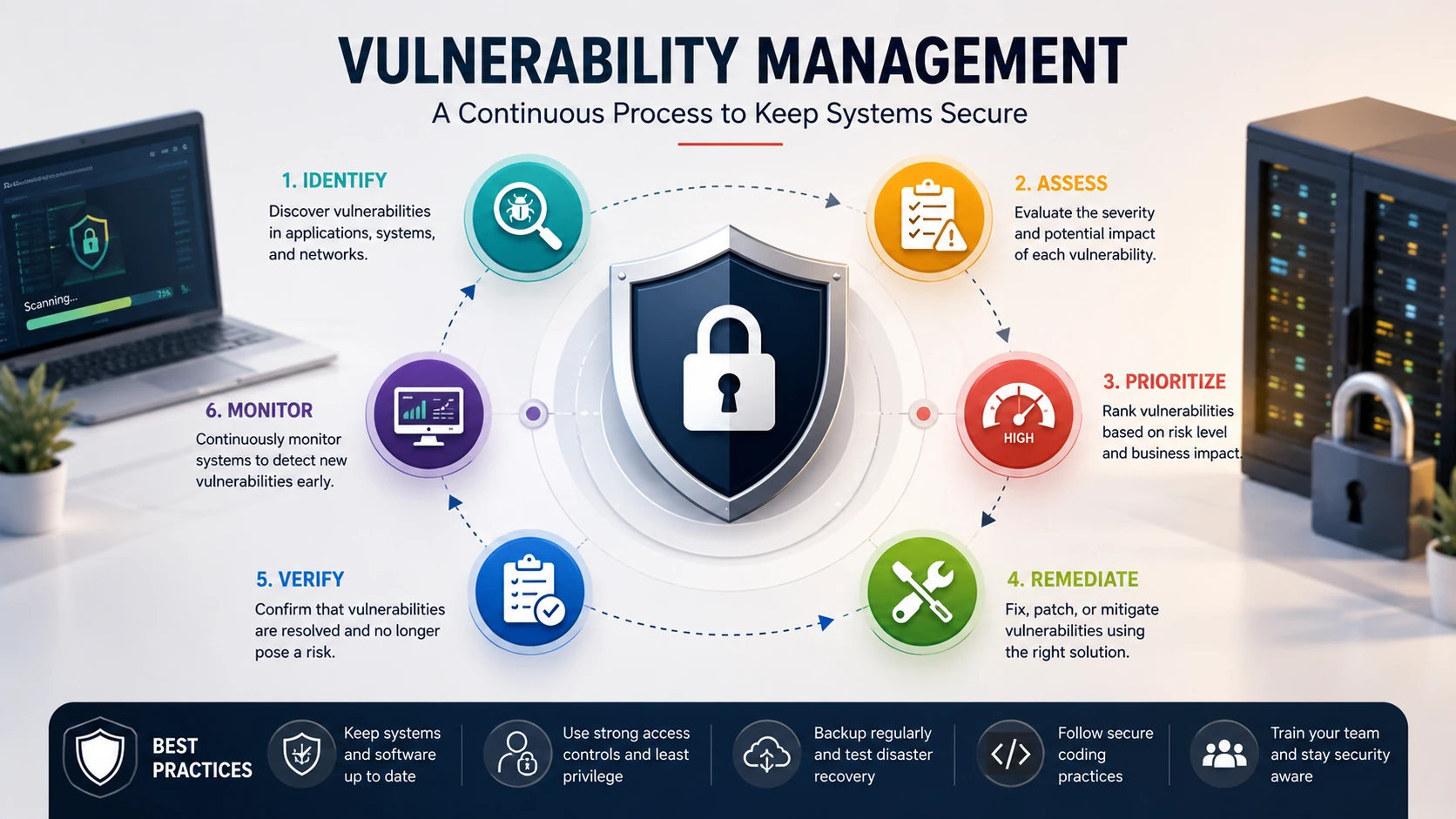
Managing vulnerabilities is an ongoing process rather than a one-time activity.
A typical lifecycle includes:
- Identify potential weaknesses through secure reviews and testing.
- Assess the severity and business impact.
- Prioritize issues based on risk.
- Develop and deploy appropriate fixes.
- Verify that the issue has been resolved.
- Continuously monitor applications for newly discovered vulnerabilities.
- Repeat the process as software evolves.
Organizations that follow this continuous cycle are generally better prepared to respond to emerging security challenges.
Secure Coding: The First Line of Defense
The most effective way to reduce security vulnerabilities is to write secure code from the beginning. Fixing security issues during development is significantly easier and less expensive than addressing them after deployment.
Secure coding is not about making software impossible to attack. Instead, it is about minimizing risk by following proven development practices and reducing opportunities for mistakes.
Developers should make security a standard part of every feature they build rather than treating it as a final checklist before launch.
Some important secure coding principles include:
- Validate all user input before processing it.
- Follow the principle of least privilege.
- Never trust data coming from browsers or external systems.
- Handle errors gracefully without exposing sensitive information.
- Store secrets securely instead of hardcoding them.
- Use modern security features provided by frameworks.
- Review code regularly through peer reviews.
These habits become increasingly valuable as projects grow larger and more complex.
Validate User Input Carefully
Every application accepts information from users through forms, APIs, search boxes, file uploads, and many other interfaces.
Although most users interact honestly, applications should never assume that all input is valid.
Input validation helps ensure that data follows the expected format before it is processed.
Examples include validating:
- Email addresses
- Phone numbers
- Dates
- File types
- Numeric values
- Usernames
- Required fields
Validation improves both security and application reliability by reducing unexpected behavior.
Secure Authentication
Authentication verifies a user's identity.
A secure authentication system should make it difficult for unauthorized users to access accounts while remaining convenient for legitimate users.
Best practices include:
- Require strong passwords.
- Support multi-factor authentication when appropriate.
- Hash passwords using modern algorithms such as bcrypt or Argon2.
- Never store passwords in plain text.
- Protect password reset workflows.
- Expire sessions after periods of inactivity.
- Allow users to review active sessions and revoke them if needed.
A strong authentication process forms the foundation of application security.
Implement Proper Authorization
Authentication answers the question, "Who are you?"
Authorization answers, "What are you allowed to do?"
These are different responsibilities, and both are equally important.
Every request should be evaluated to ensure the user has permission to access the requested resource.
For example:
- Customers should only access their own profiles.
- Employees should only access relevant business data.
- Administrators should have additional privileges only when necessary.
Authorization should always be enforced on the server, even if the client application hides certain features.
Protect Sensitive Data
Applications often process valuable information such as:
- Personal details
- Payment information
- Business records
- Medical data
- Authentication tokens
Protecting this information requires multiple layers of security.
Recommended practices include:
- Encrypt data during transmission using HTTPS.
- Encrypt sensitive information when stored if appropriate.
- Avoid collecting unnecessary personal information.
- Remove outdated records according to retention policies.
- Limit access to confidential information.
The less sensitive data an application stores, the smaller the potential impact of a future security incident.
Manage Dependencies Responsibly
Modern software development relies heavily on open-source packages.
These libraries improve productivity and reduce development time, but they also introduce additional security responsibilities.
Developers should:
- Update dependencies regularly.
- Remove unused packages.
- Monitor security advisories.
- Replace abandoned libraries.
- Test updates before deploying them.
Maintaining dependencies is an ongoing process rather than a one-time task.
Keep Software Updated
Security vulnerabilities are discovered every day.
Frameworks, operating systems, databases, and third-party libraries frequently release updates that include important security improvements.
Organizations should establish a regular update schedule to ensure systems remain protected.
Delaying updates for long periods increases exposure to known security issues.
Security Testing Throughout Development
Security testing should be integrated into the software development lifecycle instead of occurring only before release.
Several testing approaches help improve software quality.
Static Application Security Testing (SAST)
SAST analyzes source code without running the application.
It helps identify potential issues early during development, allowing developers to address them before deployment.
Because the application does not need to be running, SAST can easily become part of automated development workflows.
Dynamic Application Security Testing (DAST)
DAST evaluates a running application from the outside, similar to how a user interacts with it.
It focuses on identifying weaknesses in deployed applications and helps verify whether security controls are functioning correctly.
DAST complements static analysis by examining real application behavior.
Software Composition Analysis (SCA)
Software Composition Analysis focuses on third-party dependencies.
It identifies libraries with known security advisories and helps organizations understand which components require updates.
As open-source software becomes increasingly common, SCA has become an essential part of modern application security.
Penetration Testing
Penetration testing is a structured security assessment performed by authorized security professionals.
Its purpose is to evaluate whether an organization's security controls are working effectively and to identify weaknesses that may require remediation.
Organizations often perform penetration testing before major product launches, compliance audits, or after significant infrastructure changes.
Code Reviews Improve Security
Every developer occasionally overlooks mistakes.
Peer code reviews provide an opportunity for another team member to identify potential issues before deployment.
Security-focused code reviews should verify:
- Authentication logic
- Authorization rules
- Input validation
- Error handling
- Logging practices
- Secret management
- Configuration settings
A strong review culture benefits both software quality and developer growth.
Secure Logging Practices
Logs help developers diagnose problems and investigate incidents.
However, logs should never expose confidential information.
Avoid recording:
- Passwords
- Authentication tokens
- Payment information
- Encryption keys
- Personally identifiable information unless absolutely necessary
Logs should contain enough information to support troubleshooting while respecting user privacy.
Patch Management
Finding a vulnerability is only part of the process.
Organizations also need an efficient way to deploy fixes.
A structured patch management process typically includes:
- Identifying affected systems.
- Evaluating business impact.
- Testing updates.
- Scheduling deployment.
- Monitoring for unexpected issues.
- Confirming successful remediation.
Timely patching significantly reduces organizational risk.
Continuous Monitoring
Security is not a one-time project.
Applications evolve continuously through new features, dependency updates, infrastructure changes, and user growth.
Continuous monitoring helps organizations detect unusual activity early.
Examples include monitoring:
- Login activity
- Permission changes
- Configuration updates
- Unexpected traffic patterns
- Application errors
- Infrastructure health
Monitoring provides valuable visibility into the overall security posture of an application.
Building a Security-First Culture
Technology alone cannot eliminate vulnerabilities.
Successful organizations build a culture where everyone shares responsibility for security.
This includes:
- Regular developer training
- Secure development guidelines
- Security awareness programs
- Routine code reviews
- Automated testing
- Incident response planning
When security becomes part of everyday development rather than an occasional task, software naturally becomes more resilient.
Key Takeaways from This Section
Developers can significantly reduce vulnerabilities by:
- Following secure coding practices.
- Validating user input.
- Implementing strong authentication and authorization.
- Protecting sensitive data.
- Updating dependencies regularly.
- Performing automated and manual security testing.
- Reviewing code before deployment.
- Managing patches efficiently.
- Continuously monitoring production systems.
Security is not achieved through a single tool or technology. It is the result of consistent engineering practices applied throughout the software development lifecycle.
Understanding the OWASP Top 10
One of the most trusted resources in application security is the OWASP Top 10, a regularly updated awareness document that highlights the most significant categories of web application security risks. Rather than focusing on individual software bugs, it groups common security problems into broad categories that developers and organizations should understand.
Some of the key categories include:
Broken Access Control
Access control ensures that users can only perform actions and access resources they are authorized to use. When access control is implemented incorrectly, users may gain access to data or features that should be restricted.
Preventing this issue requires consistent server-side authorization checks, role-based permissions, and regular testing of access rules.
Cryptographic Failures
Sensitive information such as passwords, financial records, and personal data must be protected through proper encryption and secure storage.
Organizations should:
- Use modern encryption standards.
- Hash passwords with strong algorithms.
- Enforce HTTPS across all pages.
- Protect encryption keys carefully.
Strong cryptography protects user privacy and helps organizations comply with industry regulations.
Injection Risks
Applications often interact with databases, APIs, and operating system commands. Poor handling of user input can introduce security risks.
Developers should reduce these risks by:
- Validating input.
- Using parameterized database queries.
- Applying secure framework features.
- Avoiding unsafe command execution.
Modern frameworks already include many protections when used correctly.
Insecure Design
Even perfectly written code can become vulnerable if the application's design lacks proper security planning.
Security should be considered during:
- System architecture
- Database design
- Authentication workflows
- API planning
- Permission models
Building security into the design phase is much more effective than trying to add it later.
Security Misconfiguration
Many incidents occur because software is configured incorrectly rather than because of programming errors.
Examples include:
- Public cloud storage buckets
- Default credentials
- Debug mode enabled in production
- Missing security headers
- Unnecessary open services
Routine configuration reviews greatly reduce these risks.
Why Security Is a Continuous Process
Some developers believe that security ends after the application is deployed. In reality, deployment is only the beginning.
Applications continue to evolve through:
- New features
- Framework updates
- Infrastructure changes
- New third-party libraries
- Changing user behavior
- Emerging security threats
Because technology changes constantly, security must also be continuous.
Organizations that regularly review their systems are generally better prepared to respond to newly discovered risks.
Security Throughout the Software Development Lifecycle
Security works best when integrated into every stage of development.
Planning
During planning, teams should identify:
- Sensitive data
- User roles
- Business risks
- Compliance requirements
Security requirements should be documented alongside functional requirements.
Development
During coding:
- Follow secure coding guidelines.
- Validate user input.
- Handle errors safely.
- Protect sensitive information.
- Write maintainable code.
Developers should view security as part of software quality rather than an additional feature.
Testing
Before deployment, applications should undergo multiple forms of testing, including:
- Functional testing
- Performance testing
- Security testing
- Code reviews
- Dependency analysis
Testing provides confidence that security controls are working as intended.
Deployment
Production environments should be configured carefully.
Important considerations include:
- HTTPS enabled
- Secure backups
- Monitoring
- Logging
- Access control
- Environment variable protection
- Regular updates
A secure deployment process minimizes unnecessary exposure.
Maintenance
After launch, organizations should:
- Monitor application health.
- Apply security updates.
- Review logs.
- Improve security controls.
- Train development teams.
Maintenance is one of the most important phases of long-term security.
Real-World Lessons from Security Incidents
Many well-known organizations have experienced security incidents over the years. While the technical details differ, several common lessons consistently emerge.
Keep Software Updated
Outdated software often contains publicly known weaknesses.
Regular updates reduce exposure and improve overall stability.
Limit Access
Not every employee or system requires full administrative privileges.
Applying the principle of least privilege reduces the potential impact of compromised accounts.
Monitor Continuously
Early detection allows organizations to respond more quickly.
Monitoring login activity, unusual system behavior, and infrastructure health improves incident response.
Prepare for Incidents
Even organizations with mature security programs should prepare for unexpected events.
Incident response plans help teams:
- Communicate effectively.
- Restore services quickly.
- Protect customers.
- Learn from each event.
Prepared organizations recover faster than those reacting without a plan.
Security Checklist for Developers
Before releasing any web application, review the following checklist.
Authentication
- Strong password policy
- Secure password hashing
- HTTPS enabled
- Session expiration
- Optional multi-factor authentication
Authorization
- Server-side permission checks
- Role-based access control
- Least privilege implementation
- Protected administrative functions
Data Protection
- Encrypt sensitive communications
- Secure storage practices
- Safe backup strategy
- Proper secret management
Development Practices
- Input validation
- Error handling
- Secure configuration
- Code reviews
- Updated dependencies
Monitoring
- Centralized logging
- Alerting for unusual activity
- Regular security reviews
- Patch management process
Following this checklist consistently helps reduce common security risks and improves application reliability.

The Future of Vulnerability Management
Cybersecurity continues to evolve rapidly.
Several trends are shaping the future of vulnerability management.
Artificial Intelligence
AI-powered tools can assist developers by identifying coding mistakes, reviewing configurations, and highlighting potential security concerns more efficiently.
However, AI should complement—not replace—human expertise and secure development practices.
DevSecOps
Many organizations are integrating security directly into continuous integration and deployment pipelines.
By automating security checks throughout development, teams can identify issues earlier and release software with greater confidence.
Zero Trust Security
Traditional security models assumed internal networks were trustworthy.
Modern architectures increasingly adopt a Zero Trust approach, where every user, device, and request must be verified before access is granted.
This approach helps reduce the impact of compromised credentials and unauthorized access.
Conclusion
Software vulnerabilities are an unavoidable reality of modern application development, but they do not have to become security incidents. Every application—from a personal portfolio website to a large enterprise platform—contains components that require careful attention to security.
The strongest defense is not a single security tool but a comprehensive strategy that combines secure coding, regular testing, timely updates, responsible dependency management, continuous monitoring, and ongoing developer education.
Organizations that treat security as an ongoing process rather than a final checklist are better positioned to protect their users, maintain customer trust, and adapt to an evolving threat landscape.
For developers, learning secure development practices is an investment that pays dividends throughout their careers. By making security part of every stage of the software development lifecycle, you can build applications that are not only functional and scalable but also resilient against modern security challenges.
Frequently Asked Questions (FAQs)
1. What is a software vulnerability?
A software vulnerability is a weakness or flaw in an application, system, or configuration that could potentially affect the confidentiality, integrity, or availability of data if left unaddressed. Identifying and fixing vulnerabilities is a core part of secure software development.
2. Why is vulnerability management important?
Vulnerability management helps organizations identify, assess, prioritize, and remediate security weaknesses before they lead to security incidents. A structured process reduces business risk, protects customer data, and improves overall system reliability.
3. Can every vulnerability be completely eliminated?
No software can realistically be guaranteed to be completely free of vulnerabilities. However, organizations can significantly reduce risk through secure coding, regular updates, security testing, continuous monitoring, and timely remediation of identified issues.
4. What are the most common causes of software vulnerabilities?
Common causes include programming mistakes, insecure configurations, outdated third-party dependencies, insufficient input validation, weak authentication or authorization controls, and a lack of regular security testing throughout the development lifecycle.
5. How can developers improve application security?
Developers can strengthen application security by following secure coding standards, validating user input, protecting sensitive data, using strong authentication and authorization mechanisms, keeping dependencies updated, performing regular code reviews, integrating security testing into development workflows, and continuously monitoring applications after deployment.