
How Attackers Target Servers and How to Protect Them:
how attackers commonly target servers from a defensive perspective and discover practical strategies to secure Linux, Windows, VPS, and cloud servers. This beginner-friendly guide covers server hardening, authentication, firewalls, monitoring, backups, cloud security, and best practices to help protect your infrastructure against modern cyber threats.

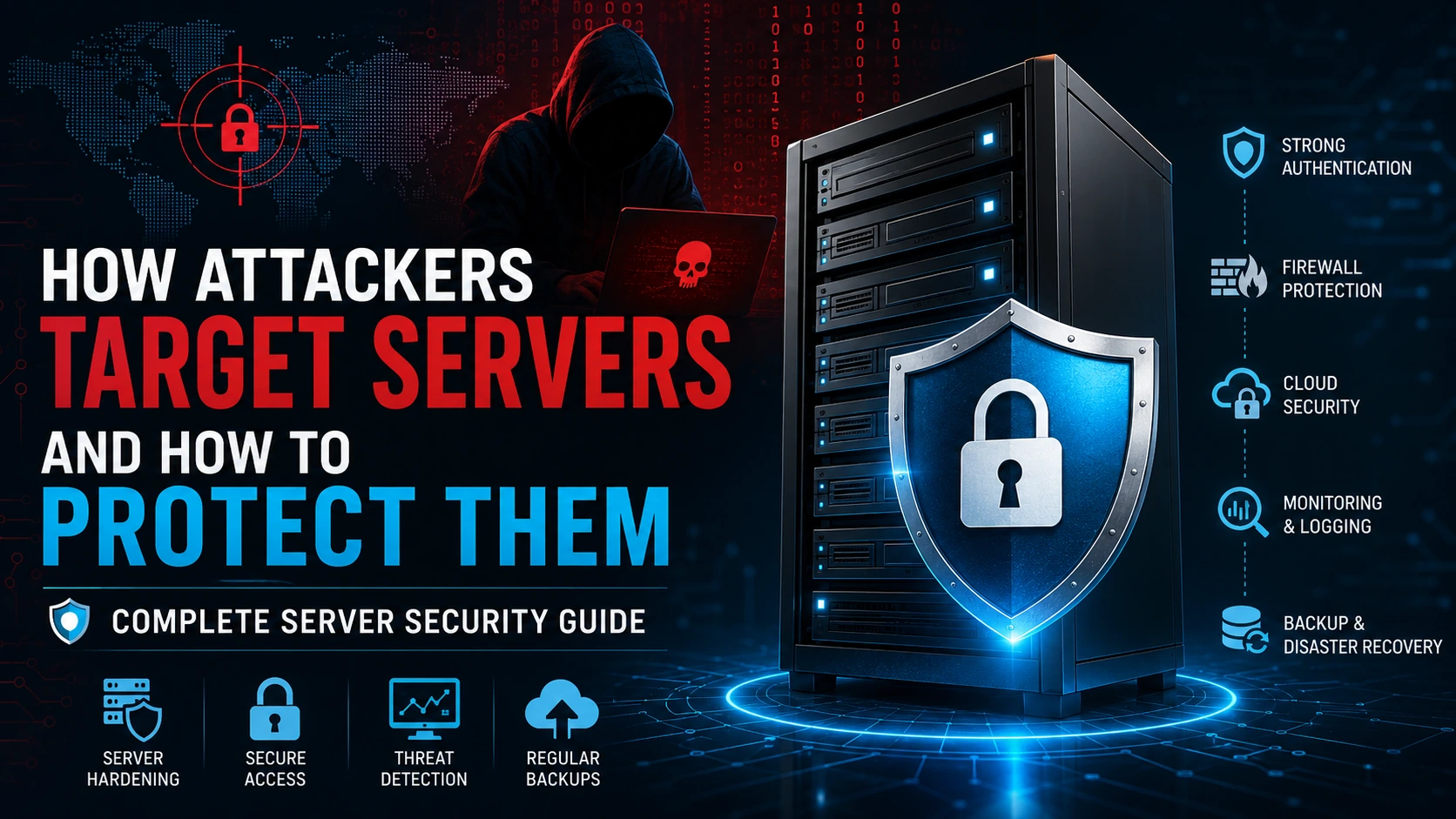
Table of Content
Table of Content
Introduction
Every website you visit, every mobile application you use, every online payment you make, and every cloud service you rely on is powered by one or more servers. These servers process requests, store valuable information, authenticate users, and keep digital services running around the clock.
Because servers are responsible for handling sensitive information, they have become one of the biggest targets for cybercriminals. A successful compromise can expose customer records, financial data, business secrets, or even take an entire service offline.
Fortunately, protecting a server does not require expensive enterprise solutions alone. Most successful attacks happen because of simple mistakes such as outdated software, weak passwords, exposed services, or poor monitoring. Organizations that follow security best practices dramatically reduce their risk.
In this guide, you'll learn how attackers generally target servers from a defensive perspective, understand common security risks, and discover practical ways to strengthen Linux, Windows, VPS, and cloud servers.
What Is a Server?
A server is a computer or virtual machine that provides services, data, or resources to other computers over a network.
Examples include:
- Web servers
- Database servers
- Email servers
- DNS servers
- File servers
- Cloud servers
- Application servers
Whenever someone opens your website, the server receives the request, processes it, and sends back the required information.
If the server becomes unavailable or compromised, the entire application can be affected.
Why Are Servers Valuable Targets?
Servers usually contain valuable assets that criminals want to access.
These may include:
- Customer information
- Login credentials
- Payment details
- Company documents
- Source code
- Business databases
- Internal APIs
- Cloud credentials
- AI models
- Employee records
Instead of attacking thousands of individual users, criminals often focus on servers because compromising one system can expose data belonging to many users at once.
How Modern Cybercriminals Think
Modern attackers rarely begin by directly attacking a target. Instead, they typically look for weaknesses that make a system easier to compromise.
These weaknesses often include:
- Outdated software
- Weak authentication
- Poor security configuration
- Publicly exposed services
- Misconfigured cloud storage
- Forgotten admin panels
- Missing security updates
- Weak monitoring
The goal is usually to find the easiest entry point rather than attempting to bypass strong security controls.
Organizations can significantly reduce risk by eliminating these common weaknesses.
The Server Attack Lifecycle (High-Level Overview)
Understanding the general stages of an attack helps defenders identify opportunities to stop threats early.
A simplified defensive view of the lifecycle includes:
1. Information Gathering
Attackers often begin by collecting publicly available information about a target, such as technologies in use, exposed services, or software versions. Defenders can reduce unnecessary exposure by limiting public information and disabling unused services.
2. Identifying Weaknesses
Next, they look for outdated software, insecure configurations, or known vulnerabilities. Regular patching and security reviews help close these gaps.
3. Attempting Initial Access
If a weakness exists, an attacker may try to gain access. Strong authentication, least-privilege access, and network protections make this much more difficult.
4. Expanding Access
Once inside, an attacker may attempt to move deeper into the environment. Network segmentation and strict permissions help contain any compromise.
5. Achieving Their Goal
The final objective might be stealing data, disrupting services, or deploying ransomware. Monitoring, backups, and incident response plans reduce the impact.
Understanding these phases helps security teams focus on prevention and early detection rather than reacting only after damage has occurred.
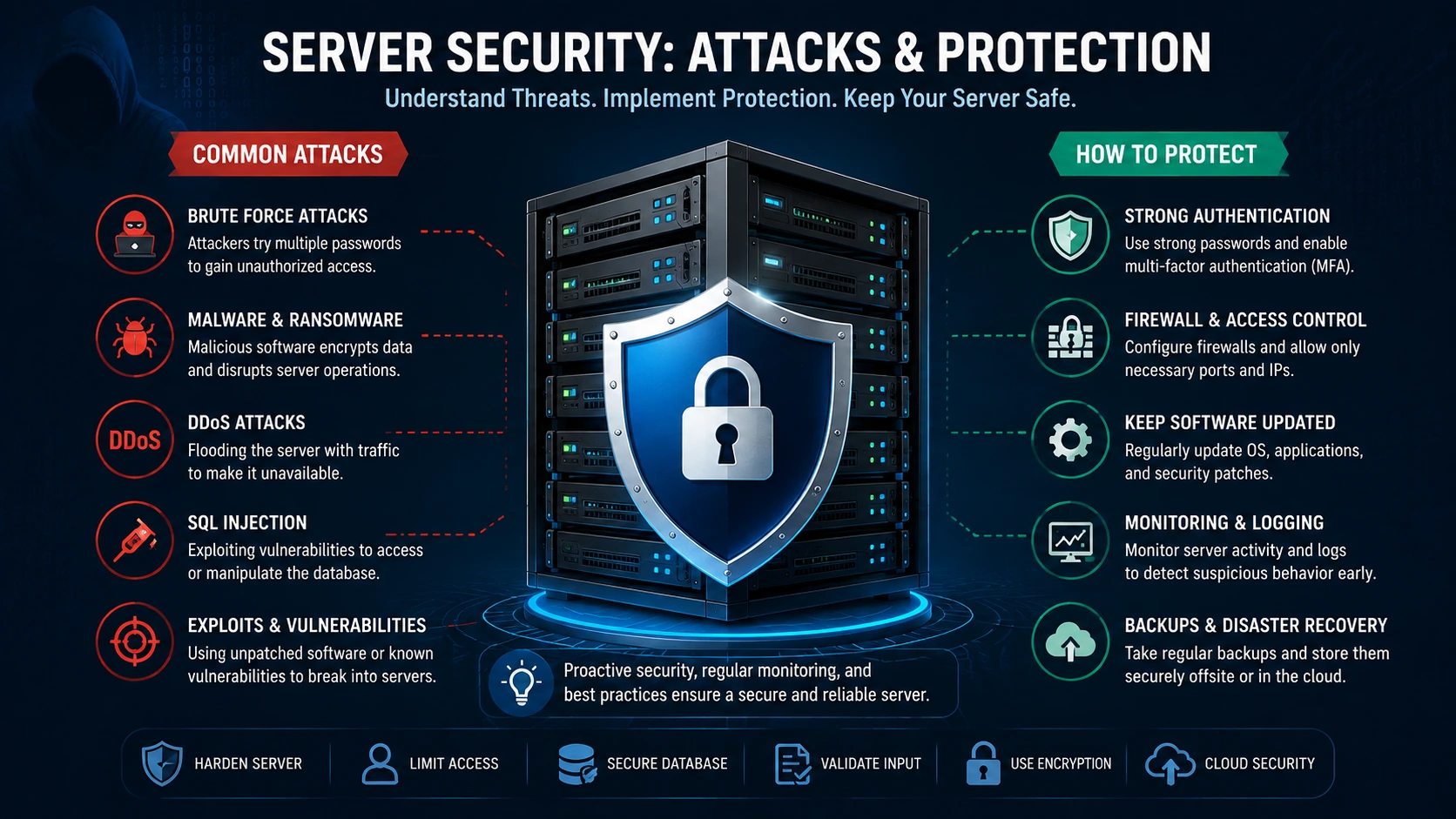
Most Common Server Security Threats
Servers face many different types of threats. Some of the most common include:
Weak Passwords
Weak passwords remain one of the biggest security risks.
Examples include:
- password123
- admin123
- companyname123
Good practices include:
- Long passphrases
- Password managers
- Multi-factor authentication
- Unique passwords for every account
Outdated Software
Many attacks target software that has known security flaws.
Examples include:
- Old Linux packages
- Outdated Apache or Nginx versions
- Legacy PHP versions
- Unpatched CMS platforms
- Unsupported operating systems
Keeping software updated closes many known vulnerabilities before they can be exploited.
Misconfigured Servers
Incorrect settings can unintentionally expose sensitive resources.
Examples include:
- Public admin dashboards
- Open storage buckets
- Debug mode enabled in production
- Excessive user permissions
- Default credentials
Regular configuration reviews help identify and correct these issues.
DDoS Attacks
Distributed Denial-of-Service attacks attempt to overwhelm a server with massive amounts of traffic.
The result may include:
- Website downtime
- Slow response times
- Interrupted business operations
- Poor customer experience
Using CDNs, Web Application Firewalls (WAFs), rate limiting, and DDoS protection services can help mitigate these attacks.
Malware
Malicious software may be introduced through compromised applications, unsafe uploads, or infected systems.
Potential impacts include:
- Data theft
- Service disruption
- Unauthorized changes
- Credential compromise
Endpoint protection, application controls, and regular scans help reduce this risk.
Ransomware
Ransomware encrypts important files and demands payment for their recovery.
Organizations can reduce the impact by:
- Maintaining offline backups
- Restricting privileges
- Keeping systems patched
- Training staff to recognize phishing attempts
- Testing recovery procedures
Insider Threats
Not all risks come from outside the organization.
Employees or contractors with excessive access may accidentally or intentionally cause security incidents.
Applying the principle of least privilege and monitoring privileged actions helps manage this risk.
Warning Signs Your Server May Be Under Attack
Recognizing unusual behavior early can significantly reduce damage.
Common warning signs include:
- Unexpected CPU spikes
- High RAM usage without explanation
- Sudden increase in outbound traffic
- Unknown user accounts
- Unexpected configuration changes
- Failed login attempts occurring repeatedly
- Services stopping unexpectedly
- Website defacement
- Missing or modified files
- Unusual log entries
- New scheduled tasks or startup services you did not create
These indicators do not always mean a compromise has occurred, but they warrant immediate investigation.
Server Hardening Basics
Server hardening means reducing the system's attack surface before it goes into production.
Key practices include:
- Remove unnecessary software
- Disable unused services
- Close unused network ports
- Change default configurations
- Enforce strong authentication
- Keep software updated
- Use secure configuration baselines
- Limit administrative access
- Enable logging
- Regularly review permissions
A hardened server provides attackers with far fewer opportunities to exploit mistakes.
Secure Authentication
Authentication is one of the most critical layers of server security.
Recommended practices include:
- Use long, unique passwords
- Enable Multi-Factor Authentication (MFA)
- Rotate credentials when necessary
- Disable unused accounts
- Remove shared administrator accounts
- Review privileged users regularly
- Lock inactive sessions
- Enforce password policies
Identity security is often the first line of defense against unauthorized access.
Linux Server Security Best Practices
Linux powers a significant portion of the internet. Many web applications, APIs, cloud platforms, and enterprise systems run on Linux because of its flexibility, performance, and stability. However, simply installing Linux does not make a server secure. Proper configuration and ongoing maintenance are essential.
Here are some of the most effective ways to secure a Linux server.
Keep the Operating System Updated
One of the simplest yet most important security practices is installing updates regularly.
Security updates fix known vulnerabilities before they can be exploited by attackers. Delaying updates leaves systems exposed to publicly documented security issues.
Develop a routine to:
- Install security patches promptly.
- Update critical software packages.
- Remove unsupported software.
- Replace operating systems that have reached end-of-life.
Staying current significantly reduces the risk of compromise.
Remove Unnecessary Packages
Many servers are deployed with software that is never used.
Unused applications increase the attack surface because each installed package could potentially contain vulnerabilities.
A secure server should contain only the software required for its intended purpose.
Benefits include:
- Reduced attack surface
- Easier maintenance
- Lower resource usage
- Faster updates
- Simpler security audits
Minimal installations are generally easier to secure.
Disable Unused Services
Every running service listens for requests or performs background tasks.
If a service is not required, it should not be running.
Examples include:
- Legacy file-sharing services
- Unused remote management tools
- Development utilities left enabled in production
Regularly review active services and disable anything that is unnecessary.
Use Strong User Permission Management
Not every administrator needs complete control over every part of a system.
Follow the Principle of Least Privilege:
- Grant only the permissions required for a user's role.
- Separate administrative accounts from daily-use accounts.
- Remove unused accounts promptly.
- Review permissions periodically.
Limiting privileges reduces the impact of mistakes and compromised accounts.
Secure Remote Administration
Remote administration should always be treated as a sensitive operation.
Best practices include:
- Use encrypted connections.
- Restrict remote access to trusted administrators.
- Require multi-factor authentication where possible.
- Maintain detailed audit logs of administrative actions.
Avoid exposing management interfaces unnecessarily to the public internet.
Windows Server Security Best Practices
Windows Server environments require the same level of attention as Linux systems.
Proper maintenance greatly improves resilience against modern cyber threats.
Install Security Updates Regularly
Microsoft releases updates that address newly discovered vulnerabilities.
Organizations should:
- Install critical patches promptly.
- Test updates before large-scale deployment.
- Replace unsupported versions of Windows Server.
An outdated operating system remains one of the most common causes of successful compromises.
Enable Microsoft Defender
Modern Windows Server editions include built-in security features that help detect malware and suspicious activity.
Ensure these protections remain enabled and updated.
Combine endpoint protection with:
- Real-time monitoring
- Controlled administrative access
- Security event logging
- Application control policies
Restrict Administrative Privileges
Administrative accounts represent valuable targets.
Recommendations include:
- Separate administrator accounts from standard accounts.
- Require approval for privileged operations where appropriate.
- Review administrator membership regularly.
- Remove unnecessary privileged accounts.
Privilege management reduces risk across the environment.
Monitor Event Logs
Windows Event Viewer provides valuable information about system activity.
Security teams should monitor:
- Login activity
- Permission changes
- Service failures
- Account creation
- Policy modifications
- Software installation events
Logs often provide the earliest indication that something unusual has occurred.
Network Security
Even a fully patched server can be exposed if the surrounding network is poorly configured.
Strong network security creates multiple layers of defense.
Configure Firewalls Properly
A firewall controls which network traffic is allowed to reach your server.
A secure configuration should:
- Allow only required services.
- Block unnecessary ports.
- Limit administrative access.
- Review firewall rules regularly.
Avoid opening ports simply because an application requests them unless they are truly necessary.
Network Segmentation
Critical systems should not all exist within a single unrestricted network.
Separate environments whenever possible:
- Public-facing services
- Internal applications
- Databases
- Backup infrastructure
- Administrative systems
Segmentation limits the spread of security incidents.
Use Secure Protocols
Always prefer encrypted communication.
Examples include:
- HTTPS instead of HTTP
- Secure email protocols
- Encrypted file transfers
- Secure VPN connections for remote administration
Encryption protects information while it travels across networks.
Application Security
Many successful server compromises begin with vulnerabilities in web applications rather than the operating system itself.
Application security deserves equal attention.
Validate User Input
Applications should carefully validate all user-supplied data.
Proper validation helps prevent:
- Injection attacks
- Malformed requests
- Unexpected application behavior
- Data corruption
Input validation should occur on both the client side and the server side.
Keep Frameworks Updated
Popular frameworks receive regular security improvements.
Examples include:
- Next.js
- React
- Express
- Laravel
- Django
- Spring Boot
Using supported versions helps protect against publicly known vulnerabilities.
Secure API Endpoints
APIs often process sensitive business operations.
Protect them by:
- Requiring authentication
- Authorizing every request
- Limiting excessive requests
- Logging important operations
- Encrypting communication
Well-designed APIs are significantly harder to misuse.
Protect Sensitive Data
Sensitive information should never be exposed unnecessarily.
Examples include:
- Customer records
- Financial information
- Authentication tokens
- Internal configuration files
- API credentials
Only authorized users should be able to access confidential data.
Reverse Proxies
Many production environments place a reverse proxy in front of application servers.
Benefits include:
- Improved performance
- SSL termination
- Load balancing
- Rate limiting
- Security filtering
- Better scalability
A reverse proxy also hides internal application infrastructure from direct exposure.
HTTPS and TLS
Every modern website should encrypt communication.
HTTPS protects users by ensuring that information exchanged between browsers and servers remains confidential and resistant to tampering.
Benefits include:
- Encrypted communication
- Improved user trust
- Better SEO performance
- Protection against interception on insecure networks
Certificates should be renewed before expiration and outdated encryption settings should be removed.
Monitoring and Logging
Prevention is important, but no security program is complete without visibility.
Continuous monitoring helps organizations detect suspicious behavior before it becomes a major incident.
Important data sources include:
- Authentication logs
- Web server logs
- Database logs
- Application logs
- Firewall logs
- Operating system events
Centralizing logs makes investigation and response much easier.
Intrusion Detection and Security Monitoring
Security teams should monitor for unusual activity rather than waiting for visible damage.
Examples of events worth investigating include:
- Repeated failed login attempts
- Unexpected privilege changes
- New user accounts
- Configuration modifications
- Sudden traffic spikes
- Unusual outbound connections
- Unexpected service restarts
Early detection can prevent a small issue from becoming a major breach.
Rate Limiting
Rate limiting restricts how many requests a client can make within a certain period.
Benefits include:
- Reduced abuse
- Better application stability
- Protection against automated traffic
- Improved availability during traffic spikes
Rate limiting should be applied thoughtfully to authentication endpoints and public APIs.
Secure Configuration Management
Security settings should remain consistent across environments.
Document important configurations such as:
- Firewall rules
- User permissions
- Installed software
- Logging policies
- Backup schedules
- Security baselines
Configuration management reduces human error and simplifies recovery.
Regular Security Reviews
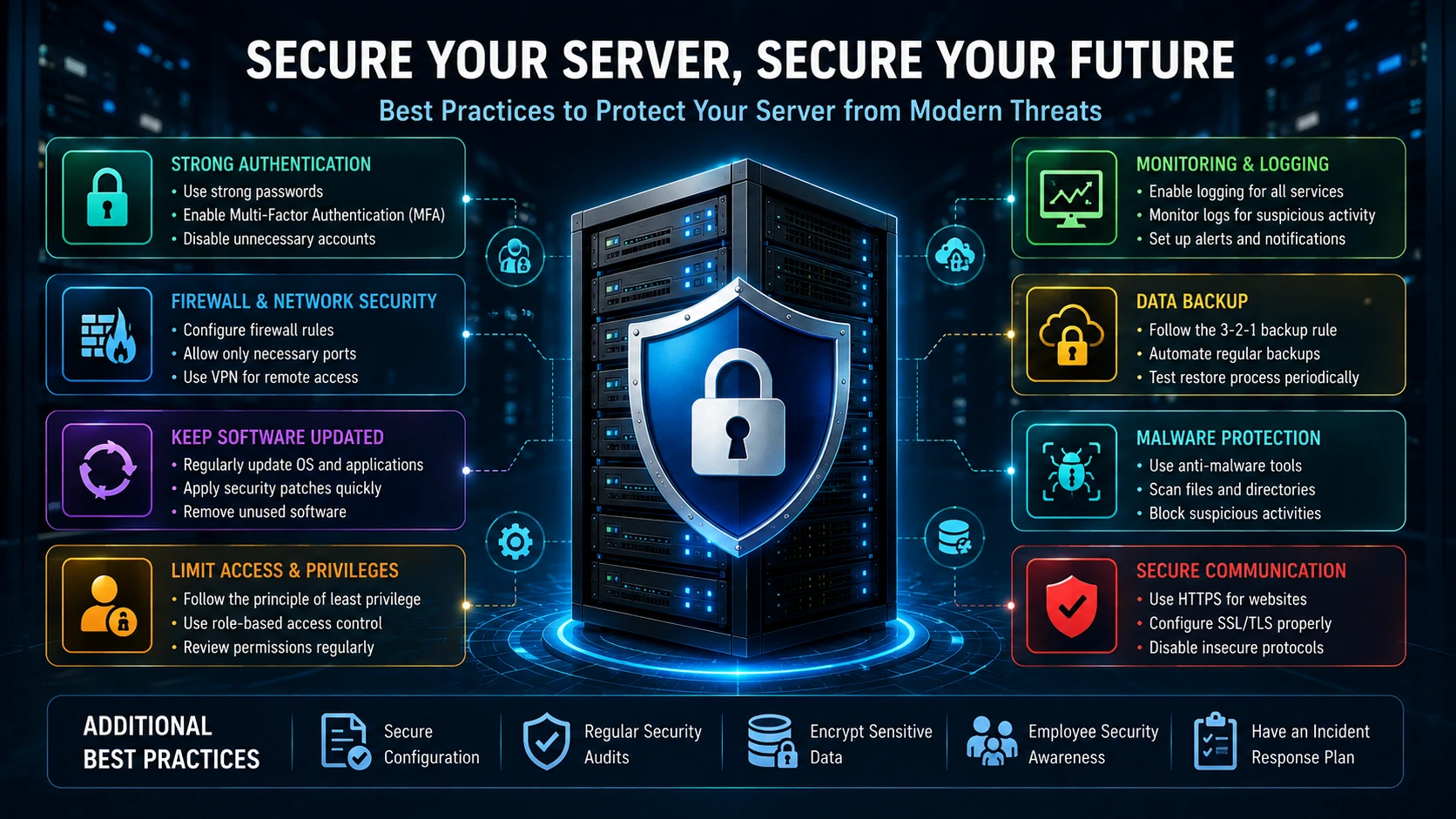
Security is not something that is completed once and forgotten.
Organizations should regularly review:
- User accounts
- Software versions
- Access permissions
- Firewall configurations
- SSL certificates
- Backup health
- Monitoring alerts
Continuous improvement is one of the strongest defenses against evolving threats.
Backup and Disaster Recovery
Even with excellent security practices, no server can be guaranteed to be 100% secure. Hardware failures, software bugs, human errors, ransomware, and natural disasters can all lead to data loss. That's why backups are one of the most important components of server security.
A good backup strategy ensures that your business can recover quickly without losing critical information.
Follow the 3-2-1 Backup Rule
One of the most widely recommended backup strategies is the 3-2-1 rule:
- Keep 3 copies of your data.
- Store them on 2 different types of storage.
- Keep 1 copy offsite or in cloud storage.
This approach protects against hardware failure, accidental deletion, ransomware, and physical disasters.
Automate Backups
Manual backups are often forgotten, especially in busy production environments.
Instead:
- Schedule automatic daily backups.
- Perform weekly full backups.
- Keep monthly archive backups.
- Verify backup integrity regularly.
A backup that cannot be restored is effectively useless, so periodic restoration tests are just as important as creating the backups.
Encrypt Backup Data
Backups frequently contain sensitive information such as databases, customer records, and configuration files.
Always:
- Encrypt backup files.
- Restrict who can access them.
- Store encryption keys securely.
- Monitor backup access.
Encryption helps ensure that stolen backup files cannot be easily read.
Cloud Server Security
Cloud platforms have made deploying servers much easier, but security remains a shared responsibility. Cloud providers secure the underlying infrastructure, while customers are responsible for configuring and protecting their own workloads.
Identity and Access Management (IAM)
Access to cloud resources should follow the principle of least privilege.
Good practices include:
- Grant users only the permissions they need.
- Remove unused accounts.
- Review access regularly.
- Require multi-factor authentication (MFA) for privileged users.
Strong identity management reduces the risk of unauthorized access.
Protect Storage Resources
Cloud storage should never be publicly accessible unless there is a clear business need.
Review storage permissions regularly to ensure that only authorized users and applications can access sensitive data.
Secure Secrets and Credentials
Avoid storing passwords, API keys, or database credentials directly in source code or configuration files that may be shared.
Instead:
- Use dedicated secret management services.
- Rotate credentials periodically.
- Remove unused keys.
- Monitor credential usage.
Good secret management significantly reduces the impact of accidental exposure.
Enable Security Monitoring
Most cloud platforms provide built-in monitoring tools.
These services can help detect:
- Unusual login activity.
- Configuration changes.
- Excessive permissions.
- Unexpected resource creation.
- Suspicious API activity.
Monitoring enables security teams to respond quickly to potential incidents.
Incident Response Plan
Preparation is essential. When a security incident occurs, having a documented response plan can reduce downtime and limit damage.
A typical incident response process includes:
1. Detect
Identify unusual activity using logs, monitoring systems, or security alerts.
2. Contain
Limit the impact by isolating affected systems and preventing further spread.
3. Investigate
Determine what happened, what systems were affected, and what data may have been exposed.
4. Recover
Restore services safely from trusted backups and verify that systems are secure before returning them to production.
5. Improve
After the incident, review what happened and strengthen security controls to reduce the likelihood of similar events in the future.
Server Security Checklist
Use this checklist as part of your regular server maintenance routine.
Operating System
✔ Keep the operating system updated.
✔ Remove unnecessary software.
✔ Disable unused services.
✔ Use supported software versions.
✔ Review installed packages regularly.
Authentication
✔ Use strong passwords.
✔ Enable multi-factor authentication.
✔ Remove unused accounts.
✔ Review privileged access.
✔ Rotate credentials when appropriate.
Network Security
✔ Configure firewalls correctly.
✔ Allow only required ports.
✔ Use encrypted communication.
✔ Segment critical systems.
✔ Review network rules regularly.
Application Security
✔ Validate user input.
✔ Keep frameworks and dependencies updated.
✔ Protect APIs with authentication and authorization.
✔ Secure file uploads.
✔ Handle sensitive data carefully.
Monitoring
✔ Enable logging.
✔ Review logs regularly.
✔ Monitor authentication events.
✔ Watch for unusual traffic.
✔ Configure security alerts.
Backup
✔ Automate backups.
✔ Encrypt backup data.
✔ Test restoration procedures.
✔ Store backups securely.
✔ Keep offsite copies.
Cloud Security
✔ Review IAM permissions.
✔ Protect storage resources.
✔ Secure secrets.
✔ Enable monitoring.
✔ Review cloud configurations regularly.
Future of Server Security
Server security continues to evolve as technology advances.
Several trends are shaping the future:
Artificial Intelligence in Cybersecurity
AI is increasingly used to detect unusual behavior, prioritize alerts, and assist security teams in identifying threats more quickly. At the same time, organizations must ensure that AI systems themselves are secured against misuse.
Zero Trust Security
The Zero Trust model assumes that no user or device should be trusted automatically, even if it is inside the corporate network.
Core principles include:
- Verify every request.
- Enforce least privilege.
- Continuously monitor activity.
- Limit lateral movement through segmentation.
Zero Trust is becoming a standard approach for modern organizations.
Passwordless Authentication
Many organizations are moving toward authentication methods that reduce reliance on traditional passwords.
Examples include:
- Passkeys
- Hardware security keys
- Biometric authentication
- Trusted device authentication
These approaches can improve both security and user experience.
Better Automation
Security teams increasingly automate routine tasks such as:
- Patch deployment
- Configuration checks
- Compliance validation
- Backup verification
- Alert triage
Automation helps reduce human error and allows teams to focus on higher-priority work.
Final Thoughts
Servers are the foundation of today's digital infrastructure. Whether you run a personal blog, an e-commerce platform, a SaaS application, or a large enterprise environment, protecting your servers is essential for maintaining trust, availability, and business continuity.
Most successful compromises are not the result of sophisticated techniques but rather preventable issues such as weak passwords, outdated software, poor configurations, excessive permissions, or inadequate monitoring.
By following proven security practices keeping systems updated, applying the principle of least privilege, using strong authentication, encrypting communications, monitoring activity, maintaining reliable backups, and preparing an incident response plan you can greatly reduce the likelihood and impact of security incidents.
Remember that server security is not a one-time task. It is an ongoing process of assessment, improvement, and adaptation as new technologies and threats emerge. Organizations that continuously review and strengthen their security posture are far better prepared to protect their systems, their data, and the people who rely on them.
Frequently Asked Questions (FAQs)
1. What is the biggest security risk for most servers?
The most common risks are outdated software, weak passwords, misconfigured services, excessive user permissions, and poor monitoring. Addressing these fundamentals significantly improves server security.
2. How often should a server be updated?
Critical security updates should be applied as soon as they have been tested and approved. Regular maintenance schedules should also include periodic updates for operating systems, applications, and dependencies.
3. Is Linux more secure than Windows Server?
Both Linux and Windows Server can be highly secure when configured and maintained correctly. Security depends more on proper administration, timely updates, strong authentication, and ongoing monitoring than on the operating system alone.
4. Why are backups important for server security?
Backups enable organizations to recover from accidental deletion, hardware failures, ransomware, or other incidents. Regularly tested backups help minimize downtime and data loss during recovery.
5. What are the first steps to secure a new server?
A good starting point is to:
- Install the latest security updates.
- Enable a firewall.
- Configure strong authentication and MFA where possible.
- Remove unnecessary software and services.
- Enable logging and monitoring.
- Set up automated, encrypted backups.
- Review user permissions and access controls.
Conclusion
Protecting a server is about reducing risk through consistent security practices rather than relying on a single tool or solution. A layered approach combining secure configuration, timely updates, strong authentication, monitoring, backups, and user awareness provides the best defense against today's evolving cyber threats.
Whether you manage a small website or a large cloud environment, investing time in server security today can prevent costly incidents in the future. By making security an ongoing priority, you create a stronger, more resilient infrastructure that can support your applications and users with confidence.