
C++ STL Cheat Sheet: Most Used Libraries Every Programmer Should Know
Master the most commonly used C++ STL libraries with this complete cheat sheet. Learn vectors, maps, sets, algorithms, queues, stacks, and more through simple explanations, practical examples, and expert tips.


Table of Content
Table of Content
C++ STL Cheat Sheet: Most Used Libraries Every Programmer Should Know
Writing efficient C++ programs becomes much easier once you understand the Standard Template Library, commonly known as STL. Instead of creating every data structure and algorithm from scratch, STL gives developers a collection of optimized and well-tested components that can solve common programming problems quickly and efficiently.
Whether you are preparing for coding interviews, solving competitive programming challenges, building desktop software, or developing large-scale applications, the Standard Template Library is one of the most valuable parts of modern C++. It helps you write cleaner code, improve performance, reduce development time, and avoid unnecessary complexity.
Many beginners spend countless hours implementing stacks, queues, sorting algorithms, or searching techniques manually. While learning these concepts is important, professional developers usually rely on STL because it has already been optimized by compiler developers and follows industry standards. Using STL not only improves productivity but also makes your code easier to read and maintain.
This comprehensive C++ STL cheat sheet introduces the most commonly used STL libraries that every programmer should know. Instead of memorizing dozens of header files, you will understand when each library should be used, why it exists, and how it can simplify your daily programming tasks. Throughout this guide, you will also discover practical examples, interview tips, and best practices that help you write modern C++ code with confidence.
By the end of this article, you will have a strong understanding of the most important STL components and know exactly which library to choose for different programming scenarios.
What is the C++ Standard Template Library (STL)?
The Standard Template Library, or STL, is a powerful collection of generic classes and functions that are included with the C++ Standard Library. It provides reusable implementations of common data structures and algorithms so developers do not need to build them repeatedly for every project.
Before STL became popular, programmers often created their own implementations of arrays, linked lists, sorting algorithms, and searching methods. This approach increased development time and introduced unnecessary bugs. STL solved this problem by providing standardized implementations that are fast, reliable, and portable across different operating systems and compilers.
One of the biggest strengths of STL is that it is template based. Templates allow the same container or algorithm to work with multiple data types without requiring separate implementations. For example, a vector can store integers, floating point values, characters, strings, or even user-defined objects without changing its underlying implementation.
Another major advantage is consistency. Once you learn how one STL container works, understanding the others becomes much easier because they follow similar design principles and interfaces.
Today, STL is used by software engineers, game developers, embedded programmers, backend developers, system programmers, and competitive coders around the world.
Why Every C++ Programmer Should Learn STL
Learning STL is one of the best investments you can make as a C++ developer. Almost every professional project uses some part of the Standard Template Library because it saves time while improving code quality.
Here are some important reasons why STL is considered an essential skill.
Faster Development
Instead of writing hundreds of lines of code to implement common data structures, you can simply include the required header file and start using ready-made containers.
This significantly reduces development time while allowing you to focus on solving the actual business problem.
Better Performance
STL containers and algorithms are highly optimized by experienced library developers.
In most situations, their performance is better than manually written implementations because they have been carefully tested over many years.
Cleaner Code
Programs become easier to understand when they use standard containers such as vectors, maps, queues, and sets.
Developers who read your code immediately understand what each container is intended to do.
Industry Standard
Most software companies expect C++ developers to know STL.
Interview questions frequently include topics related to vectors, maps, priority queues, sorting algorithms, iterators, and hash tables.
Strong STL knowledge can significantly improve your interview performance.
Reduced Bugs
Since STL components are well-tested and widely used, they eliminate many common implementation mistakes that developers often make while creating custom data structures.
This leads to more reliable and maintainable applications.
Major Components of the Standard Template Library
Although STL contains hundreds of useful utilities, almost everything can be grouped into a few core components.
Understanding these building blocks makes learning STL much easier.
1. Containers
Containers are objects that store collections of data.
Different containers are designed for different purposes. Some provide fast insertion, while others offer quick searching or efficient random access.
Popular examples include:
- vector
- array
- deque
- list
- stack
- queue
- priority_queue
- map
- unordered_map
- set
- unordered_set
- multiset
- multimap
Choosing the correct container is one of the most important decisions while writing efficient C++ programs.
2. Algorithms
Algorithms perform operations on data stored inside containers.
Instead of writing sorting or searching logic yourself, STL already provides optimized implementations.
Common examples include:
- sort()
- reverse()
- find()
- count()
- binary_search()
- max_element()
- min_element()
- rotate()
- unique()
- copy()
- remove()
- transform()
Learning these algorithms can dramatically reduce the amount of code you write.
3. Iterators
Iterators are objects used to traverse elements inside containers.
They behave similarly to pointers and provide a common interface for accessing data regardless of the container type.
Almost every STL algorithm works through iterators, making them one of the most important concepts in modern C++.
Common iterator functions include:
- begin()
- end()
- rbegin()
- rend()
- cbegin()
- cend()
Understanding iterators allows you to combine containers with algorithms efficiently.
4. Function Objects
Function objects, also known as functors, behave like functions but are implemented as objects.
They are commonly used to customize sorting, comparison, filtering, and mathematical operations.
For example, sorting numbers in descending order becomes very simple by using predefined comparison objects.
Functors are heavily used in advanced C++ programming and template-based libraries.
5. Utility Components
Apart from containers and algorithms, STL also provides several helper classes that simplify programming.
Examples include:
- pair
- tuple
- optional
- variant
- bitset
- utility
- numeric
- limits
Although developers use these less frequently than vectors or maps, they become extremely useful in larger software projects.
Understanding STL Architecture
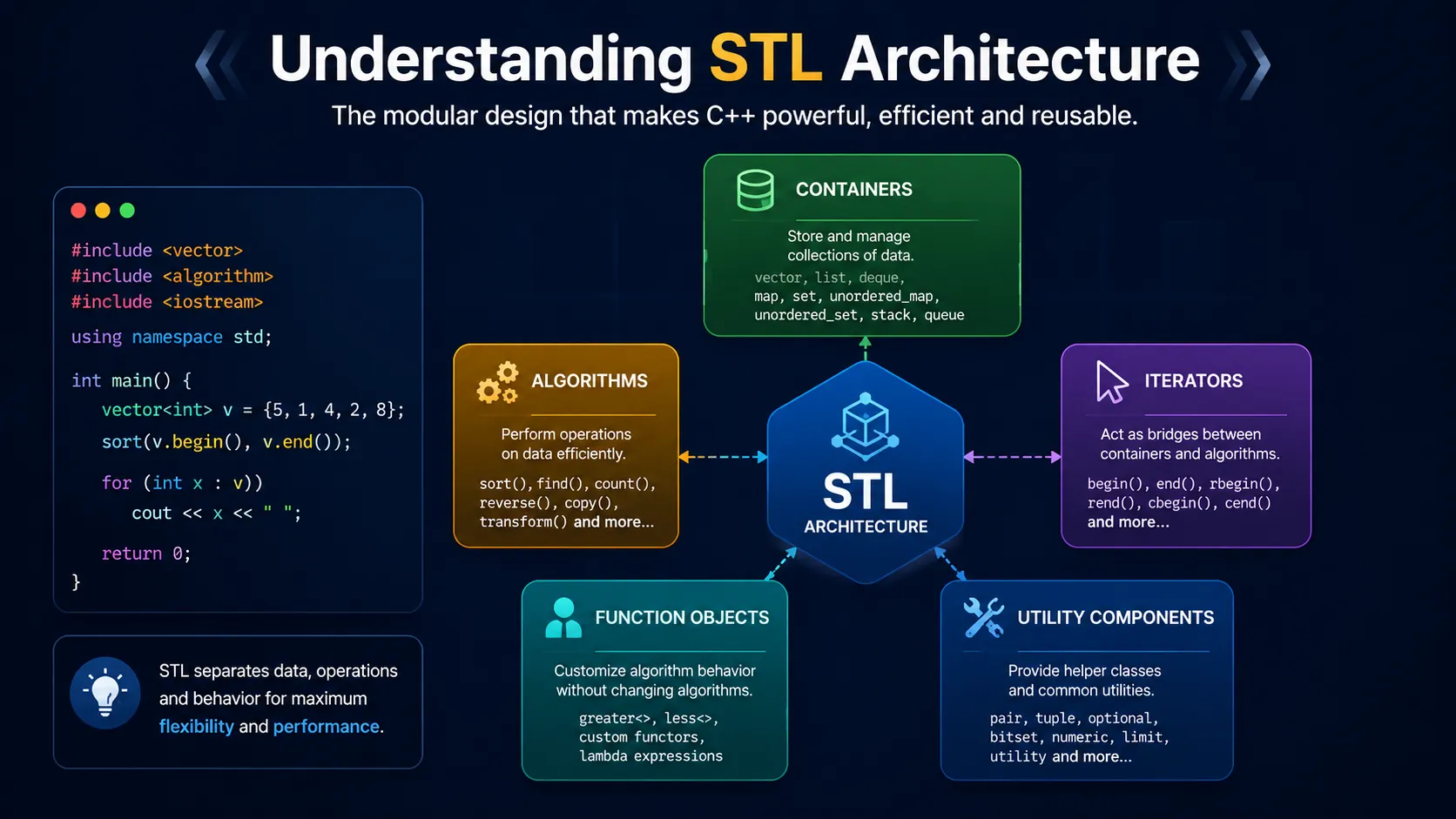
The Standard Template Library follows a modular design where multiple components work together seamlessly.
At the center are containers that store data.
Algorithms operate on the data stored inside those containers.
Iterators act as bridges between algorithms and containers by providing a standard way to access elements.
Function objects allow developers to customize algorithm behavior without modifying the algorithms themselves.
This architecture is one of the reasons STL has remained relevant for decades. Instead of tightly coupling algorithms to specific data structures, STL keeps them independent, making code more flexible and reusable.
For example, the same sort algorithm can work with vectors, arrays, or deques because it operates through iterators rather than directly interacting with a specific container.
This modular approach is considered one of the greatest strengths of modern C++.
Most Frequently Used STL Header Files
Although the Standard Template Library contains many header files, only a small group is used in most real-world applications.
As a beginner, mastering these libraries will cover a significant portion of everyday C++ development.
Some of the most commonly used header files include:
<vector><string><algorithm><map><unordered_map><set><unordered_set><queue><stack><deque><list><array><utility><numeric><iterator><functional><cmath><limits>
Each of these libraries solves a specific type of programming problem. Understanding when to use them is more valuable than simply memorizing their syntax.
In the next section of this guide, we will explore each of these STL libraries individually. You will learn what every library is designed for, when it should be used, its most useful functions, practical coding examples, performance characteristics, and common interview questions associated with each one.
Most Used C++ STL Libraries Explained
Now that you understand the basics of the Standard Template Library, it is time to explore the libraries that developers use almost every day. Knowing these libraries can significantly improve your coding speed, make your programs more efficient, and help you perform better in coding interviews.
1. <vector> Library
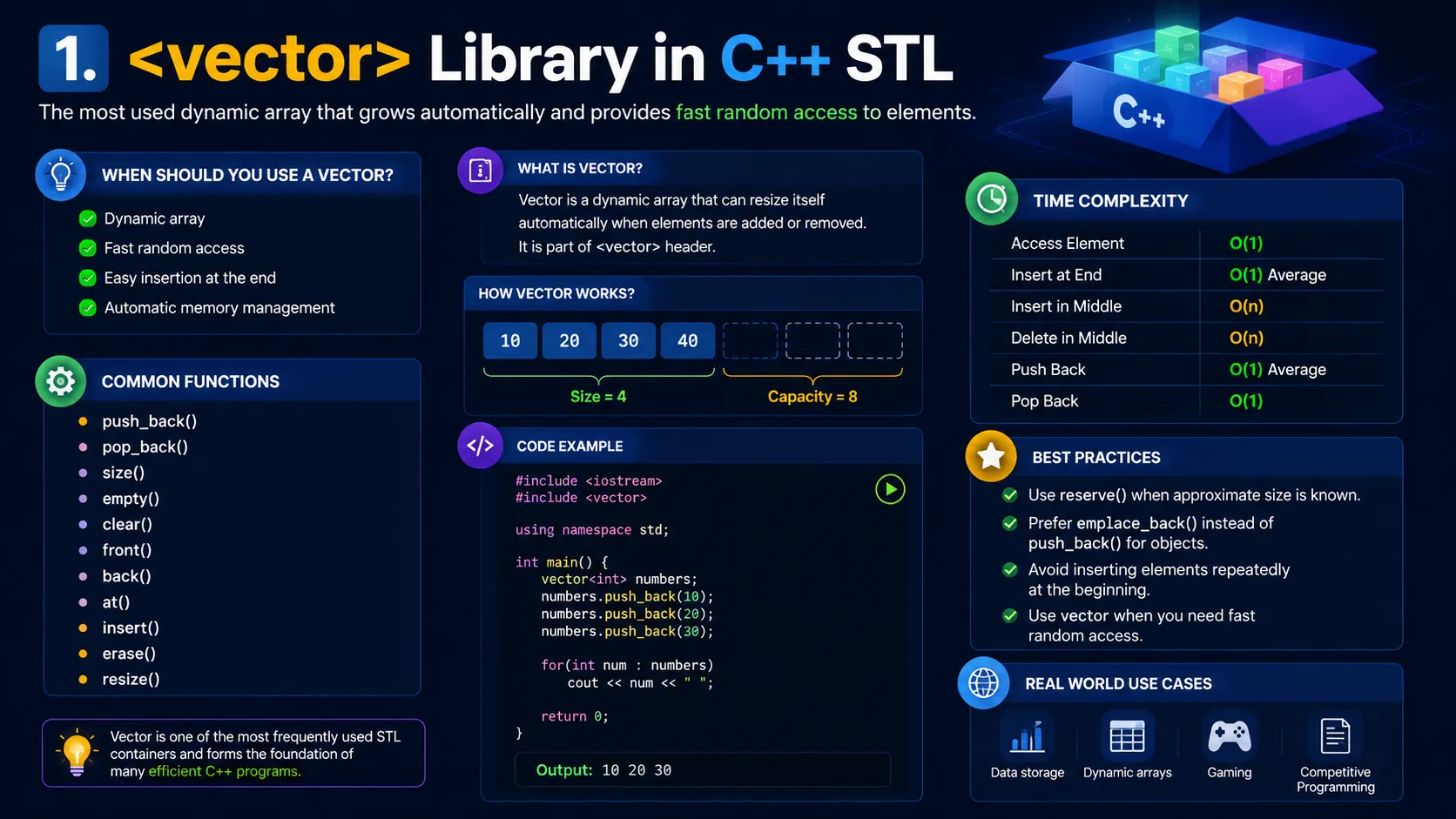
The vector is one of the most widely used containers in C++. It works like a dynamic array, meaning its size can grow or shrink automatically while your program is running.
Unlike traditional arrays, you do not need to know the size beforehand. The vector manages memory internally, making it much easier to work with collections of data.
When Should You Use a Vector?
Use a vector whenever you need:
- A dynamic array
- Fast random access
- Easy insertion at the end
- Automatic memory management
Vectors are commonly used in competitive programming, desktop applications, games, and backend systems.
Common Functions
- push_back()
- pop_back()
- size()
- empty()
- clear()
- front()
- back()
- at()
- insert()
- erase()
- resize()
Example
#include <iostream>
#include <vector>

using namespace std;

int main() {

vector<int> numbers;

numbers.push_back(10);
numbers.push_back(20);
numbers.push_back(30);

for(int num : numbers)
cout << num << " ";

}
Time Complexity
- Access Element : O(1)
- Insert at End : O(1) Average
- Insert in Middle : O(n)
- Delete in Middle : O(n)
Best Practices
- Use
reserve()when the approximate size is already known. - Prefer
emplace_back()instead ofpush_back()for objects. - Avoid inserting elements repeatedly at the beginning.
2. <string> Library
Strings are one of the most commonly used data types in programming. The STL string class makes working with text much easier than character arrays.
It automatically handles memory allocation, concatenation, searching, comparison, and modification.
When Should You Use It?
Use strings whenever your program needs to handle:
- Names
- Sentences
- User input
- File data
- Text processing
Common Functions
- length()
- size()
- append()
- substr()
- find()
- replace()
- erase()
- compare()
- empty()
Example
#include <iostream>
#include <string>

using namespace std;

int main() {

string name = "Eduxnotes";

cout << name.length() << endl;
cout << name.substr(0,4);

}
Best Practices
- Use
getline()for full-line input. - Prefer STL strings over character arrays.
- Avoid unnecessary string copying.
3. <algorithm> Library
The algorithm library is one of the most powerful parts of STL.
Instead of writing sorting, searching, counting, or reversing logic manually, you can simply call built-in functions.
Professional developers rely heavily on this library.
Popular Algorithms
- sort()
- reverse()
- find()
- count()
- max_element()
- min_element()
- binary_search()
- unique()
- rotate()
- swap()
- copy()
- fill()
Example
#include <iostream>
#include <vector>
#include <algorithm>

using namespace std;

int main() {

vector<int> arr = {5,2,8,1,4};

sort(arr.begin(), arr.end());

for(int x : arr)
cout << x << " ";

}
Why Developers Love It
Instead of writing 30 to 50 lines of sorting code, one line is enough.
The algorithms are also highly optimized.
4. <map> Library
A map stores data as key-value pairs.
Every key is unique.
The elements remain automatically sorted according to their keys.
Think of it like a dictionary where every word has its meaning.
Real World Example
Student ID → Student Name
Employee ID → Employee Details
Country Code → Country Name
Common Functions
- insert()
- erase()
- find()
- count()
- clear()
- size()
Example
#include <iostream>
#include <map>

using namespace std;

int main() {

map<int,string> student;

student[1] = "Rahul";
student[2] = "Amit";

cout << student[1];

}
Time Complexity
Search : O(log n)
Insertion : O(log n)
Deletion : O(log n)
5. <unordered_map> Library
This container is very similar to a map.
The biggest difference is that it stores elements using hashing.
The data is not sorted.
Because of hashing, searching is usually much faster.
When Should You Use It?
Whenever ordering is not important.
Examples include:
- Frequency counting
- Hash tables
- Caching
- Fast lookup operations
Example
#include <iostream>
#include <unordered_map>

using namespace std;

int main() {

unordered_map<string,int> marks;

marks["Math"] = 95;
marks["Science"] = 90;

cout << marks["Math"];

}
Time Complexity
Average Search : O(1)
Average Insert : O(1)
Average Delete : O(1)
Worst Case : O(n)
6. <set> Library
A set stores only unique elements.
Duplicate values are automatically ignored.
The values remain sorted.
Best Use Cases
- Removing duplicate values
- Maintaining sorted unique data
- Mathematical set operations
Example
#include <iostream>
#include <set>

using namespace std;

int main() {

set<int> numbers;

numbers.insert(10);
numbers.insert(5);
numbers.insert(10);

for(int x : numbers)
cout << x << " ";

}
Output
5 10
Notice that the duplicate value was automatically removed.
7. <unordered_set> Library
This is the hash-table version of a set.
Values remain unique but are not stored in sorted order.
Searching is extremely fast.
Best Use Cases
- Duplicate detection
- Fast membership checking
- Large datasets
Example
#include <unordered_set>

unordered_set<int> nums;

nums.insert(10);
nums.insert(20);
nums.insert(30);
Average Complexity
Insert : O(1)
Search : O(1)
Delete : O(1)
8. <stack> Library
A stack follows the Last In First Out principle.
The last inserted element is removed first.
Think about a stack of books.
The top book is removed before the others.
Operations
- push()
- pop()
- top()
- size()
- empty()
Example
#include <iostream>
#include <stack>

using namespace std;

int main() {

stack<int> s;

s.push(10);
s.push(20);
s.push(30);

cout << s.top();

}
Output
30
Applications
- Undo feature
- Browser history
- Expression evaluation
- Recursion simulation
9. <queue> Library
A queue follows the First In First Out principle.
The first inserted element leaves first.
Just like people standing in a queue.
Common Functions
- push()
- pop()
- front()
- back()
- size()
- empty()
Example
#include <iostream>
#include <queue>

using namespace std;

int main() {

queue<int> q;

q.push(100);
q.push(200);
q.push(300);

cout << q.front();

}
Output
100
Applications
- Printer queue
- CPU scheduling
- BFS Traversal
- Ticket booking systems
10. <priority_queue> Library
A priority queue automatically keeps the highest priority element at the top.
By default, it behaves like a max heap.
Common Functions
- push()
- pop()
- top()
- size()
Example
#include <iostream>
#include <queue>

using namespace std;

int main() {

priority_queue<int> pq;

pq.push(20);
pq.push(50);
pq.push(10);

cout << pq.top();

}
Output
50
Applications
- Dijkstra Algorithm
- Task Scheduling
- Job Prioritization
- Event Simulation
11. <deque> Library
Deque stands for Double Ended Queue.
It allows insertion and deletion from both the front and the back.
Unlike vectors, it efficiently supports operations at both ends.
Common Functions
- push_front()
- push_back()
- pop_front()
- pop_back()
- front()
- back()
Example
#include <deque>

deque<int> d;

d.push_front(5);
d.push_back(10);
d.push_back(15);
Applications
- Sliding Window Problems
- Browser History
- Scheduling Systems
12. <list> Library
The list container is implemented as a doubly linked list.
Unlike vectors, inserting or deleting elements from the middle is much faster.
Common Functions
- push_back()
- push_front()
- pop_back()
- pop_front()
- insert()
- erase()
- remove()
- reverse()
Example
#include <list>

list<int> data;

data.push_back(10);
data.push_back(20);
data.push_front(5);
When Should You Use It?
Use a list when your application performs frequent insertions and deletions in the middle of a collection.
However, if you need fast random access, prefer using a vector instead because lists do not support direct indexing.
Final Thoughts
The C++ Standard Template Library is much more than a collection of ready-made classes and functions. It is a powerful toolkit that enables developers to write cleaner, faster, and more reliable code while reducing development time. Whether you are building software applications, solving competitive programming problems, or preparing for technical interviews, mastering STL is one of the best investments you can make in your C++ journey.
Instead of trying to memorize every container or algorithm, focus on understanding when and why each library should be used. Choosing the right container can significantly improve your program's performance and readability. For example, use a vector for dynamic arrays, an unordered_map for fast key-value lookups, a set for storing unique sorted values, and the algorithm library to avoid writing common operations from scratch.
As you continue practicing C++, make STL a part of your daily coding routine. Experiment with different containers, explore their time complexities, and solve real-world programming challenges using STL components. Over time, selecting the right library for a problem will become second nature, allowing you to write more efficient and professional code.
Remember, great C++ developers are not those who write the most code. They are the ones who know how to use the language's powerful standard library effectively. Keep practicing, keep experimenting, and let the Standard Template Library become one of your strongest programming skills.
Frequently Asked Questions (FAQs)
1. What is the C++ Standard Template Library (STL)?
The C++ Standard Template Library, commonly known as STL, is a collection of pre-built classes, containers, algorithms, and utility functions provided by the C++ Standard Library. It helps developers perform common programming tasks such as sorting, searching, storing data, and manipulating collections without implementing everything from scratch.
2. Which STL library is used the most in C++ programming?
The most frequently used STL libraries include <vector>, <algorithm>, <string>, <map>, <unordered_map>, <set>, <queue>, and <stack>. Among these, vector and algorithm are considered the most popular because they are useful in almost every C++ project and coding interview.
3. What is the difference between map and unordered_map in C++?
A map stores key-value pairs in sorted order and typically performs operations in O(log n) time using a balanced tree. An unordered_map stores data using a hash table, providing average O(1) lookup, insertion, and deletion times, but it does not maintain any order of elements. Choose map when sorted data is required and unordered_map when fast lookups are more important.
4. Why should beginners learn the STL before advanced C++ topics?
Learning STL first allows beginners to solve programming problems more efficiently without spending time implementing basic data structures and algorithms. A strong understanding of STL also makes it easier to learn advanced topics such as templates, generic programming, competitive programming, and system design while improving coding interview performance.
5. Is STL enough for coding interviews and competitive programming?
For most coding interviews and competitive programming contests, having a solid understanding of STL is essential. While STL alone is not enough, combining it with knowledge of data structures, algorithms, recursion, dynamic programming, graphs, and problem-solving techniques gives you a strong foundation for tackling a wide variety of programming challenges.