
Best AI Code Generation Prompts for Developers (2026 Guide)
Table of Content
Table of Content
Best AI Code Generation Prompts for Developers
Artificial Intelligence has changed the way developers write software. Instead of spending hours searching documentation, writing repetitive code, or fixing small mistakes, developers can now use AI assistants to complete many tasks within minutes. However, the quality of AI-generated code depends heavily on the prompt you provide. A vague request usually produces average results, while a detailed and structured prompt often generates production-ready code that requires very little modification.
This guide contains carefully designed AI code generation prompts that can be used with modern AI assistants like ChatGPT, Claude, Gemini, Microsoft Copilot, and other large language models. These prompts are written to help beginners, students, freelance developers, software engineers, and technical teams generate better code with higher accuracy.
Rather than simply asking an AI to "write code," these prompts encourage the model to understand project requirements, coding standards, security considerations, performance optimization, scalability, and documentation. Following this approach can significantly reduce development time while improving overall code quality.
Whether you are building websites, mobile applications, REST APIs, automation scripts, or enterprise software, these prompts can serve as reusable templates for different programming languages and frameworks.
Why AI Code Generation Prompts Matter
AI models are extremely powerful, but they only perform as well as the instructions they receive. A good prompt provides context, explains the goal, defines the expected output, and specifies important constraints such as programming language, framework, architecture, coding style, and security requirements.
Instead of generating random snippets, a structured prompt guides the AI to create maintainable, readable, and reusable code. This reduces debugging time and minimizes unnecessary revisions.
Using detailed prompts also helps developers maintain consistency across projects. Teams can standardize prompt templates so that generated code follows the same naming conventions, folder structures, documentation style, and best practices.
How to Get Better Coding Results from AI
Before using any prompt, spend a few minutes describing your project requirements. Mention the programming language, framework, expected functionality, coding standards, error handling requirements, security practices, and performance expectations.
Whenever possible, ask the AI to explain its implementation, document important functions, and suggest improvements. This not only produces better code but also helps developers learn new concepts while working.
Remember that AI-generated code should always be reviewed before deployment. Although modern AI models are highly capable, manual testing and validation remain essential for production applications.
Prompt 1: Generate Clean Production-Ready Code
One of the most common mistakes developers make is asking AI to "write code" without providing enough context. A production-quality application requires much more than functionality. The code should be readable, modular, secure, properly documented, and easy to maintain.
This prompt is designed for developers who want AI to generate professional-quality code instead of quick examples.
Prompt
You are an experienced senior software engineer.

Generate production-ready code for the following requirement.

Project Description:
[Describe your project]

Programming Language:
[Language]

Framework:
[Framework]

Requirements:
- Follow clean code principles.
- Use meaningful variable names.
- Include proper comments where necessary.
- Handle all possible errors.
- Validate user inputs.
- Optimize performance.
- Follow security best practices.
- Separate business logic properly.
- Keep the code modular.
- Explain the implementation after the code.

Return complete working code only.
Best Use Cases
- Full-stack development
- Backend APIs
- Frontend components
- Automation scripts
- Desktop applications
- Mobile app development
Why This Prompt Works
Instead of focusing only on functionality, this prompt instructs the AI to think like an experienced software engineer. It emphasizes software architecture, readability, maintainability, and security, resulting in higher-quality code that is easier to integrate into real-world projects.
Prompt 2: Build a Complete CRUD Application
Creating CRUD (Create, Read, Update, Delete) functionality is one of the most repetitive tasks in software development. AI can dramatically reduce development time by generating complete CRUD modules with validation, routing, database operations, and error handling.
Prompt
Act as a full-stack software developer.

Create a complete CRUD application.

Technology Stack:
Frontend:
[React / Next.js / Vue]

Backend:
[Node.js / Django / Spring Boot]

Database:
[MySQL / PostgreSQL / MongoDB]

Requirements:
- Authentication ready
- Validation
- Error handling
- Pagination
- Search
- Sorting
- API documentation
- Modular folder structure
- Responsive frontend
- Clean architecture

Explain every folder after generating the project.
Best Use Cases
- Student projects
- Portfolio applications
- SaaS products
- Admin panels
- Business management software
- Inventory systems
Pro Tip
After the AI generates the project, ask it to optimize the folder structure for scalability. This helps future expansion without major refactoring.
Prompt 3: Convert Code Between Programming Languages
Many developers need to migrate applications from one programming language to another. Manual conversion often introduces bugs and consumes significant time. This prompt helps AI preserve business logic while translating code into another language.
Prompt
Convert the following source code into another programming language.

Source Language:
[Current Language]

Target Language:
[Target Language]

Requirements:
- Preserve all business logic.
- Follow the target language's coding standards.
- Optimize performance.
- Replace deprecated methods.
- Improve readability.
- Explain every important change.
- Suggest additional improvements after conversion.

Source Code:

[Paste Code Here]
Best Use Cases
- PHP to Node.js
- Java to Kotlin
- JavaScript to TypeScript
- Python to Go
- C++ to Rust
- Legacy application migration
Why This Prompt Is Useful
Instead of performing a direct line-by-line translation, the AI understands the purpose of the original code and rewrites it according to the best practices of the target language. This produces cleaner and more maintainable results than simple syntax conversion.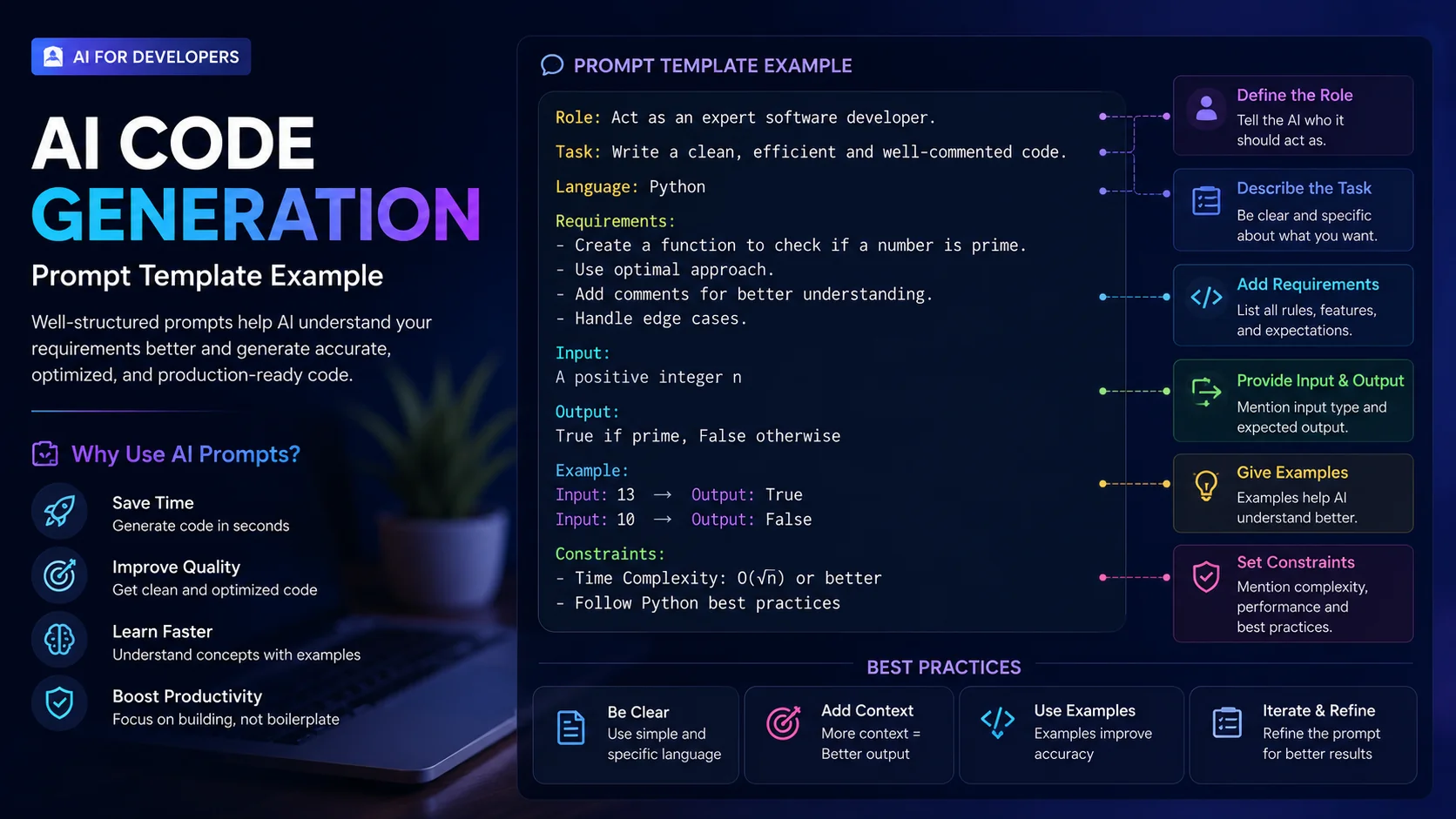
Continue Learning with AI
AI should be viewed as a development partner rather than a replacement for programming knowledge. Developers who understand algorithms, software architecture, debugging, and system design can use AI much more effectively than those who rely entirely on generated code.
The prompts shared above are intended to save time while maintaining professional coding standards. As your projects grow, you can further customize these prompts to match your organization's development workflow, preferred architecture, and coding guidelines.
Prompt 4: Debug Existing Code Like a Senior Developer
Debugging is often more time-consuming than writing code itself. Many developers simply ask AI to "fix this code," which usually results in incomplete or incorrect solutions. A better approach is to ask the AI to analyze the code systematically, identify the root cause, explain the issue, and then provide an improved implementation.
This prompt is designed to make AI behave like an experienced software engineer performing a professional code review instead of making random edits.
Prompt
Act as a senior software engineer and debugging expert.

Analyze the following code carefully.

Requirements:
- Identify every bug.
- Explain why each issue occurs.
- Classify issues as syntax, logical, security, performance, or architecture problems.
- Fix every issue.
- Preserve existing functionality.
- Suggest a cleaner implementation if possible.
- Mention any edge cases that should be tested.
- Explain the final solution step by step.

Code:

[Paste Your Code Here]
Best Use Cases
- JavaScript errors
- React component issues
- Node.js backend debugging
- Python scripts
- Java applications
- C and C++ programs
- SQL query optimization
- Laravel debugging
Why This Prompt Works
Instead of only correcting syntax errors, this prompt encourages AI to investigate the complete application flow. The explanation also helps developers understand the real cause of the issue, making future debugging much easier.
Pro Tip
After receiving the fixed code, ask the AI:
"Can this code be simplified further while keeping the same functionality?"
This often produces an even cleaner version.
Prompt 5: Optimize Slow or Inefficient Code
Code that works correctly is not always efficient. As applications grow, poor optimization can increase server costs, slow down response times, and reduce the user experience.
This prompt helps AI identify bottlenecks and improve the performance of existing code without changing its functionality.
Prompt
You are a software performance optimization expert.

Review the following code.

Objectives:
- Improve execution speed.
- Reduce memory usage.
- Remove duplicate logic.
- Optimize loops.
- Improve database queries if applicable.
- Suggest better algorithms where needed.
- Preserve the original functionality.
- Explain each optimization.

Code:

[Paste Code]
Best Use Cases
- Large datasets
- Backend APIs
- Database queries
- Data processing
- Automation scripts
- Image processing
- Machine learning preprocessing
- High-traffic web applications
Expected Output
The AI should provide:
- Optimized source code
- Explanation of every improvement
- Estimated performance benefits
- Complexity analysis
- Alternative implementation if available
Why Developers Love This Prompt
Instead of rewriting everything from scratch, the AI improves only the inefficient parts while keeping the overall application stable.
Prompt 6: Generate Professional Unit Tests
Testing is one of the most neglected areas of software development. Many developers finish writing features but delay testing until bugs appear in production.
AI can generate comprehensive unit tests within minutes, saving significant development time while improving software reliability.
Prompt
Act as an experienced software testing engineer.

Generate complete unit tests for the following code.

Requirements:
- Cover all public methods.
- Test edge cases.
- Include positive and negative test cases.
- Mock external APIs if needed.
- Explain each test.
- Follow testing best practices.
- Use the appropriate testing framework.

Programming Language:
[Language]

Testing Framework:
[Jest / JUnit / PyTest / Mocha / NUnit]

Source Code:

[Paste Code]
Best Use Cases
- Backend services
- React components
- REST APIs
- Utility functions
- Database services
- Authentication modules
Benefits
Using this prompt helps developers:
- Detect bugs earlier
- Improve code quality
- Increase project stability
- Refactor with confidence
- Improve deployment reliability
Pro Tip
After generating tests, ask AI:
"Which important edge cases are still missing?"
This usually increases overall test coverage.
Prompt 7: Generate Complete REST APIs
Building APIs involves repetitive tasks such as routing, validation, authentication, database integration, error handling, and documentation.
Instead of generating individual endpoints one by one, this prompt asks AI to build a complete production-ready API structure.
Prompt
Act as an experienced backend software engineer.

Build a complete REST API.

Technology Stack:

Backend:
[Node.js / Spring Boot / Django / ASP.NET]

Database:
[MySQL / PostgreSQL / MongoDB]

Requirements:

- Authentication
- Authorization
- CRUD Operations
- Input Validation
- Pagination
- Filtering
- Search
- Sorting
- Error Handling
- API Documentation
- Environment Configuration
- Secure Password Hashing
- Logging
- Modular Folder Structure
- Production Ready

Generate complete project files.

Explain every module after completion.
Best Use Cases
- SaaS products
- Admin dashboards
- Mobile application backends
- E-commerce platforms
- Learning Management Systems
- Inventory software
- CRM systems
- ERP applications
Why This Prompt Is Effective
Rather than generating isolated API endpoints, the AI creates an organized backend architecture that is easier to maintain, test, and scale.
Professional Advice
Always review generated authentication logic, environment variables, and security settings before deploying your API. AI can accelerate development, but production systems should still undergo manual testing, code reviews, and security audits.
Making AI Work Like Your Development Partner
The biggest advantage of AI is not that it writes code—it helps you solve problems faster. Developers who provide clear requirements, specify constraints, and ask for explanations consistently receive better results than those who use one-line prompts.
Think of AI as an experienced teammate. The more context you provide, the more accurate and maintainable the generated code becomes. Over time, you'll develop your own prompt templates that match your coding style, project architecture, and team standards.AI Prompt Description (Part 3)
Prompt 8: Explain Complex Code in Simple Language
Developers often inherit projects written by other programmers. Understanding unfamiliar code can take hours, especially when documentation is missing or the logic is complex. Instead of reading every line manually, you can ask AI to explain the code in a structured and beginner-friendly way.
This prompt is especially useful for students, junior developers, interview preparation, and teams maintaining legacy applications.
Prompt
Act as an experienced software architect and programming mentor.

Analyze the following source code.

Requirements:
- Explain the purpose of the code.
- Describe every important function.
- Explain the control flow.
- Identify important variables and classes.
- Mention dependencies.
- Explain the algorithm used.
- Highlight possible improvements.
- Suggest better coding practices.
- Use beginner-friendly language.

Source Code:

[Paste Your Code Here]
Best Use Cases
- Learning new programming languages
- Understanding open-source projects
- Reviewing legacy applications
- Preparing for technical interviews
- Team onboarding
- Code reviews
Why This Prompt Works
Instead of simply describing what each line does, this prompt asks AI to explain the overall architecture, making it much easier to understand how different parts of the application work together. It saves time while improving learning and long-term maintainability.
Prompt 9: Generate Professional Technical Documentation
Many developers finish writing code but postpone documentation until the end of the project. Poor documentation makes collaboration difficult and increases maintenance costs. AI can generate organized, readable documentation that benefits both developers and end users.
Prompt
Act as a senior technical writer.

Create professional documentation for the following software project.

Include:

- Project Overview
- Features
- Folder Structure
- Installation Guide
- Configuration Steps
- Environment Variables
- API Endpoints
- Database Design
- Usage Examples
- Error Handling
- Security Recommendations
- Deployment Instructions
- Troubleshooting
- Frequently Asked Questions

Explain everything clearly for beginners and experienced developers.
Best Use Cases
- Open-source repositories
- Company documentation
- API documentation
- SaaS platforms
- Internal development teams
- Portfolio projects
Benefits
Professional documentation helps new developers understand the project quickly, reduces support requests, improves collaboration, and makes software easier to maintain over time. Well-documented projects are also more attractive to recruiters and open-source contributors.
Prompt 10: Build an Entire Project Structure
Planning the architecture of a software project before writing code helps reduce technical debt and keeps the application scalable. This prompt asks AI to design the complete project structure rather than generating isolated files.
Prompt
You are an experienced software architect.

Design a complete software project.

Technology Stack:

Frontend:
[Technology]

Backend:
[Technology]

Database:
[Database]

Requirements:

- Scalable architecture
- Modular folder structure
- Authentication
- Authorization
- Database schema
- API design
- Environment configuration
- Logging
- Error handling
- Security best practices
- Testing strategy
- Deployment plan
- CI/CD recommendations

Generate a detailed project blueprint before writing any code.
Best Use Cases
- Enterprise software
- Startup MVPs
- Portfolio projects
- ERP systems
- CRM platforms
- Learning Management Systems
- E-commerce applications
- Mobile application backends
Why Developers Use This Prompt
Instead of starting development without a plan, this prompt helps create a clear roadmap. A well-designed architecture reduces future refactoring, improves scalability, and makes collaboration easier for development teams.
Best Practices for Using AI Code Generation Prompts
Using AI effectively is not just about asking questions; it is about providing the right context. Before requesting code, clearly define the project goal, programming language, framework, expected functionality, coding standards, and any technical limitations. The more specific your instructions are, the better the generated output will be.
Break large tasks into smaller steps instead of requesting an entire enterprise application in a single prompt. This approach improves accuracy and makes it easier to review the generated code.
Always ask the AI to explain its implementation, highlight assumptions, and suggest possible improvements. Reviewing explanations helps developers learn while reducing the risk of introducing hidden issues into production systems.
Finally, remember that AI-generated code should always be tested before deployment. Run automated tests, perform manual verification, and review security-sensitive areas such as authentication, authorization, database queries, and user input validation.
Common Mistakes Developers Make While Using AI
Many developers expect perfect results from extremely short prompts. Asking AI to "build a website" or "write a login system" without additional context often produces incomplete or generic code.
Another common mistake is copying generated code directly into production without understanding how it works. While AI can accelerate development, developers remain responsible for reviewing, testing, and maintaining the final implementation.
Ignoring performance, scalability, and security requirements is another frequent issue. Always include these expectations in your prompt so the AI considers them from the beginning instead of treating them as afterthoughts.
Developers should also avoid relying on AI for every small task. Learning programming fundamentals, algorithms, system design, and debugging techniques will make AI a much more valuable development partner.
Final Thoughts
AI has become one of the most valuable tools in modern software development, helping developers write cleaner code, debug applications, automate repetitive tasks, and build projects more efficiently. However, the quality of AI-generated results depends largely on the quality of the prompts provided.
The prompts shared in this guide are designed to go beyond basic code generation. They encourage AI to consider software architecture, maintainability, testing, security, documentation, and performance, making the generated output far more practical for real-world projects.
Whether you are a beginner learning your first programming language, a freelancer building client projects, or an experienced software engineer working on enterprise applications, these prompt templates can significantly improve your workflow and productivity.
As AI technology continues to evolve, developers who master prompt engineering will gain a clear advantage. Instead of replacing programming skills, AI enhances them by reducing repetitive work and allowing developers to focus on problem-solving, innovation, and delivering high-quality software.
Use these prompts as a foundation, customize them according to your project requirements, and continuously refine them based on your experience. With the right approach, AI can become a reliable coding assistant that saves time, improves code quality, and supports long-term software development success.
Conclusion
Effective AI code generation starts with effective communication. Well-structured prompts produce better code, clearer explanations, and more reliable software. By applying the techniques and prompt templates covered in this guide, you can streamline your development process, improve collaboration, and build applications with greater confidence.
Keep experimenting with different prompt variations, review every generated solution carefully, and combine AI assistance with your own technical expertise. This balanced approach will help you create secure, scalable, and maintainable software while staying ahead in the rapidly evolving world of software development.
Frequently Asked Questions (FAQs)
1. What are AI code generation prompts?
AI code generation prompts are detailed instructions given to AI tools like ChatGPT, Gemini, or Claude to generate source code, explain programming concepts, debug errors, optimize applications, or create complete software projects. Well-written prompts provide context, programming language, framework, and expected output, helping AI deliver more accurate and production-ready results.
2. Which AI tools work best for code generation?
Several AI assistants can generate high-quality code, including ChatGPT, Gemini, Claude, GitHub Copilot, and Microsoft Copilot. The best choice depends on your workflow, programming language, and development environment. Regardless of the tool, providing clear and detailed prompts significantly improves the quality of the generated code.
3. Can AI-generated code be used in production applications?
Yes, AI-generated code can be used in production, but it should always be reviewed, tested, and validated before deployment. Developers should check for security vulnerabilities, performance issues, coding standards, and business logic to ensure the code meets project requirements.
4. How can I write better AI coding prompts?
A good AI coding prompt should clearly describe the project goal, programming language, framework, required features, coding standards, security requirements, and expected output. The more context you provide, the more accurate and useful the AI-generated code will be.
5. Is AI code generation suitable for beginners?
Absolutely. AI code generation is a valuable learning tool for beginners because it can explain concepts, generate examples, fix errors, and provide step-by-step explanations. However, beginners should use AI as a learning assistant rather than relying on it completely, as understanding programming fundamentals is essential for long-term growth.