
150+ HTML, CSS and JavaScript Interview Questions and Answers PDF
Download 150+ HTML, CSS and JavaScript interview questions and answers PDF for freshers. Prepare key frontend concepts with one beginner-friendly guide.
Preparing for a web development interview can feel overwhelming, especially when you are trying to revise HTML, CSS, and JavaScript together. Each technology covers a different part of web development, and interviewers often move between them during the same technical round.
HTML defines the structure of a webpage, CSS controls its appearance and layout, and JavaScript adds logic and interactivity. Together, these technologies form the foundation of frontend development. Whether you are applying for a frontend developer internship, junior web developer position, MERN Stack role, or full-stack development job, you will be expected to understand all three.
To make your preparation easier, we have created a downloadable PDF containing more than 150 HTML, CSS, and JavaScript interview questions with answers. It brings the most important frontend concepts together in one resource so that you can revise them without searching across multiple websites.
This guide explains what the PDF covers, why these technologies are important, how interviewers evaluate freshers, and how you can prepare more effectively.
Why HTML, CSS and JavaScript Are Important for Interviews
HTML, CSS, and JavaScript are often described as the three pillars of frontend web development. They work together, but each one has a different responsibility.
HTML organizes the content and gives it meaning. It defines elements such as headings, paragraphs, links, images, forms, buttons, and navigation sections.
CSS decides how that content should look. It controls colors, typography, spacing, borders, responsiveness, animations, and page layouts.
JavaScript adds behaviour. It allows users to interact with the page, submit forms, open menus, update content, fetch information from APIs, and perform many other actions.
Interviewers ask questions about all three technologies because a frontend developer needs more than framework knowledge. A candidate may know how to build a React component but still struggle to create accessible HTML, responsive CSS, or reliable JavaScript logic.
Strong fundamentals help you use frameworks correctly rather than depending on them for every task.
About the HTML, CSS and JavaScript Interview Questions PDF
The PDF contains more than 150 interview questions and answers covering the essential concepts of frontend development. It has been prepared for students, beginners, freshers, and developers who need a structured revision resource.
It is useful for:
- Frontend developer interviews
- Web developer internships
- Junior software developer roles
- MERN Stack interviews
- Full-stack developer interviews
- Campus placement preparation
- Technical viva examinations
- College practical assessments
- Web development certification preparation
- Personal knowledge assessment
The questions are divided across HTML, CSS, and JavaScript topics. This allows you to study one technology at a time or revise everything together before an interview.
Answers are written to make important concepts easier to understand. However, you should not memorize them word for word. Read each answer, understand the reasoning, and then try to explain it naturally in your own language.
What Interviewers Expect from Freshers
Interviewers do not normally expect freshers to know every browser API or advanced JavaScript design pattern. However, they expect a clear understanding of basic concepts and the ability to apply them in practical situations.
For an entry-level position, you should be able to:
- Create a properly structured HTML page
- Use semantic HTML elements
- Build accessible forms
- Apply CSS selectors correctly
- Understand the box model
- Create responsive layouts
- Use Flexbox and Grid
- Explain variables and JavaScript data types
- Work with functions, arrays, and objects
- Handle browser events
- Manipulate the DOM
- Understand promises and asynchronous code
- Debug basic frontend problems
Interviewers may ask theoretical questions, provide code snippets, or give you a small task. For example, you might be asked to build a responsive card, validate a form, center an element, reverse a string, or explain the output of a JavaScript program.
The goal is not only to test your memory. The interviewer wants to observe how you think, communicate, and solve problems.
HTML Interview Topics Covered in the PDF
HTML Fundamentals
HTML stands for HyperText Markup Language. It is used to create the structure and content of webpages.
The PDF begins with fundamental topics such as:
- HTML document structure
- Elements and tags
- Attributes
- Headings and paragraphs
- Links and images
- Lists and tables
- Block and inline elements
- Comments
- Character entities
- The HTML5 doctype
You should understand the difference between an HTML tag and an HTML element. A tag is part of the syntax, while an element generally includes its opening tag, content, and closing tag where applicable.
Interviewers may also ask about global attributes such as id, class, title, style, hidden, and data-*.
These concepts may seem basic, but mistakes in document structure can affect accessibility, search visibility, styling, and browser behaviour.
Semantic HTML
Semantic HTML uses elements that clearly describe their purpose. Examples include:
headernavmainsectionarticleasidefooter
Using semantic elements helps browsers, search engines, screen readers, and other tools understand the structure of a webpage.
For example, using a button element for an action is usually better than making a generic div behave like a button. A native button provides keyboard support and meaningful accessibility behaviour by default.
Interviewers may ask why semantic HTML matters. A strong answer should mention readability, maintainability, accessibility, and document meaning rather than claiming that semantic tags alone guarantee higher search rankings.
HTML Forms
Forms are used to collect information from users. They are commonly found in login pages, registration forms, contact pages, search boxes, checkout pages, and surveys.
Important form concepts include:
- The
formelement - Input types
- Labels
- Text areas
- Select menus
- Buttons
- Validation attributes
- The
nameattribute - GET and POST methods
- Form submission
- Autocomplete
- Fieldsets and legends
Every important form control should have an appropriate label. Placeholders should not be treated as permanent replacements for labels because they disappear after the user starts typing and may create accessibility problems.
You should understand commonly used validation attributes such as required, min, max, minlength, maxlength, and pattern.
HTML Accessibility
Accessibility ensures that websites can be used by people with different abilities and assistive technologies.
Important accessibility practices include:
- Writing meaningful alternative text for images
- Maintaining a logical heading order
- Connecting labels with form controls
- Supporting keyboard navigation
- Using semantic elements
- Providing sufficient color contrast
- Avoiding unnecessary ARIA attributes
- Giving buttons and links meaningful names
ARIA can improve accessibility when native HTML cannot express the required behaviour. However, native semantic HTML should generally be preferred when a suitable element already exists.
Accessibility is not only an interview topic. It is part of building professional and inclusive web applications.
HTML Multimedia and Modern Features
HTML5 introduced improved support for audio, video, graphics, storage-related browser features, and more descriptive elements.
You may receive questions about:
- Audio and video elements
- Canvas
- SVG
- Iframes
- Meta tags
- Responsive images
- The
pictureelement - Local and session storage
- Custom data attributes
Canvas is pixel-based and commonly controlled using JavaScript. SVG is vector-based and can scale without losing clarity. Each one is suitable for different use cases.
CSS Interview Topics Covered in the PDF
CSS Fundamentals
CSS stands for Cascading Style Sheets. It controls the design and presentation of HTML documents.
The PDF covers:
- Inline, internal, and external CSS
- Selectors
- Properties and values
- The cascade
- Inheritance
- Specificity
- Units
- Colors
- Typography
- Backgrounds and borders
External stylesheets are generally preferred for reusable website styling because they help keep structure and presentation separate.
The word “cascading” refers to the process the browser uses to determine which declarations apply when multiple CSS rules target the same element.
CSS Selectors and Specificity
Selectors identify the elements that should receive a set of styles.
Common selectors include:
- Element selectors
- Class selectors
- ID selectors
- Attribute selectors
- Universal selectors
- Descendant selectors
- Child selectors
- Sibling selectors
- Pseudo-classes
- Pseudo-elements
Specificity helps determine which declaration wins when competing rules have the same origin and importance. Inline styles, IDs, classes, attributes, pseudo-classes, and element selectors contribute differently to specificity.
However, specificity is only one part of the cascade. Importance, origin, cascade layers, scope proximity in supported contexts, and source order can also affect the result.
Instead of using !important everywhere, write organized selectors and maintain a predictable styling structure.
The CSS Box Model
Every visible HTML element can be understood as a rectangular box consisting of:
- Content
- Padding
- Border
- Margin
By default, declared width and height apply to the content box. Padding and borders are then added to the final rendered size.
With box-sizing: border-box, the declared dimensions include the content, padding, and border. Many developers apply this behaviour globally because it makes layout calculations easier.
Interviewers frequently ask about the box model because it is essential for understanding element dimensions and spacing.
CSS Display and Positioning
The display property affects how an element participates in the layout.
Common display values include:
blockinlineinline-blocknoneflexgrid
You should also understand the main position values:
staticrelativeabsolutefixedsticky
An absolutely positioned element is positioned relative to its nearest appropriate positioned ancestor. If none is available, its containing block may be established by the initial containing block or another qualifying ancestor.
A sticky element behaves according to the scrolling container and requires an inset such as top to create the expected sticking behaviour.
Flexbox
Flexbox is a one-dimensional layout system. It is particularly useful for arranging elements in a row or column.
Important Flexbox properties include:
display: flexflex-directionjustify-contentalign-itemsalign-contentgapflex-growflex-shrinkflex-basisflex-wrap
One common interview question asks about the difference between justify-content and align-items. The correct explanation depends on the main and cross axes, which change based on flex-direction.
Flexbox is useful for navigation bars, button groups, card rows, alignment, and smaller layout components.
CSS Grid
CSS Grid is a two-dimensional layout system. It can control rows and columns together.
Important Grid concepts include:
- Grid containers
- Grid items
- Template rows and columns
- Grid tracks
- Gaps
- Fractional units
- Line-based placement
- Named grid areas
- Implicit and explicit grids
- Responsive grid patterns
CSS Grid is helpful for page layouts, galleries, dashboards, and complex responsive structures.
Flexbox and Grid are not competitors where one must always replace the other. Grid works well for two-dimensional layout, while Flexbox is often more convenient for one-dimensional alignment. Many professional interfaces use both.
Responsive Web Design
Responsive design helps webpages work across mobile phones, tablets, laptops, and larger displays.
Core responsive design techniques include:
- Flexible layouts
- Media queries
- Relative units
- Responsive images
- Mobile-first styling
- Flexbox and Grid
- Suitable viewport configuration
- Content-based breakpoints
A mobile-first approach starts with styles for smaller screens and adds enhancements for larger screens.
Avoid selecting breakpoints only because they match a specific device model. Content-based breakpoints are usually more maintainable because they respond to the point where the layout needs to change.
CSS Transitions and Animations
Transitions create smooth changes between property values. CSS animations provide more control through keyframes.
You should know:
- Transition properties
- Duration
- Timing functions
- Delay
- Keyframes
- Animation iteration
- Animation direction
- Transform properties
Properties such as transform and opacity can often be animated efficiently. Excessive animations can distract users and affect performance.
It is also good practice to consider the prefers-reduced-motion media query for users who prefer reduced animation.
JavaScript Interview Topics Covered in the PDF
JavaScript Fundamentals
JavaScript adds logic and interactivity to webpages. It can also run outside browsers through environments such as Node.js.
The PDF covers fundamental topics including:
- Variables
- Data types
- Operators
- Conditions
- Loops
- Functions
- Arrays
- Objects
- Scope
- Type conversion
You should understand the differences between var, let, and const. Modern code typically uses const by default and let when reassignment is required. Understanding var remains important for older code and interview questions involving hoisting and scope.
Equality and Type Coercion
The loose equality operator == may perform type conversion before comparison. The strict equality operator === compares values without the same coercion and requires the types to match.
JavaScript’s automatic type coercion can sometimes produce unexpected output. Interviewers use these questions to test whether you understand how values are converted.
Instead of memorizing unusual examples, learn the underlying rules and prefer predictable comparisons in application code.
Functions, Scope and Closures
Functions are first-class values in JavaScript. They can be assigned to variables, passed as arguments, and returned from other functions.
Important function concepts include:
- Function declarations
- Function expressions
- Arrow functions
- Callback functions
- Higher-order functions
- Default parameters
- Rest parameters
- Return values
Scope determines where a variable can be accessed. JavaScript has global, function, block, and module scope.
A closure is formed when a function continues to access variables from its surrounding lexical environment. Closures are used in event handlers, function factories, private state, memoization, and many other patterns.
Arrays and Objects
Arrays store ordered collections, while objects store data using property keys.
Important array methods include:
map()filter()reduce()find()some()every()forEach()slice()splice()
You should know which operations modify the original array and which return a new value.
Objects and arrays are reference values. Copying an object variable does not automatically create an independent object. This is why understanding shallow copies, nested references, and immutable update patterns is important.
The DOM and Browser Events
The Document Object Model represents an HTML document in a form JavaScript can access and modify.
JavaScript can:
- Select elements
- Change content
- Update attributes
- Add or remove classes
- Create elements
- Delete elements
- Handle events
- Validate forms
Browser events include clicks, input, form submission, keyboard actions, scrolling, and pointer movement.
You should understand event bubbling, capturing, delegation, preventDefault(), and stopPropagation().
Event delegation is particularly useful when similar child elements share the same behaviour or when elements are created dynamically.
Promises and Asynchronous JavaScript
JavaScript frequently performs operations that finish later, such as network requests, timers, and file-related tasks in supported environments.
Important asynchronous concepts include:
- Callbacks
- Promises
- Promise chaining
- Error handling
- Async functions
- The
awaitkeyword - The event loop
- Microtasks and tasks
A promise represents the eventual completion or failure of an asynchronous operation. It can be pending, fulfilled, or rejected.
Async and await provide a readable way to work with promises. Errors should still be handled using try...catch or appropriate promise rejection handlers.
You should also understand that asynchronous code does not necessarily execute in the order it appears in the source file.
How HTML, CSS and JavaScript Work Together
A strong frontend developer should understand how these technologies interact rather than treating them as completely separate subjects.
Consider a registration form:
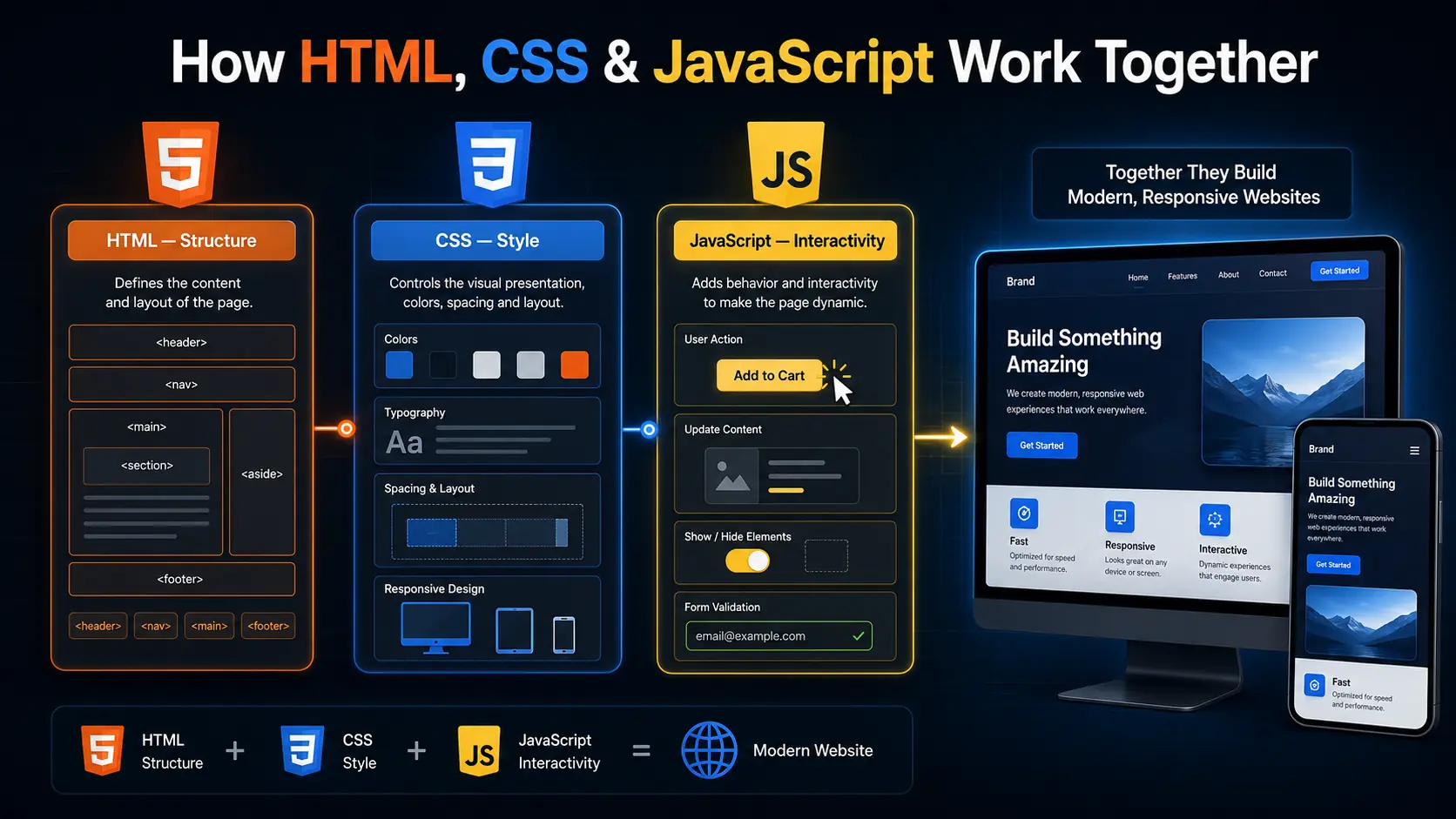
- HTML creates the form fields, labels, and submit button.
- CSS controls spacing, colors, layout, and responsive behaviour.
- JavaScript checks input, displays feedback, and sends data to a server.
If the HTML is not semantic, the form may be difficult to navigate with assistive technology. If the CSS is not responsive, it may break on mobile devices. If the JavaScript validation is unreliable, users may submit incorrect data.
Client-side validation also does not replace server-side validation. JavaScript improves the user experience, but the server must independently validate submitted data for security and correctness.
Understanding this complete flow helps you give stronger answers during interviews.
How to Use the PDF Effectively
Do not attempt to memorize more than 150 answers in one day. Divide your preparation into manageable sections.
A practical study plan could be:
- Begin with HTML structure, semantics, forms, and accessibility.
- Study CSS selectors, the box model, positioning, Flexbox, and Grid.
- Revise JavaScript variables, functions, arrays, objects, and scope.
- Continue with the DOM, events, promises, and asynchronous programming.
- Practise coding and output-based questions.
- Review the questions you find difficult.
For each question:
- Read it carefully.
- Try answering without looking at the PDF.
- Compare your answer with the provided explanation.
- Create a small practical example.
- Explain the concept aloud in simple English.
- Review it again after a few days.
This active process is much more effective than repeatedly reading the same answers.
Practical Tasks You Should Practise
Along with theory, practise small frontend tasks such as:
- Creating a semantic webpage
- Building an accessible contact form
- Designing a responsive navigation bar
- Creating a card layout using Flexbox
- Building a gallery using CSS Grid
- Creating a responsive landing page
- Validating a form with JavaScript
- Building a modal window
- Developing a simple to-do list
- Creating an accordion or FAQ section
- Fetching data from an API
- Adding a loading and error state
- Filtering and sorting an array
- Implementing event delegation
- Building a theme switcher
These projects connect interview concepts to real development work. They also provide examples you can discuss when an interviewer asks about your practical experience.
Common Interview Preparation Mistakes
Avoid these common mistakes:
- Learning React without understanding JavaScript
- Using only
divelements instead of semantic HTML - Ignoring accessibility
- Memorizing CSS properties without building layouts
- Depending on Bootstrap or Tailwind for every design
- Confusing Flexbox with Grid
- Using
!importantfor every conflict - Memorizing JavaScript output without understanding coercion
- Ignoring closures and scope
- Learning async and await without understanding promises
- Writing code without handling loading and error states
- Reading questions without practising code
- Giving unnecessarily long interview answers
- Claiming experience you cannot demonstrate
A clear, honest, and well-explained answer is more valuable than an advanced answer that you cannot support with an example.
Why This PDF Is Useful for Freshers
Freshers often struggle to identify which topics are worth studying. The combined PDF provides one structured resource instead of separating the preparation across many disconnected pages.
Its benefits include:
- More than 150 questions and answers
- Coverage of all three core frontend technologies
- Beginner-friendly explanations
- Useful for quick revision
- Suitable for offline study
- Helpful for interview and viva preparation
- Convenient for mobile and desktop reading
- Useful as a self-assessment checklist
The PDF can help you organize your preparation, but your results will depend on how actively you use it. Write code, build small projects, and test your understanding regularly.
Final Thoughts
HTML, CSS, and JavaScript form the foundation of frontend development. Frameworks and libraries may change, but these core technologies remain essential.
The 150+ HTML, CSS and JavaScript Interview Questions and Answers PDF provides a convenient starting point for students and freshers. It covers document structure, semantic HTML, accessibility, styling, responsive layouts, functions, arrays, objects, DOM events, promises, and other important topics.
Use the PDF as a guide rather than a list to memorize. Practise each concept, build small examples, predict code output, and explain your reasoning clearly.
A successful interview does not require perfect knowledge of everything. It requires clear fundamentals, practical thinking, honest communication, and the ability to learn from feedback.
Frequently Asked Questions
1. Is this HTML, CSS and JavaScript interview PDF suitable for freshers?
Yes. The PDF is designed for students, beginners, and fresh graduates preparing for frontend development internships, junior developer roles, campus placements, and technical viva examinations.
2. How many questions are included in the PDF?
The combined PDF contains more than 150 HTML, CSS, and JavaScript interview questions with answers. It covers beginner-level concepts along with important intermediate topics.
3. Is this PDF useful for frontend and MERN Stack interviews?
Yes. HTML, CSS, and JavaScript are essential for frontend development and form the client-side foundation of the MERN Stack. Candidates should understand them before moving to React and other frameworks.
4. Which topics should freshers study first?
Start with semantic HTML, forms, CSS selectors, the box model, Flexbox, Grid, responsive design, JavaScript variables, functions, arrays, objects, scope, DOM events, promises, and async and await.
5. Can publishing this blog guarantee permanent Google indexing?
No. Permanent indexing cannot be guaranteed because Google may recrawl and reevaluate pages. You can improve the page’s long-term value by publishing original content, maintaining the PDF, adding relevant internal links, using accurate metadata, improving page speed, and avoiding duplicate or misleading content.